

Photo culling software for landscape photographers: A Complete 2026 Guide
Table of contents
- Why landscape culling is its own problem
- The criteria that actually matter when you cull landscapes
- How AI culling narrows a bursted or bracketed set
- Where a batch color grade fits once the keepers are chosen
- What culling software does not do for landscapes
- Building a landscape culling workflow that scales
- Related guides and where to go next
- Frequently Asked Questions
- What does photo culling software do for landscape photographers?
- Can AI culling fix a soft or out-of-focus landscape frame?
- How does Imagen help with landscape culling, and what does it cost?
- Does culling software handle focus stacking or HDR exposure blending?
- What is the best order for a landscape editing workflow?
Landscape photographers do not have a shooting problem. They have a selecting problem. A single sunrise session at one composition can produce forty near-identical frames as the light shifts, the wind stills, and you bracket for safety. The right photo culling software for landscape photographers in 2026 does the tedious first pass for you, comparing those near-duplicates and surfacing the sharpest, best-exposed frame per composition so you can spend your time editing the keepers instead of squinting at ten versions of the same ridge line. This guide explains what culling software actually does for landscape work, where AI genuinely helps, where it does not, and how to build a workflow that gets you from a full card to a finished gallery without losing a weekend to the review screen.
We will cover what makes landscape culling different from event culling, the criteria that matter when you sort frames, how AI culling narrows a bracketed or bursted set, and where a batch color grade fits once the keepers are chosen. We will also be honest about the jobs that culling software does not do, so you know which separate tools to reach for when a frame needs focus stacking, exposure blending, or heavy detail recovery.
Why landscape culling is its own problem
Culling a wedding is about moments. Culling a landscape is about millimeters and micro-changes in light. You return from a location with clusters of frames that look almost the same to a thumbnail grid but differ in ways that decide whether a shot is usable: one frame has a gust-blurred branch, the next is tack sharp; one exposure clips the highlight in the sky, the next holds it; one has a bird in the wrong third, the next is clean. The differences are small, and there are a lot of them, which is exactly the situation where a fast, consistent first pass pays off.
Because the frames are so similar, manual culling is slow and error prone. You zoom to 100 percent on the same rock over and over, lose your place, and second guess which of three bracketed sequences to keep. Good culling software collapses each cluster of near-duplicates, ranks the members by sharpness and exposure, and lets you confirm a winner in seconds rather than minutes. That is the core value: not making the artistic call for you, but clearing the obvious noise so the artistic call is all that is left.
The criteria that actually matter when you cull landscapes
Before you automate anything, it helps to name what you are looking for, because that is what any tool is scoring on your behalf. For landscape work the usual short list is sharpness at the point of focus, clean corners with no motion blur in foliage or water, a histogram that holds both the highlight in the sky and the shadow in the foreground, and a clean frame free of stray distractions. On top of that sit the artistic criteria only you can judge: which arrangement of light and cloud you actually like best.
The practical split is this. The mechanical criteria, sharpness and exposure and obvious duplicates, are what software can sort quickly and reliably. The taste criteria stay with you. A sensible culling pass uses the software to rank each near-duplicate cluster by the mechanical criteria, then hands you the top one or two frames per composition so your only remaining decision is the one a machine cannot make.
How AI culling narrows a bursted or bracketed set
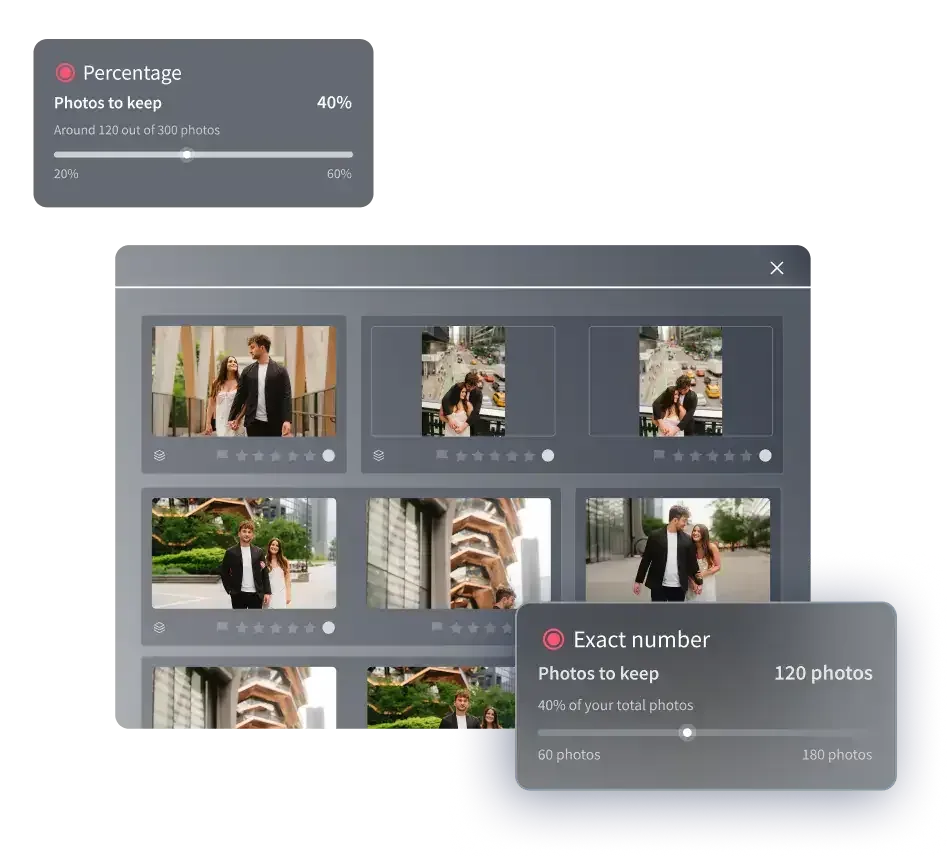
This is where AI culling earns its place in a landscape workflow. When you feed it a shoot, it groups near-identical frames, evaluates each group for sharpness and exposure, and surfaces the strongest candidate per composition. Instead of scrolling through ten versions of the same headland, you review one suggested keeper and a runner up, confirm or override, and move on. For a photographer who brackets heavily and shoots the same scene as the light develops, this collapses the longest and most joyless part of the edit into a quick confirmation pass.
It is worth being precise about what the AI is doing here. It is comparing frames you captured and ranking them; it is not inventing sharpness or rescuing a frame that missed focus. If every frame in a cluster is soft, culling will still tell you which is least soft, but none of them becomes usable that was not usable before. Used with that understanding, AI culling is a genuine time saver for exactly the high-duplicate, high-volume situation landscape shooters create at every good location.
Where a batch color grade fits once the keepers are chosen
Culling and grading are two halves of the same bottleneck. Once you have picked the sharp keeper from each composition, you still face applying a consistent look across the whole set so a gallery from one location reads as one coherent body of work rather than a patchwork of separate edits. This is where a batch editing layer that learns your style and applies it across every selected frame turns the second slow pass into an automated one.
Imagen is a desktop app for Mac and Windows built for this exact pairing, now as a Studio where you cull, edit and export in one project. It runs AI culling to narrow your near-duplicate clusters (manual culling is free if you prefer), then your personal AI style applies color correction, exposure balancing, and white balance across the whole shoot. A frame shot in flat pre-dawn light and one shot minutes later in warm first light come back looking like one deliberate set. You download and install it, and the AI processing runs in the cloud, which matters when you want to turn a location around quickly. A session that used to eat an evening of sorting and grading becomes a short confirmation pass plus an automated grade.
Pricing is pay-as-you-go, with a monthly base fee plus a charge for the photos you export, and exploring the tools is free, so you can run a real location through it before committing. The honest boundary is clear too: this layer culls and grades and finishes what your camera recorded, and you pay for what you export.
What culling software does not do for landscapes
Being clear about the limits keeps your workflow realistic. Culling and batch grading choose your keepers and apply a look; they do not do the heavy per-frame compositing that a lot of landscape work needs. Focus stacking a foreground-to-infinity scene, blending several exposures into a single true high dynamic range merge, and correcting converging verticals or lens geometry on an architectural landscape are all separate jobs, handled by dedicated blending and geometry tools rather than by a culling pass. Likewise, recovering detail from a soft capture, reducing high-ISO noise from a long blue-hour exposure, or sharpening a frame that missed critical focus belongs to specialized detail-enhancement software.
None of that is a knock on culling software. It is simply a different stage of the pipeline. A dedicated exposure-blending or focus-stacking tool builds a single composite from multiple captures; a dedicated detail enhancer works to sharpen, denoise, or upscale one file within limits and cannot invent focus that was never there. The sane approach is to let each tool do the job it is built for: cull and batch-grade the whole take first, then hand the rare frame that needs a true HDR merge, a focus stack, a geometry fix, or deep noise reduction to the specialist software for that step.
Building a landscape culling workflow that scales
Put the pieces together and the workflow is straightforward. Import the full card. Run AI culling to collapse your near-duplicate clusters and surface the sharpest, best-exposed frame per composition, then confirm or override each suggested keeper. Apply a batch color grade so the whole set of keepers shares one consistent look. Only then, on the handful of frames that need it, branch out to the specialist tools for exposure blending, focus stacking, geometry correction, or detail recovery. Finish and deliver.
The reason to order it this way is efficiency. You never waste a heavy manual edit on a frame you were going to cut, because culling happens first. You never grade the same location twice, because the batch pass covers every keeper at once. And you reserve your slow, hands-on compositing time for the small number of frames that genuinely reward it. For a landscape photographer, that is the difference between processing a location in an evening and losing a weekend to the review screen.
Related guides and where to go next
If you also shoot high-volume genres or want to go deeper on the two slow passes described here, three companion guides cover the adjacent workflows in detail. See photo culling software for wedding photographers for how the same culling logic applies to event-scale volume, batch photo editing software for wedding photographers for the grading layer at scale, and color grading software for wedding photography for building and reusing a consistent style. You can also browse the full library of photography workflow tips for more on culling, batch editing, and finishing.
What’s new in Imagen: Imagen is now an intelligent, agentic Studio for professional photographers, where culling lives in the same project as editing, review and export. For a landscape shoot, AI filters such as blur help you narrow the clusters, you can cull manually for free, and the assistant can find specific frames when you ask in plain language. It is rolling out gradually as a beta.
Frequently Asked Questions
What does photo culling software do for landscape photographers?
It automates the first pass of selecting keepers. Landscape shooters often capture many near-identical frames of one composition as the light changes, and culling software groups those duplicates, ranks them by sharpness and exposure, and surfaces the strongest frame per composition so you confirm a winner in seconds instead of comparing ten versions by hand.
Can AI culling fix a soft or out-of-focus landscape frame?
No. AI culling compares the frames you captured and ranks them by sharpness and exposure, but it cannot invent focus that was never recorded. If a whole cluster is soft, culling tells you which is least soft, but none becomes usable. Recovering detail from a soft or noisy capture is a separate job for dedicated sharpening and detail-enhancement software, and even that works within limits.
How does Imagen help with landscape culling, and what does it cost?
Imagen is a desktop app for Mac and Windows that offers AI culling, or free manual culling, to narrow near-duplicate clusters, then grades your keepers in one consistent style across the whole set with your personal AI style. It is pay-as-you-go, with a monthly base fee plus a charge for the photos you export, and exploring the tools is free so you can test a real location first.
Does culling software handle focus stacking or HDR exposure blending?
No. Culling and batch grading choose your keepers and apply a look, but focus stacking, true HDR bracket-merging or exposure blending, and lens geometry correction are separate steps handled by dedicated blending and geometry tools. The efficient approach is to cull and batch-grade the whole take first, then hand only the frames that need it to the specialist software for those composites.
What is the best order for a landscape editing workflow?
Import the full card, run AI culling to pick the sharpest frame per composition and confirm the keepers, apply a batch color grade so every keeper shares one look, and only then branch the handful of frames that need exposure blending, focus stacking, geometry correction, or noise reduction out to specialist tools. Culling first means you never spend a heavy manual edit on a frame you were going to cut.
