
AI Photo Editing for Real Estate
Be the photographer agents call first.Edit entire listings in minutes with consistent, high-quality results. Deliver same-day, win more agents, and book more shoots.
Get startedNo credit card needed. No commitment.
 Excellent 4.81,227 reviews
“Imagen’s platform allows us to completely transform our workflow for the benefit of our team and our clients. We are now one day ahead with edits, rather than one day behind.”
“I could guarantee people their photographs back within an hour or two. That is industry changing.”
“Imagen is revolutionary to the real estate imaging industry, to shoot more properties and spend less time with the modern version of the darkroom.”
“If you’re constantly just taking photos of houses and editing the photos, you’re not really growing your business… If you had all that time back, you can focus on those things.”
Shot at 10. Delivered by 11. Invoiced by noon.
Imagen’s web app batch edits real estate photos in minutes, with nothing to install.
More shoots, no backlog.
Upload the listing and head to your next shoot while Imagen edits.
Quality agents rebook.
Consistent, high-quality, MLS-ready results across the whole listing. Fine-tune anything, or request a review from our editors.
Same-day, at a premium.
One price per photo with every tool included, so what you charge for same-day delivery is yours to keep.
HDR real estate photo retouching and virtual staging, handled automatically
HDR Merge
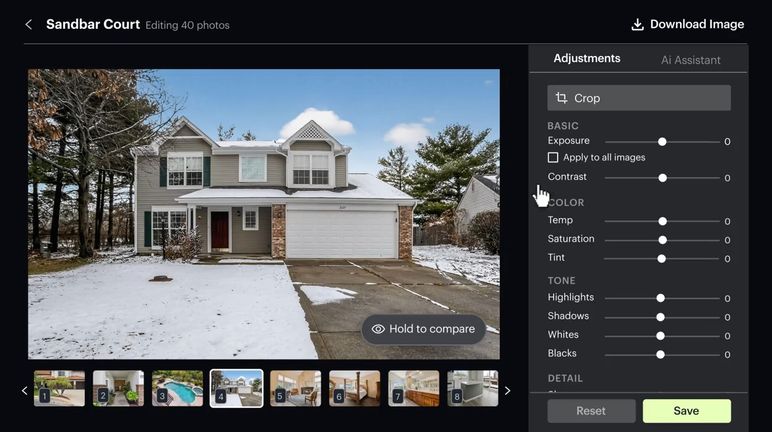
Blend multiple exposures into one perfectly balanced listing photo, with bright windows and detailed interiors every time.
Window Pull
Recover blown-out window detail with balanced interiors and outdoor views in every shot.
Perspective Correction
Straighten vertical lines and correct lens distortion for consistent architectural quality across every shot.
Sky Replacement
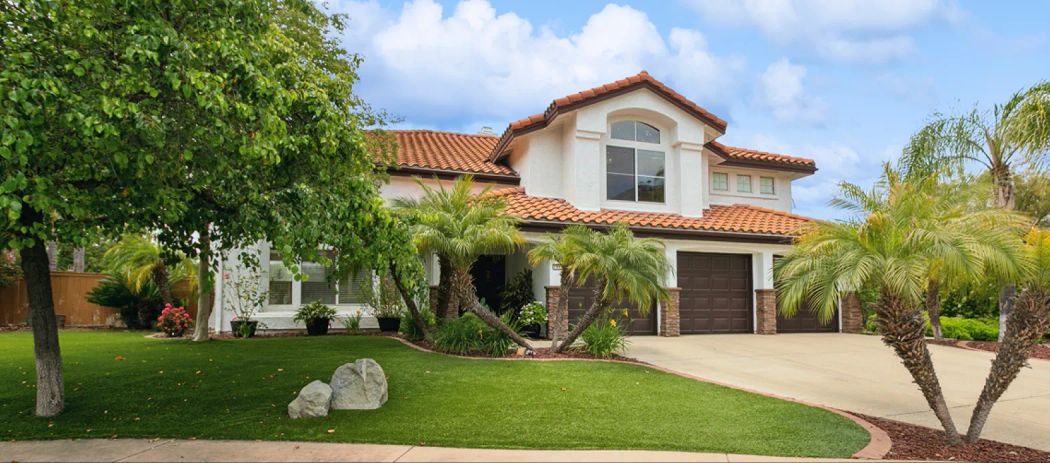
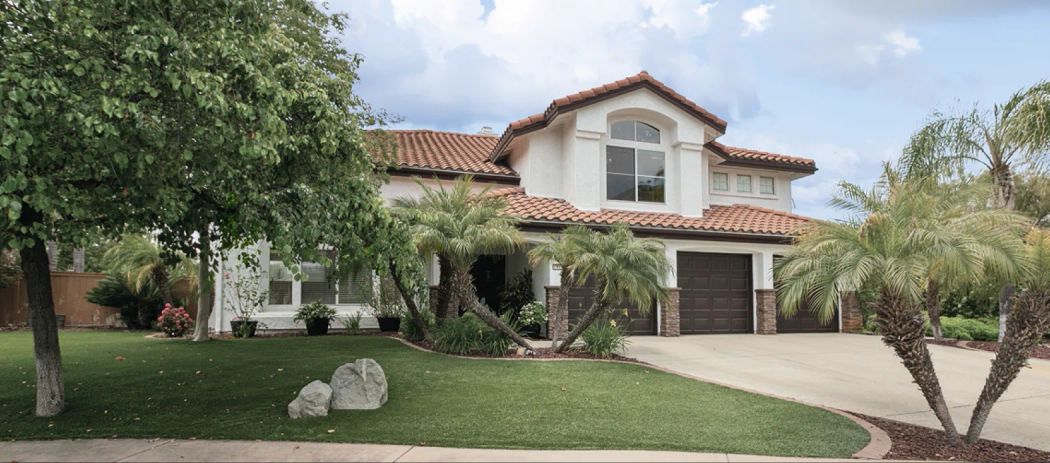
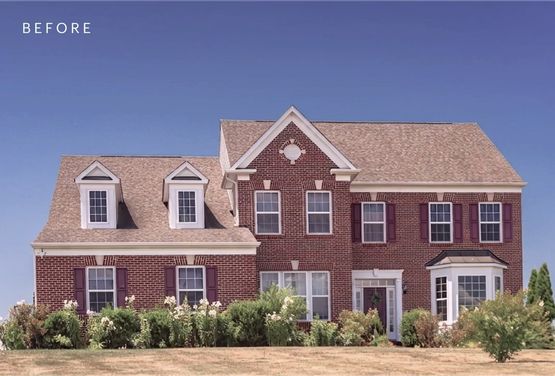
Turn overcast skies into clean, vibrant backgrounds so every exterior looks its best, regardless of shoot conditions.
Color Enhancement
Ensure every listing looks inviting and true to life, with consistent color across every photographer on your team.
Crop
Ensure uniform framing across high-volume batches, with every photo cropped to the right dimensions.
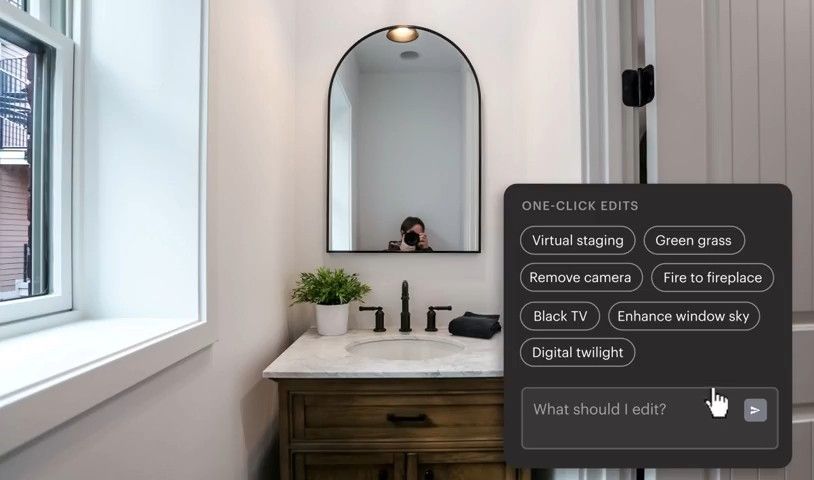
AI Assistant
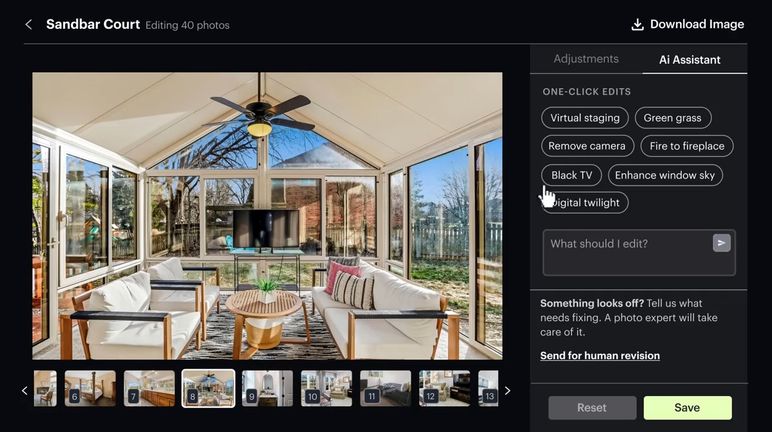
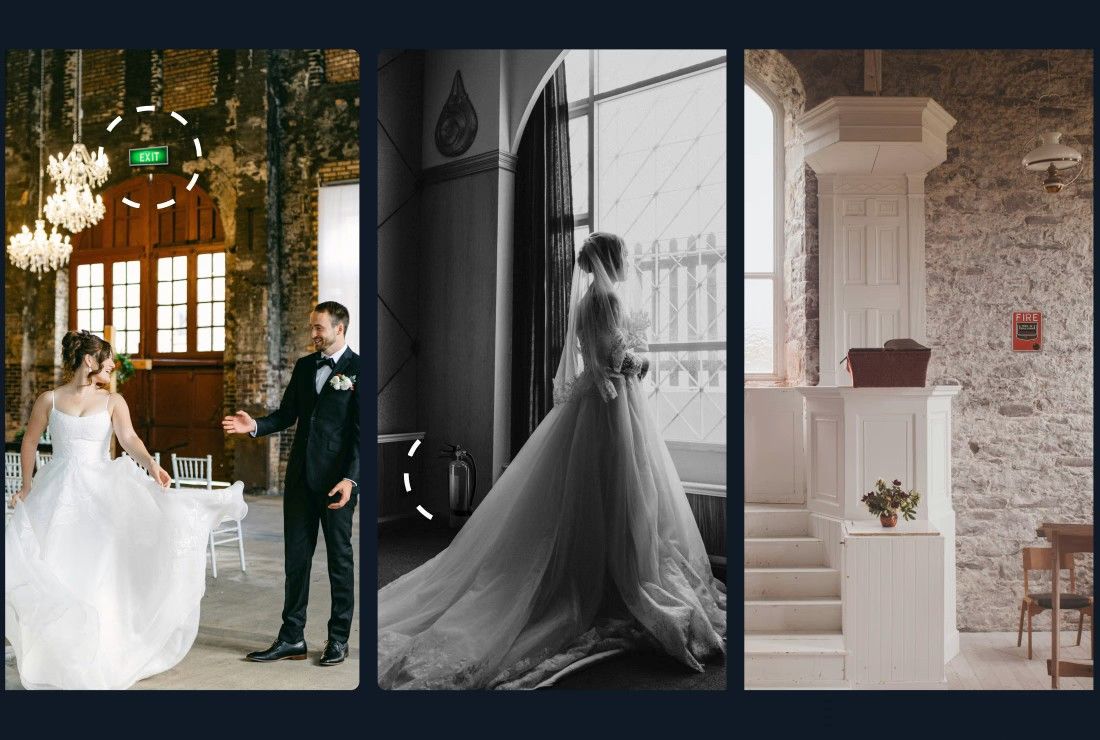
Need a custom edit? Type your request or select a quick action to remove unwanted objects, convert to twilight, and more. Virtual Staging has its own card, with six styles and a choice of room.
Object Removal
Erase clutter, cords, and camera reflections from any shot. Select a quick action or type a request in the AI Assistant, and it’s gone.
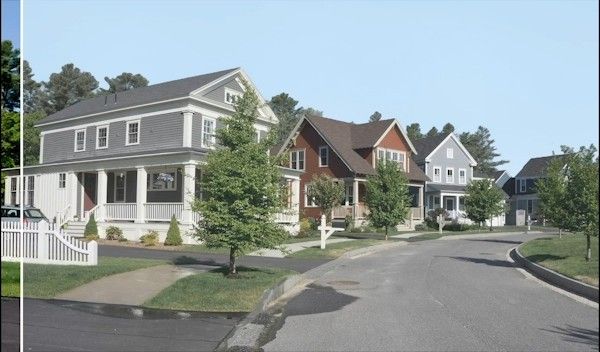
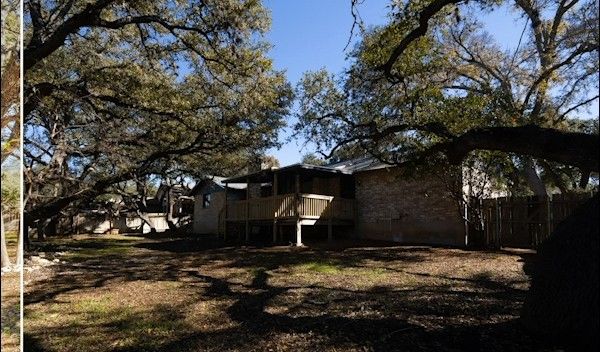
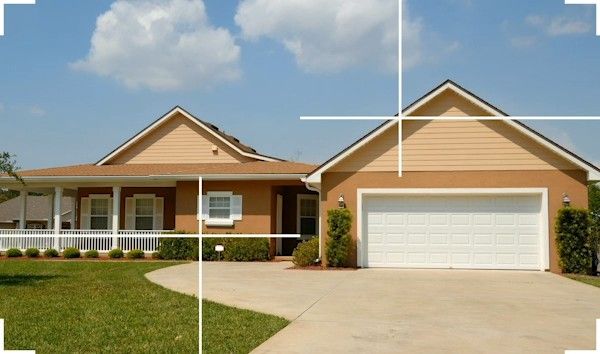
HDR Merge
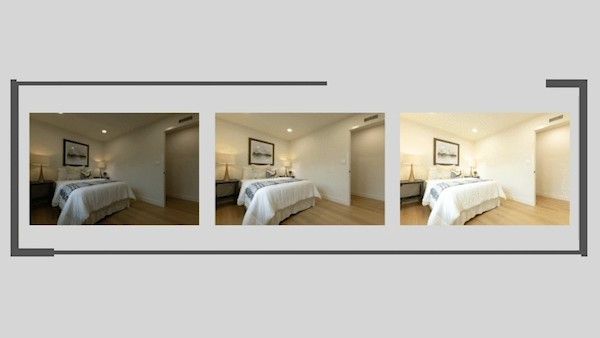
Blend multiple exposures into one perfectly balanced listing photo, with bright windows and detailed interiors every time.
Window Pull
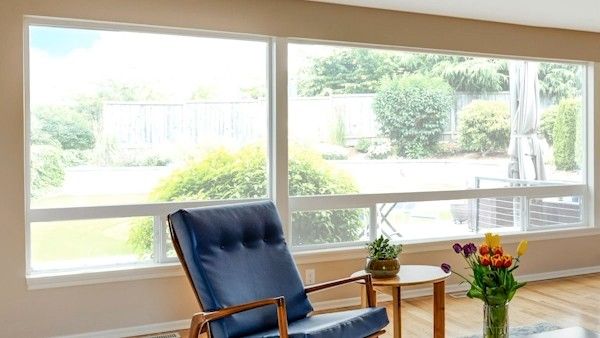
Recover blown-out window detail with balanced interiors and outdoor views in every shot.
Perspective Correction
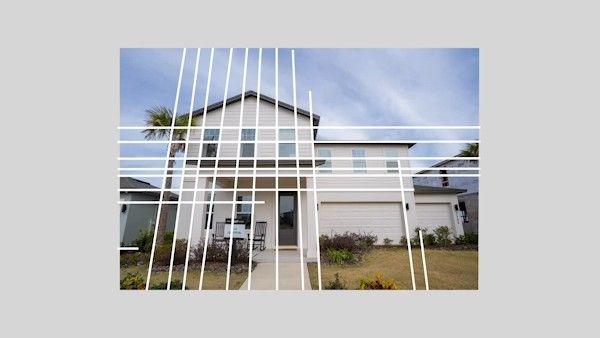
Straighten vertical lines and correct lens distortion for consistent architectural quality across every shot.
Sky Replacement
Turn overcast skies into clean, vibrant backgrounds so every exterior looks its best, regardless of shoot conditions.
Color Enhancement
Ensure every listing looks inviting and true to life, with consistent color across every photographer on your team.
Crop
Ensure uniform framing across high-volume batches, with every photo cropped to the right dimensions.
AI Assistant
Need a custom edit? Type your request or select a quick action to remove unwanted objects, convert to twilight, and more. Virtual Staging has its own card, with six styles and a choice of room.
Object Removal
Erase clutter, cords, and camera reflections from any shot. Select a quick action or type a request in the AI Assistant, and it’s gone.
Give yourself a raise
No commitment. No contracts. Cancel anytime
First 30 days
Black Friday deal
$10for a whole month of editing
Up to 2,000 photos and every tool included for 30 days. After that, pay only for the photos you edit.
Claim offerAfter that
Pay-as-you-go
US$0.32/ photo
- Full AI editing suite
- One-click AI fixes
- RAW and JPEG support
- Up to 6K resolution output Every tool includedSky replacementStraighten verticalsOne-click AI fixesRAW and JPEGProperty linesLocation pinsWindow pullPrivacy blurBranded watermark
Prices in USD. Billed at the end of each month for that month’s edited photos.
For teams
Editing 25,000+ photos / year? Hear about our volume pricing, dedicated account manager and priority processing.
Not ready yet? Start with a limited free trial instead
Built for teams that can’t afford inconsistency

 Consistency at scale
Eliminate variations between photographers and deliver consistent results across every project, even with different cameras on the same shoot.
 No apps required
Imagen runs entirely in the browser, with no installation or licenses required, making adoption effortless for your team.
 Transparency watermark
Add a Digitally altered watermark to single photos or full batches when a listing needs a disclosure label. Your branded watermark builds recognition with every delivery.
 Speed that keeps up
Deliver listing-ready photos in minutes, so urgent properties hit the market the same day potential buyers start searching.
 Human revision included
Need a fix? Flag it in the app, and a photo expert will handle it, no separate workflow or email back-and-forth required.
 Always-on support
Get a dedicated Customer Success Manager from day one, with guidance tailored to your workflow and goals.
Processing 2,000+ images a month? This was built for you.
Built for property marketing at scale. Run multi-photographer, multimarket workflows in your browser, with fast onboarding and dedicated support from day one.
Real estate photo editing services: your questions
Do we need to install anything?
No. Imagen’s real estate photo editor is fully browser-based and works independently, there’s no desktop app, no plugins, and no complex software to install. Your team can start editing property photos from any browser on day one.
Is Imagen a real estate photo editing company or software?
Software, with people behind it. Imagen's AI edits every photo in the listing in your browser, and when a result needs a fix, you flag it and a photo expert from our team corrects it. Three human revisions per listing are included, so you get the safety net of an editing service without sending your shoot away.
How does Imagen compare with outsourcing real estate photo editing?
With an outsourcing service, the shoot leaves your hands and comes back when the editor gets to it. With Imagen, you upload the listing yourself and a first batch is typically ready in under 10 minutes. The same style is applied to every photo in the gallery, and you pay per photo with every tool included. Anything you want a person to look at goes to human review from inside the app.
What does HDR real estate photo retouching include?
HDR Merge blends your bracketed exposures into one balanced frame, and Window Pull brings back the view through bright windows. Perspective correction straightens the verticals. Sky replacement turns a gray exterior blue, and color enhancement keeps every room true to life. It all runs on the whole listing at once, and you can fine-tune any photo afterwards.
How fast can I deliver a listing to the agent?
Upload the photos as soon as you're off site. A first batch is typically ready in under 10 minutes, which makes same-day delivery a realistic promise to your agents, even on a busy shooting day.
Does the web app work on my phone?
Yes. It’s the same app at the same link, and it fits a phone screen. Start a listing from your camera roll, Dropbox or Google Drive, browse your listings and save any finished photo, check billing, and subscribe or upgrade. Editing adjustments and Clip Maker still need a computer.
Can I turn listing photos into a video?
Yes. Clip Maker turns up to 12 listing photos into one video clip, with natural motion in trees, water and light, and it’s usually ready in under a minute. Add music and a signature shot: a digital twilight that turns the exterior from day to dusk as the camera moves in, or virtual staging that furnishes an empty room. Those shots are labeled for MLS disclosure. Once the clip is made, you can reorder or shorten shots, change the song, or remake a single shot that came out wrong.
Can I mark the property on aerial and drone photos?
Yes. Property Lines outline the lot, and Location Pins drop a map-style pin on the house, with a bubble for the address or a short detail like acreage and bedrooms. Add up to 10 pins to a photo, move or resize them on the photo, and they’re drawn into the full-resolution download.
How does virtual staging work?
Open a photo, go to the AI tab and use the Virtual Staging card. Pick Modern, Mid-century, Scandinavian, Japandi, Industrial or Retro, choose the room type or let Imagen decide, and click Stage room. It typically takes about 10 seconds, it’s designed to leave walls, doors and windows untouched, and it closely matches the photo’s lighting and colors. Always disclose virtual staging as your MLS requires.
Can I deliver a staged and an empty version of the same room?
Yes. Duplicate any photo in a listing and edit the copy separately, with virtual staging on one and the empty room on the other, or the same room cropped two ways. The copy keeps your slider, crop and mask edits, and it downloads with the rest of the listing.
Is there a free trial?
Yes, if you want one. When you sign up, you can choose to start with 100 free photo edits. They’re exactly what paying customers get: every tool, up to 6K, no watermarks, ready to send straight to your agent. If you join a plan with free edits left, those are used first.
Who is the web app built for?
It’s a real estate photography editor built for real estate teams, agencies, and companies that need a fast, scalable, cloud-based editing workflow, especially high volume operations processing thousands of photographs per month.
Will it edit consistently across a full gallery, not just individual photos?
Yes. Imagen’s AI real estate photo editing engine is built for consistency at scale: it applies the same listing-ready style across every photo in a gallery, so multiple images from the same shoot, even from different cameras or different real estate photographers, look like one cohesive set.
What happens when a result isn’t right?
Flag the photo in the app and it goes to human review: a photo expert from Imagen’s team corrects the image, the updated version replaces the current one, and you’re notified by email when the revision is complete. Three human revisions per listing are included.
Can we bring our existing editing style into the web app?
You can use an existing Personal AI Profile that was created in the Imagen desktop app. Creating new Personal AI Profiles isn’t currently available inside the web app itself, most teams use the built-in real-estate-optimized styles, which cover standard listings out of the box.
What file types do you support?
You can upload JPEG, RAW, HEIC/HEIF, AVIF, and DNG (containing JPEG images) files. All output is delivered as final JPEGs at up to 6K resolution, which is more than enough for standard listings, MLS, and premium property marketing.
How are photos uploaded?
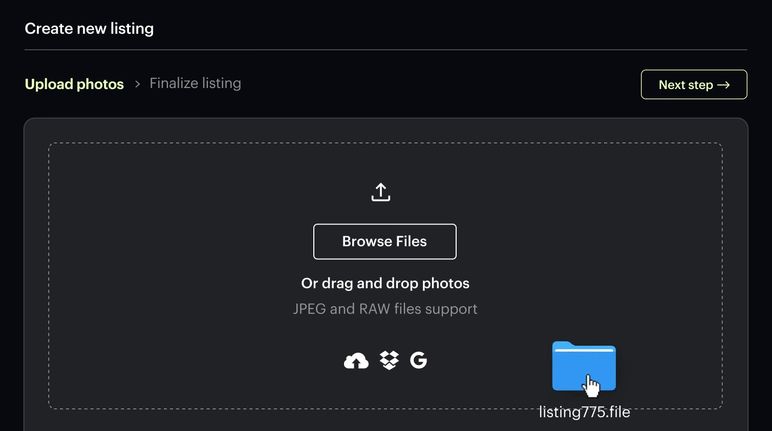
Directly from your browser, drag and drop, file picker, Google Drive, or Dropbox. Upload images in batches and batch processing starts right away; a first batch is typically ready in under 10 minutes.
Does it work for teams with multiple photographers?
Yes. That’s exactly what it’s built for. The editing process applies one consistent standard across every photographer, camera, and market, eliminating the style drift that comes with manual editing spread across a team.
How is Imagen priced?
Pricing is based on your photo volume and team size. We offer flexible plans to match how you work. Talk to the team to find the right fit.
What if we need help getting set up?
You get a dedicated Customer Success Manager from day one. Beyond that, support is available via live chat inside the app, a 24/7 self-service Help Center, and a contact form — with responses within 24 hours and urgent issues prioritized. All support is included at no additional cost.
Where are photos stored and processed?
Your property images are stored and processed on Amazon Web Services (AWS) secure infrastructure, primary region US East (N. Virginia), with US West (Oregon) for backup and disaster recovery. All data stays within AWS data centers that meet SOC 2, ISO 27001, and GDPR standards.
How long do you keep our original files?
Original full-resolution files are permanently deleted within 7 days of upload from all storage and backups. Once deleted, they can’t be recovered. Low-resolution previews are retained separately, used only to improve that specific customer’s AI editing results.
Are our photos used to train your AI?
No. Without your explicit consent, your photos are never used for anything other than editing your images and, where applicable, training your own profile. Our artificial intelligence doesn’t learn from your listing photos for anyone else’s benefit, and using Imagen lets you maintain your GDPR compliance.
Do files pass through Imagen’s servers during upload?
Uploads go directly to AWS S3 using pre-signed, time-limited URLs, and all communication is encrypted with HTTPS and TLS 1.2+. Photos aren’t routed through intermediate servers along the way.
What about data compliance and security certifications?
All customer data is encrypted in transit (TLS 1.2+) and at rest. Imagen uses a Zero Trust network architecture, role-based access control, multi-factor authentication, and thirdparty penetration testing, and all subprocessors (including AWS and MongoDB Atlas) are SOC 2 and GDPR compliant. Access to customer data is exception-based — our personnel don’t access it by default, and all access is logged and auditable. Ask us for specific compliance information if you don’t see what you need.
Can it remove unwanted elements from property photos?
Yes. The AI Assistant includes one-click quick actions like removing the camera or photographer’s reflection and you can also type a custom request to remove other unwanted objects from a photo. Complex, cluttered scenes may need a human revision, which is included.
Which AI features are included in the price
All of them: there are no feature tiers. Every plan includes Smart Editing batch processing, HDR Merge, Window Pull, Sky Replacement, Perspective Correction, lawn and color enhancement, crop, and the AI Assistant’s per-photo tools (virtual staging, digital twilight, green grass, window sky enhancement), plus 6K output, the digitally-altered compliance watermark, and human revision.
Do you offer relight AI for twilight photos?
Yes. The AI Assistant’s digital twilight action relights a daytime exterior into a dusk shot in one click, no second visit to the property, no manual compositing.