

Photo culling software for editorial photographers: A Complete 2026 Guide
Table of contents
- Why culling is the editorial photographer’s real bottleneck
- What to look for in photo culling software for editorial work
- How AI culling narrows a large take to the key frames
- Culling and grading in one editorial workflow
- Where a dedicated tool handles the rest
- Building a repeatable editorial culling routine
- Frequently Asked Questions
Editorial work rewards the frame, not the folder. A magazine feature, a news assignment, or a documentary essay can end with two or three thousand exposures on the card, yet the story runs on eight to twelve pictures. Photo culling software for editorial photographers exists to close that gap fast, so you spend your energy choosing the frames that carry the narrative instead of scrolling past hundreds of near-duplicates. This guide walks through what culling software actually does for editorial shooters, what to look for in 2026, and how culling connects to the grading and finishing steps that follow.
The short answer up front: the best culling tools use AI to group and rank near-identical frames from a burst, surface the sharpest and best-timed options, and let you approve or reject in seconds. That first pass is where the hours hide, and it is the part editorial photographers most want to automate without losing final say over the edit.
Why culling is the editorial photographer’s real bottleneck
Editorial assignments tend to produce volume for a reason. You shoot a portrait sitting in continuous bursts to catch a fleeting expression, you cover a live event where you cannot ask for a second take, and you bracket around a decisive moment because you get one chance at it. The result is a take full of frames that differ by a blink, a half step, or a flicker of focus. None of that is wasted on the shoot, but all of it lands on you afterward.
Manual culling means opening each near-duplicate, comparing sharpness at 100 percent, checking eyes and timing, and rejecting the losers one by one. On a large take that is several hours before you have even started the real edit. For editorial photographers on a next-morning deadline, those hours come straight out of sleep or out of the time you should spend refining the selects. Culling software is the answer to that specific pain, and it is why the category has grown so quickly.
What to look for in photo culling software for editorial work
Not every culling feature matters equally for editorial. A few capabilities do the heavy lifting, and they are worth prioritizing when you compare options.
Burst grouping. The software should cluster near-identical frames automatically, so you review a sequence as one decision rather than forty. This is the single biggest time saver on a portrait or event take.
Focus and sharpness detection. Editorial standards are unforgiving on critical focus. A tool that flags the sharpest frame in a group, and warns you when the whole group is soft, saves you from squinting at pixels.
Eyes-open and expression cues. For portraits and reportage with people, quick signals on closed eyes or blur let you clear a burst in one glance.
RAW support and speed. Editorial photographers shoot RAW, and a large take needs to load and rate quickly. A culling tool that stalls on RAW previews defeats its own purpose.
You keep the final call. Good culling software ranks and suggests. It should never lock you out of overriding a pick, because editorial selection is an editorial judgment, and the machine does not know which frame the story needs.
How AI culling narrows a large take to the key frames
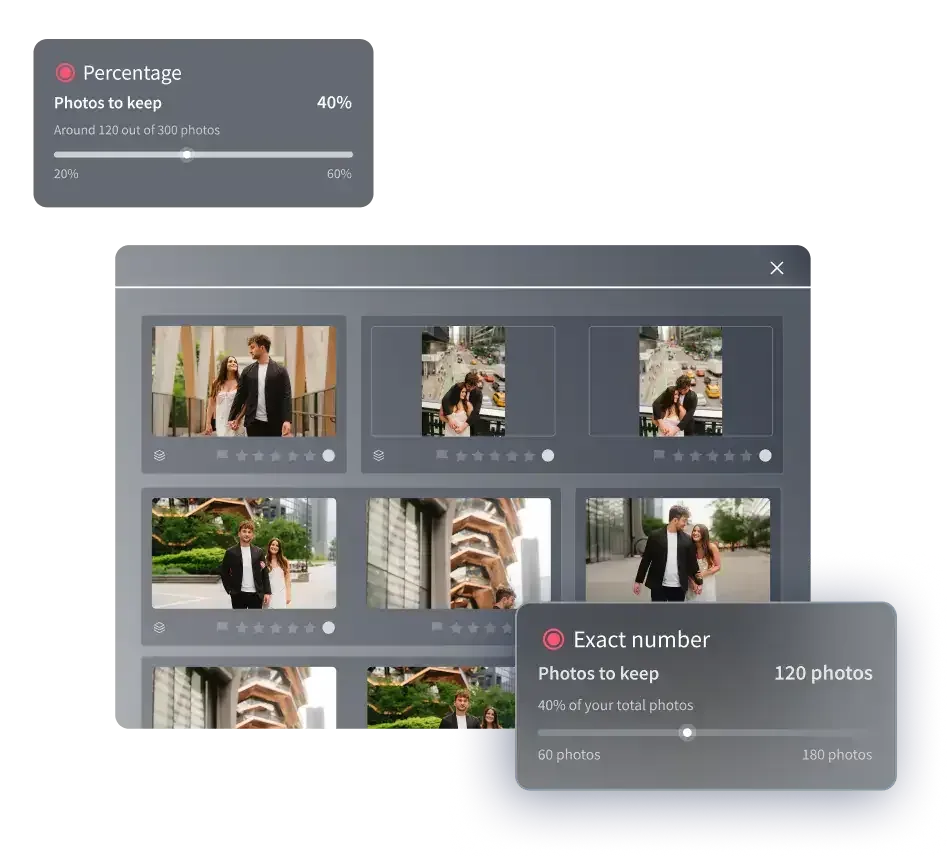
Modern AI culling works in layers. First it ingests the take and reads technical qualities across every frame: focus, exposure, motion blur, and whether subjects have their eyes open. Then it groups the near-duplicates that a burst produces, so instead of two thousand loose files you see a few hundred clusters, each representing one moment. Within each cluster it ranks the frames, floating the sharpest and best-timed candidate to the top.
Your job shifts from hunting to confirming. You move through the ranked groups, accept the suggested pick or swap it for the frame you prefer, and reject the rest of the cluster in a single action. A take that once took an afternoon to narrow can come down to a working shortlist in a fraction of that time. The point is not to hand the edit to software. The point is to let the software clear the obvious rejects and the redundant frames, so your attention goes to the close calls that actually decide the story.
Culling and grading in one editorial workflow
Culling is the first step, but it is rarely the last. Once you have your selects, an editorial set still needs a consistent look, and this is where an AI batch tool earns its place. Imagen is a desktop app for Mac and Windows built for photographers who deliver whole shoots, and it pairs AI culling with batch color and tone grading in the same flow. You cull the take down to the frames that matter, then apply your own consistent style across the entire set, so a sequence shot across changing light comes back looking like one coherent story rather than a patchwork of separate edits. Try Imagen’s new Studio to cull, edit and export in one project.
The batch step handles color correction, exposure balancing, and white balance in your personal style. Imagen is a desktop app for Mac and Windows that you download and install, with the AI processing running in the cloud, which matters when you are grading a feature on deadline. Pricing is pay-as-you-go, a monthly base fee plus a charge for the photos you export, and you can start by exploring Imagen’s tools for free, so you can test culling and grading on a real assignment before you commit.
It is worth stating the honest limits. This layer culls and grades and applies a reusable style across a set. It does not sharpen or deblur a soft frame or generate images from scratch, though it does include AI denoise. Within its lane, narrowing the take and grading the selects to one consistent look, it removes the two steps that eat the most editorial hours.
Where a dedicated tool handles the rest
Some editorial frames need more than a cull and a grade. A cover portrait may call for close skin retouching, a conceptual feature may need compositing or a montage built element by element, and an archival scan may need heavy detail recovery. These are separate jobs, and they belong to dedicated tools built for them.
Detailed skin and beauty retouching is craft done frame by frame in a dedicated retoucher. Compositing, montage, and precise masking are the domain of a layer-based editor where you build an image piece by piece. Recovering detail from a soft or noisy capture is the work of a specialized sharpening and enhancement tool, and even then within limits, because no software invents focus that was never recorded. The sensible editorial pattern is to cull and batch-grade the whole set first, then hand the one or two hero frames that need deep work to the specialist tool for that job. Trying to force one app to do everything is how the workflow slows back down.
Building a repeatable editorial culling routine
The photographers who stay fast treat culling as a fixed step, not an improvised chore. A routine that holds up under deadline usually looks like this. Ingest the full take and let the culling software group and rank the bursts. Move through the clusters once, accepting or overriding each suggested pick, and clear the rejects as you go. Lock your selects. Then push the selects through a batch grade so the whole set carries one consistent look before you deliver or send frames on for any specialist finishing.
The value of a repeatable routine is that it scales. A quiet portrait sitting and a chaotic three-camera event run through the same steps, and you always know how long each stage takes. That predictability is what lets editorial photographers accept volume assignments without dreading the edit, because the first and hardest pass, narrowing the take, is no longer a wall of manual work.
For related workflow deep dives, see our guides on photo culling software for wedding photographers, batch photo editing software for wedding photographers, and color grading software for wedding photography. You can also browse the full library of photography workflow tips for more on culling, batch editing, and grading.
What’s new in Imagen: Imagen is now an intelligent, agentic Studio for professional photographers: you cull, edit, review and export inside one project, in any order. Choose AI culling to shortlist a long take, or skip it and cull by hand for free, and let AI filters such as blur and closed eyes help you narrow it down. It is rolling out gradually as a beta.
Frequently Asked Questions
What is photo culling software, and why do editorial photographers need it?
Photo culling software uses AI to group near-identical frames from a burst, rank them by focus and timing, and help you keep the best and reject the rest quickly. Editorial photographers need it because assignments produce large takes but publish only a handful of frames, and manual culling of a big take can cost several hours before the real edit even begins.
Does culling software choose the final editorial selects for me?
No. Good culling software ranks and suggests, but you keep the final call. It clears the obvious rejects and redundant frames so your attention goes to the close calls, and you can always override a suggested pick. Editorial selection is a storytelling judgment the software cannot make for you.
Can culling software also grade or edit my selected photos?
Some tools combine culling with batch editing. Imagen, for example, culls the take and then applies your consistent color and tone style across the whole set in one desktop app flow, with the first batch finishing in under 10 minutes. You can use AI culling or skip it and cull manually for free, and AI filters such as blur and closed eyes help you narrow the shoot. Deep skin retouching, compositing, and heavy sharpening remain separate steps handled by dedicated tools.
How much does Imagen cost, and is there a free trial?
Imagen’s pay-as-you-go plan has a monthly base fee, and you pay for the photos you export. Exploring Imagen’s tools is free, so you can test culling and grading on a real editorial take before committing.
Does culling software work with RAW files?
Yes, culling tools built for professionals support RAW, which is what editorial photographers shoot. The important thing is speed, because a large RAW take needs to load and rank quickly for the cull to save time. A tool that stalls on RAW previews works against its own purpose.
