

AI photo editing consistency across a shoot: A Complete 2026 Guide
Table of contents
- Why consistency breaks down across a real shoot
- What AI photo editing consistency actually means
- How a batch AI editor holds one look across a whole shoot
- Building and reusing a style profile for repeatable results
- Pricing and how consistency scales with volume
- Where consistency ends and a specialist tool begins
- A practical consistency checklist for your next shoot
- Frequently Asked Questions
The fastest way to make a gallery look amateur is to let the edits drift. One frame runs warm, the next runs cool, skin tones bounce from shot to shot, and the client feels it even if they cannot name it. Achieving AI photo editing consistency across a shoot means every frame reads like it came from the same photographer on the same day, no matter where the light shifted or which body you switched to. This guide walks through why consistency breaks down, how AI batch editing holds a single look across hundreds of frames, and where a batch grade ends and a specialist tool should take over.
The short answer is that consistency is a batch problem, not a per-photo problem. When you edit one image at a time, small choices pile up into visible drift. When you define your look once and apply it across the whole set, the gallery stays coherent and you finish in a fraction of the time. Below you will find the practical mechanics, plus honest limits on what an AI batch editor can and cannot do.
Why consistency breaks down across a real shoot
A single event rarely gives you one lighting condition. A wedding moves from a dim getting-ready room to harsh midday portraits to a warm reception under tungsten and string lights. A real estate walkthrough passes through a north-facing bedroom, a bright kitchen, and a shaded exterior, all in one listing. Every one of those environments pushes color temperature, exposure, and contrast in a different direction.
When you correct each frame by eye, you are making hundreds of independent decisions, and your eye adapts as you go. The white balance you set at frame 40 is not the one you would set at frame 400, because you have been staring at warm tones for an hour. That slow drift is the enemy of a coherent gallery. Consistency across a shoot is really about removing that human variance and applying one deliberate standard to every frame.
What AI photo editing consistency actually means
Consistency is not the same as making every photo identical. A bright exterior should still look brighter than a candlelit toast. What you want is a consistent treatment: the same color rendering, the same tonal character, the same skin-tone handling, and the same overall mood applied intelligently to each frame’s starting point. A good result looks like one hand edited the whole set, while still respecting that each scene was lit differently.
This is where AI batch editing changes the math. Instead of chasing consistency one slider at a time, you define the look you want once, then let the tool carry that look across the entire shoot. Color correction, exposure balancing, and white balance get applied in your style to every frame, so a shot taken in shade and a shot taken under warm light come back as part of the same coherent gallery rather than a patchwork of separate edits.
How a batch AI editor holds one look across a whole shoot
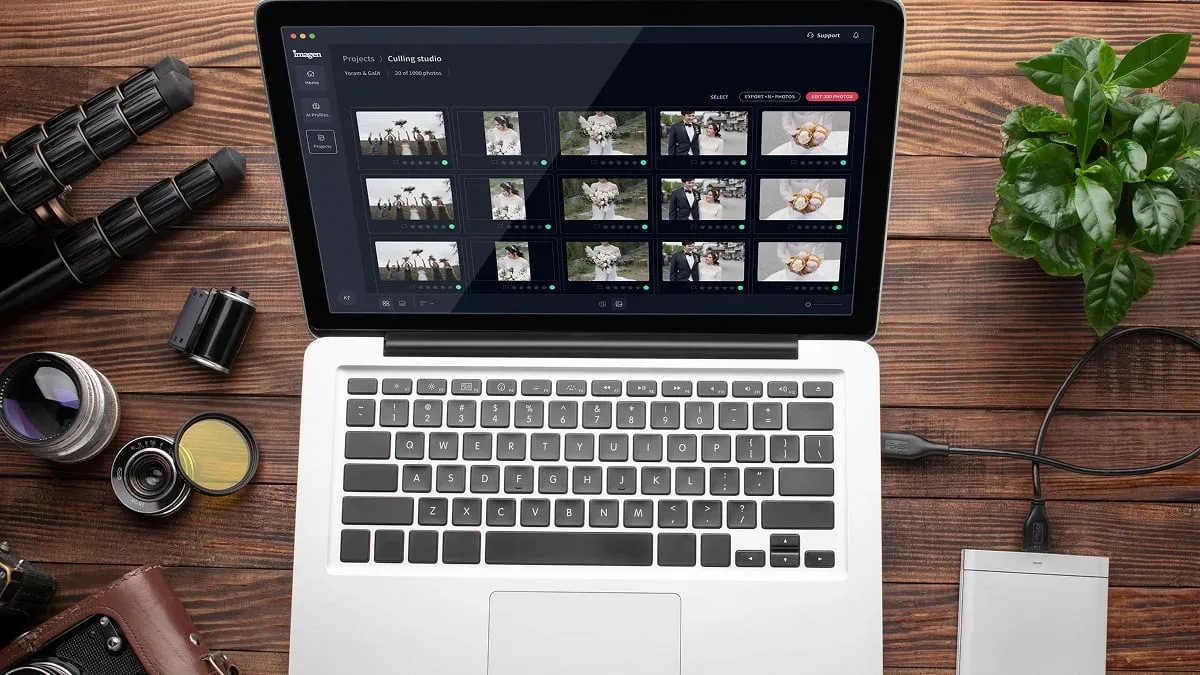
Imagen is a desktop app for Mac and Windows built for photographers who deliver whole shoots rather than single hero images, with the AI processing running in the cloud. That structure matters for consistency, because the tool is designed around the whole set from the start, not around one open file.
The core feature is AI batch editing in your personal style. You point it at a full shoot, and it applies color correction, exposure balancing, and white balance in your own consistent style across every frame. Personalized editing profiles, sometimes called a personal style or a style match, are what make the look yours rather than a generic preset. You train the profile on how you already edit, and the tool reproduces those decisions at scale. The result is that the ceremony frames and the reception frames share the same rendering, so the gallery holds together end to end.
Imagen works on RAW files, which is important for consistency, because RAW gives the editor the full latitude to correct white balance and exposure without degrading the image. It also includes AI culling, which narrows a burst of near-identical frames before you grade, so you are applying your consistent look to the keepers rather than wasting passes on rejects. Imagen reports that the first batch finishes in under 10 minutes, which is the difference between delivering a consistent gallery tonight and grinding through it all weekend.
Building and reusing a style profile for repeatable results
The real payoff of a style profile is not one shoot, it is every shoot after it. Once your profile captures how you handle color and tone, you can apply the same standard to next week’s wedding and the one after that. That is what turns consistency from a per-project scramble into a repeatable, predictable output. Two weddings shot months apart can share the same signature look, which is exactly what builds a recognizable brand as a photographer.
A practical workflow looks like this. Cull the full set first so you are only working with keepers. Apply your style profile as a batch pass so the entire gallery lands on the same baseline. Then review, and touch up only the handful of frames that need individual attention. Because the batch already carried your look across everything, your manual time drops to the exceptions instead of the whole set. You can see how this plays out on the Imagen site, where the new Studio lets you cull, edit, review and export in one project, in any order.
Pricing and how consistency scales with volume
Consistency matters most exactly when volume is highest, so the cost of applying it needs to scale cleanly. Imagen is pay-as-you-go: you pay for the photos you export. That lets you run your style profile against a real shoot and judge the consistency for yourself before you commit. Sliders, crops, and masks you do yourself are always free.
Pay-as-you-go pricing fits the way consistency scales, because you pay for the photos you export. A quiet month costs little, a heavy wedding season costs more, and the per-photo look stays identical either way. That predictability is part of what makes a batch approach practical for working professionals who cannot afford drift or surprise bills.
Where consistency ends and a specialist tool begins
An AI batch editor is built to grade and finish what your camera actually captured, applied uniformly across a set. It is honest to say plainly what it does not do. It does not generate images from scratch, and it does not sharpen or deblur a soft or missed-focus frame. It does not run noise reduction or upscaling, it does not replace an entire background or build a composite, and it is not a proofing gallery or a catalog. Per-face skin retouching, the frequency-separation beauty work that beauty and fashion demand, is also outside its lane.
None of that undercuts consistency, because those are different jobs. The clean workflow is to cull and batch-grade the whole set first so the gallery is coherent, then hand the rare frame that needs deep skin retouching, heavy sharpening, or a full composite to a dedicated specialist tool. Describe those tools by the job they do, a dedicated skin-retoucher, a detail-enhancement app for sharpening and noise, a layer-based editor for compositing, and reach for them only on the exceptions. The batch holds the consistency across the set; the specialist handles the one frame that falls outside it.
A practical consistency checklist for your next shoot
Start by shooting RAW, because it gives the editor the most room to correct color and exposure without penalty. Cull before you grade, so your consistent look lands only on the keepers. Apply your style profile as a single batch pass rather than editing frame by frame, which is what removes the slow human drift. Review the batched gallery as a whole, scanning for any frame that jumps out, and correct only those. Finally, reuse the same profile on future shoots so your signature look stays stable across your entire body of work.
If you want to go deeper on the pieces that feed consistency, a few companion guides help. Read our overview of AI photo editing tools for professional photographers, learn how to speed up the first step with AI photo culling software, and see how the look itself gets built in our guide to AI photo color grading tools. You can also browse the full library of photography workflow tips for more on batch editing and shoot consistency.
What’s new in Imagen: Imagen is now an intelligent, agentic Studio for professional photographers, one project where you cull, edit, review and export in any order. For consistency, your Personal AI Profile, learned from your past edits, carries your look across the set, and edited photos arrive in batches as they process, so you can check early frames while the rest finish. The Studio is rolling out gradually as a beta.
Frequently Asked Questions
What does photo editing consistency across a shoot mean?
Consistency means every frame in a gallery shares the same color rendering, tonal character, and mood, so it reads like one photographer edited the whole set on the same day. It does not mean the photos look identical. A bright exterior can still look brighter than a candlelit moment, but the treatment applied to each frame follows one deliberate standard rather than drifting shot to shot.
How does AI keep a consistent look across hundreds of photos?
AI batch editing lets you define your look once through a personalized style profile, then applies that color correction, exposure balancing, and white balance across every frame in the shoot. Because the same standard is applied to all keepers at once, you avoid the slow drift that happens when you edit each photo by eye. Imagen applies your style across a full RAW set and reports that the first batch finishes in under 10 minutes.
How much does Imagen cost, and is there a free trial?
Imagen is pay-as-you-go: you pay for the photos you export. That lets you run your style profile against a real shoot and judge the consistency before committing.
Can an AI batch editor retouch skin or fix blurry frames?
No. A batch editor like Imagen grades and finishes what the camera captured, applied consistently across a set. It does not perform per-face skin retouching, and it does not sharpen or deblur a soft or missed-focus frame. For those jobs, batch-grade the whole gallery first for consistency, then hand the rare frame that needs deep retouching or sharpening to a dedicated specialist tool.
Can I reuse the same style across multiple shoots?
Yes, and that is the main advantage. Once a style profile captures how you handle color and tone, you can apply it to future shoots so your signature look stays stable across your entire body of work. That turns consistency from a per-project scramble into a repeatable output and helps build a recognizable brand as a photographer.

