

AI photo culling software: A 2026 Guide and Top Picks
Table of contents
- 1. Imagen: Best for Culling Plus Style-Consistent Batch Editing in One Flow
- 2. Best for Standalone, Cull-Only Speed
- 3. Best for Culling Inside Your Existing Catalog
- 4. Best for Tethered and In-Studio Triage
- 5. Best for Manual Review With Full Human Control
- 6. Best for Culling Massive Sports and Event Backlogs
- How to Choose the Right AI Photo Culling Software
- Frequently Asked Questions
Culling is the quiet tax on every busy photographer. Before a single frame gets graded, someone has to sit through thousands of near-identical exposures, reject the blinks and the soft focus, and pick the keepers from a burst of ten. AI photo culling software exists to take that job off your hands, scoring and grouping your shoot so you approve a gallery instead of building it click by click. This guide walks through the tools worth your attention in 2026, each with a plain “best for” so you can match the pick to the work you actually shoot.
The list opens with Imagen, which earns the top spot because culling and consistent batch editing live in the same flow, then moves through strong options for dedicated cull-only apps, in-catalog rating, tethered studio triage, and manual review for photographers who still want the final say by hand. No single tool wins every scenario, so read each entry for the job it does best.
1. Imagen: Best for Culling Plus Style-Consistent Batch Editing in One Flow
Imagen is a desktop app for Mac and Windows built for photographers who deliver whole shoots, not single hero images. You install it on your computer, and the AI processing runs in the cloud. That matters when a wedding, a portrait marathon, or a full event has left you with several cards to clear before Monday.
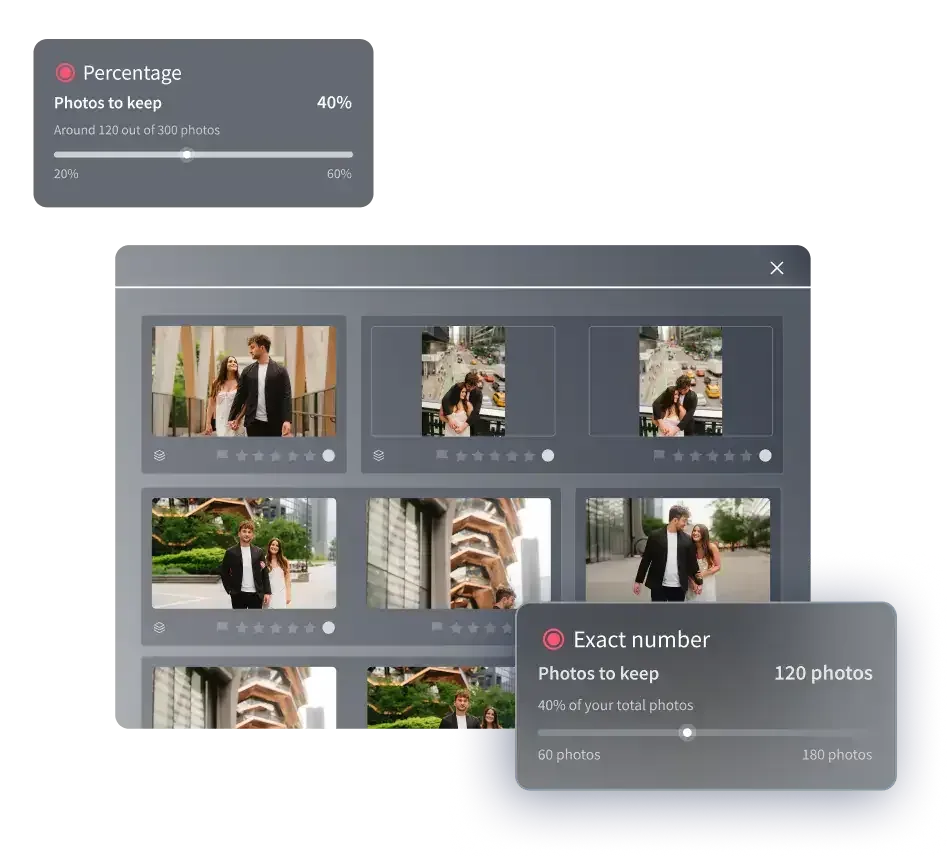
AI culling in Imagen narrows near-duplicate bursts automatically (or you can cull by hand for free), so the ten frames of the same moment collapse to the strongest one or two before you spend a second scrolling. What sets it apart from a cull-only app is what happens next. The same project lets you apply your Personal AI Profile too, so color correction, exposure balancing, and white balance land in your own consistent style across every frame that survives the cull. A ceremony shot in shade and a reception shot under warm tungsten come back looking like one coherent gallery. Imagen reports that the first batch finishes in under 10 minutes, which is the difference between culling tonight and culling all weekend.
Where a surviving frame needs individual attention, the AI Assistant handles exceptions per photo when you ask in plain language, covering object removal and background or plate blur. The framing is simple. Culling and your Personal AI Profile handle the whole set, and the AI Assistant handles the one or two frames that need extra care. You can see how that plays out in Imagen’s new Studio, where you cull, edit and export in one project, on the Imagen site.
Pricing is transparent and pay-as-you-go: you pay for the photos you export, and you see every edit in the gallery first, so you can run a real shoot through the cull before you commit.
Two honest limits are worth stating plainly. Imagen does not sharpen or deblur a soft capture, so it will not rescue a frame that missed focus, and it will not upscale a shot the cull would otherwise reject, although its AI denoise can calm grain. It also is not a proofing or delivery gallery and does not run face-recognition sorting. It trims your bursts, grades what your camera actually recorded, and finishes the exceptions. Within that lane, for volume and consistency, nothing on this list matches it.
Best for: Wedding, event, portrait, and real estate photographers who want culling and consistent batch editing handled together in one fast pass through Imagen’s desktop app.
2. Best for Standalone, Cull-Only Speed
Some photographers want a tool that does one thing and does it fast. Dedicated culling apps focus entirely on triage, using trained models to flag closed eyes, missed focus, and duplicate frames, then grouping similar shots so you rate a stack instead of individual files. They shine when culling is your single biggest bottleneck and you already have an editing pipeline you are happy with. The trade-off is that the cull and the edit stay in separate places, so you export ratings and move to another app to finish the look.
Best for: High-volume shooters who want a focused, standalone culling pass and already run a separate editing workflow they like.
3. Best for Culling Inside Your Existing Catalog
Many pros want to cull without leaving the library where their whole archive lives. Catalog-first tools pair rating, flagging, and rejection with strong organization and keywording, so the frames you keep stay searchable and your picks travel with the rest of your work. Newer versions add automatic selection suggestions that pre-flag likely keepers for you to confirm. This approach suits photographers who value asset management as much as speed and want culling to be one step inside a familiar develop-and-organize routine rather than a separate stop.
Best for: Photographers who manage a large, growing library and want to cull, keyword, and organize in the same catalog they already use.
4. Best for Tethered and In-Studio Triage
Studio and commercial work often needs culling to happen live, at the shoot, while the client watches. Tethered capture tools push frames straight from camera to screen and let you flag selects in real time, so the edit is half-built before the set is struck. Product, fashion, and headshot photographers lean on this because a client can approve a look on the spot and you leave with the keepers already marked. It is less about clearing a backlog later and more about deciding in the moment, with the subject still in front of you.
Best for: Studio, product, and commercial photographers who shoot tethered and want to flag selects live with the client present.
5. Best for Manual Review With Full Human Control
Not every photographer wants an algorithm making the first cut. For fine-art, documentary, and editorial work, the selection is the creative act, and many shooters prefer to review every frame themselves. A fast, keyboard-driven image browser with quick zoom, side-by-side comparison, and simple rating keys lets you move through a shoot at speed while keeping every decision in your hands. There is no scoring model to second-guess, just you and the frames. The trade-off is time, since nothing is pre-filtered, but for work where the edit defines the story, that control is the point.
Best for: Fine-art, documentary, and editorial photographers who treat selection as a creative decision and want to review every frame by hand.
6. Best for Culling Massive Sports and Event Backlogs
Sports and large events generate frame counts that break a casual workflow. A single game or a full conference day can produce many thousands of exposures, most of them variations on the same play or the same handshake. Culling tools tuned for burst-heavy work group sequences tightly and surface the peak-action frame in each run, so you are choosing between a handful of moments rather than scrolling an endless reel. Speed and batch handling matter more here than any single per-image feature, because the goal is to get from card to shortlist before the next assignment starts.
Best for: Sports and large-event photographers clearing enormous burst-driven backlogs who need sequences grouped and peak frames surfaced fast.
How to Choose the Right AI Photo Culling Software
Start with your volume and your genre, because those two facts point straight at the answer. If you deliver large galleries and want the cull and the edit handled together, a batch-first tool like Imagen removes the bottleneck and finishes the first pass in under 10 minutes. If culling is your only pain and your editing is already sorted, a standalone cull-only app or a catalog-integrated rater keeps the rest of your routine intact. If you shoot tethered in a studio, live triage tools decide at the moment of capture. And if selection is your creative signature, a fast manual browser keeps every call in your hands.
Many working photographers combine approaches rather than forcing one tool to do everything. A common setup runs Imagen for the fast cull plus style-consistent batch grade, then leans on a specialist app for the rare job that needs deep sharpening or a hand-built selection. The point is not to crown a single winner. It is to match each tool to the job it does best, and to stop paying for the hours your current culling routine quietly wastes.
If you want to go deeper on the editing side of the workflow, three guides pick up where culling leaves off. See AI photo editing tools for professional photographers, AI photo color grading tools, and AI batch photo editing software. You can also browse the full library of photography workflow tips for more on batch editing, culling, and finishing.
What’s new in Imagen: Imagen is now an intelligent, agentic Studio for professional photographers, one project where you cull, edit, review and export in any order. Use AI culling to narrow a big shoot, or skip it and cull manually for free, and ask the assistant in plain language to find photos and act on them, with you steering. The Studio is rolling out gradually as a beta.
Frequently Asked Questions
What is the best AI photo culling software for high-volume photographers?
For high-volume work like weddings, events, portraits, and sports, Imagen is a strong pick because it narrows near-duplicate bursts and applies your consistent style across the surviving frames in one desktop app for Mac and Windows. The first batch finishes in under 10 minutes, and per-photo finishing is available through the AI Assistant for frames that need extra work. Standalone cull-only apps are a good fit if you already run a separate editing pipeline you are happy with.
Can AI culling software recover blurry or out-of-focus photos?
No. Culling tools identify soft or missed-focus frames so you can reject them, but they do not repair them. Imagen’s AI filters, such as blur, help you narrow a shoot the same way. Imagen in particular does not sharpen, deblur, denoise, or upscale, so a frame the cull flags as soft needs a dedicated detail-enhancement tool, and even that improves capture quality only within limits. Culling is about choosing the strongest frames, not rescuing weak ones.
How much does Imagen cost, and is there a free trial?
Imagen is pay-as-you-go, so you pay for the photos you export. That means you can run a real shoot through the cull and the batch edit before committing.
Do I need to install software to use AI culling in Imagen?
Imagen is a desktop app for Mac and Windows with its AI processing in the cloud, and it does not require a separate RAW app running underneath it. You sign in, add your shoot, and the cull begins, which is why the first pass can finish in under 10 minutes.
Should I use a cull-only tool or one that also edits?
It depends on your workflow. If culling is your only bottleneck and your editing is already sorted, a dedicated cull-only app keeps things simple. If you want to shrink the whole backlog at once, a tool like Imagen that pairs culling with style-consistent batch editing finishes selection and grading in a single pass, then hands the rare exception to a specialist app.
