

Adobe Generative Credits, Explained for Photographers
Table of contents
Generative credits are what Adobe charges for generative AI. Every Adobe plan includes a number of them each month, and features like Prompt to Edit in Lightroom spend them every time you generate. They reset on your billing date, and whatever you don’t use is gone.
Here’s how many your plan includes, what each Lightroom and Photoshop feature costs, and what that adds up to on a real wedding.
What a generative credit is
Adobe compares credits to arcade tokens: a simple game takes one, a bigger one takes several. Your credits belong to your Adobe account, not to one app, so Lightroom, Photoshop and Firefly all draw from the same balance.
Adobe’s generative credits FAQ splits generative features into two kinds:
- Standard features, like Generative Fill with Adobe’s own Firefly model, mostly use 1 credit per generation.
- Premium features use more. Everything that runs on a partner model, from Google, OpenAI, Topaz and others, is premium, and the cost depends on the model and the size of the result.
Prompt to Edit in Lightroom runs on Google’s Nano Banana 2, so it’s a premium feature.
How many credits your plan includes
From Adobe’s generative credits FAQ (updated October 27, 2026) and its plan comparison page, checked on October 29, 2026:
| Plan | Generative credits a month |
|---|---|
| Lightroom (1TB) | 250 |
| Photography (1TB) | 1,000 |
| Creative Cloud Photography (20GB) | 100 |
| Lightroom mobile and web | 100 |
| Photoshop single app, subscribed on or after June 17, 2025 | 25 |
| Photoshop single app, subscribed before June 17, 2025 | 500 |
| Creative Cloud Pro | 4,000 for premium features, unlimited standard ones |
What the table doesn’t show:
- Credits don’t roll over. Your balance resets to your plan’s number every month, on your billing date.
- Two plans add up. With two subscriptions, your monthly credits are the sum of both.
- Standard features aren’t free on photography plans. Only Creative Cloud Pro, Firefly and credit plans make standard features unlimited. On a Lightroom or Photography plan, even a 1-credit Generative Fill comes out of your balance.
- Photoshop on its own lost most of its credits. Subscribe on or after June 17, 2025, and you get 25 a month instead of 500.
Prices vary by country, so check Adobe’s plan page for yours.
What uses them in Lightroom and Photoshop
From Adobe’s partner models page (updated October 23, 2026) and the credits FAQ:
| Feature | Model | Credits per generation |
|---|---|---|
| Prompt to Edit, in Lightroom | Nano Banana 2, by Google | 20 at 1K or 2K, 30 at 4K* |
| Generative Upscale, in Lightroom | Topaz Gigapixel | 10 up to 25 MP, 20 from 25 to 56 MP |
| AI Sharpen, in Lightroom | Topaz Sharpen | 10 up to 25 MP, 20 from 25 to 56 MP |
| Generate Video, in Lightroom | Veo 3.1, by Google | 50 per second of video* |
| Generative Fill, in Photoshop | Adobe Firefly | 1 |
| Generative Fill, in Photoshop | Nano Banana 2, by Google | 10 to 40, by output size |
| Generative Remove, in Lightroom | Adobe’s own | none |
| Remove Tool, in Photoshop | Adobe’s own | none |
*Adobe marks these rates as for a limited time, so they can change.
Two things stand out. Generative Remove, the one generative tool most photographers use every week, costs nothing. And a single 5-second video clip from Lightroom uses 250 credits: a whole month of the Lightroom plan.
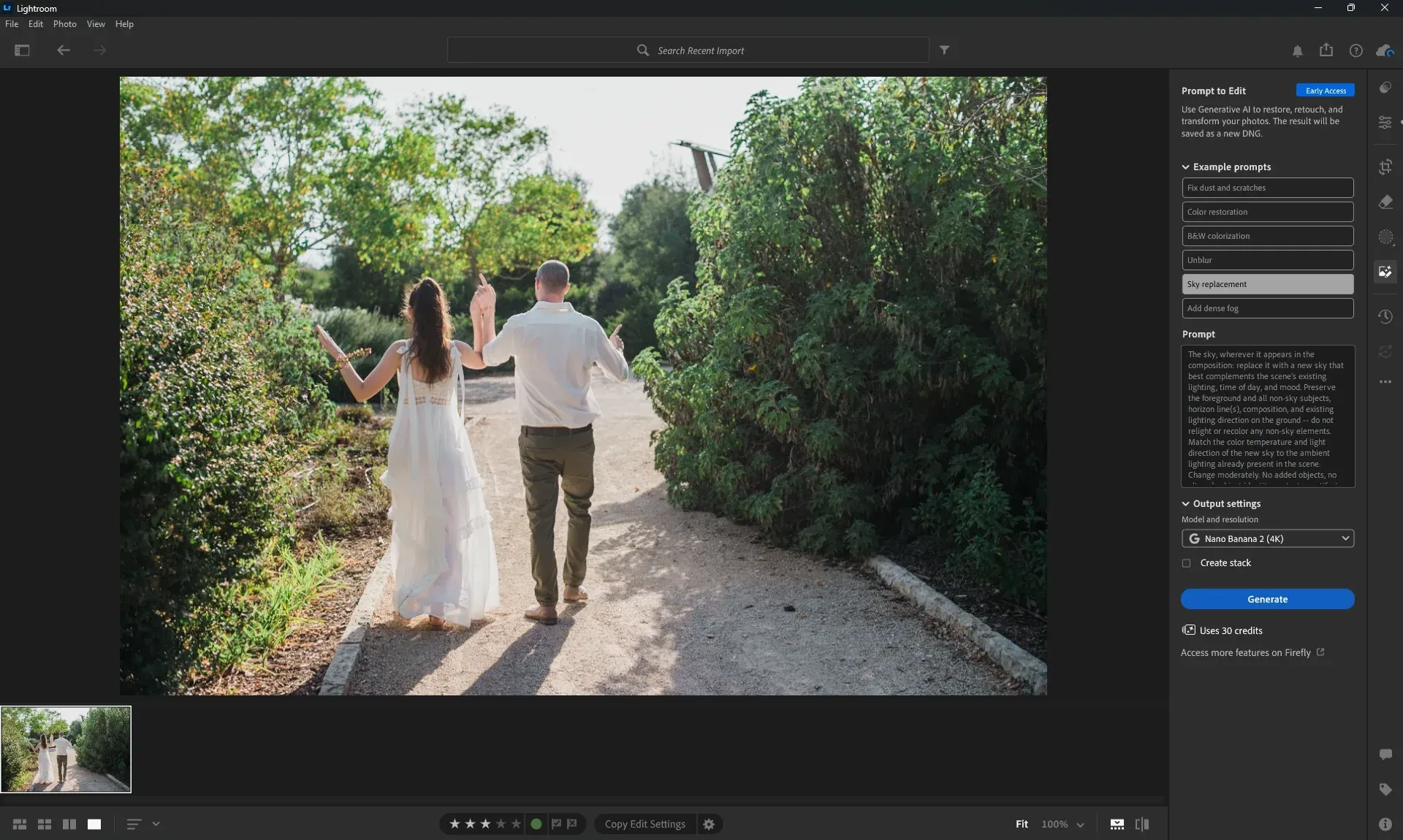
Prompt to Edit shows the cost before you generate: 30 credits for a 4K result (screenshot: Imagen, October 2026)
The wedding math
Say you shot a 600-photo wedding and want one Prompt to Edit pass on every photo.
- At 2K: 600 × 20 = 12,000 credits.
- At 4K: 600 × 30 = 18,000 credits.
- With retries: redo a quarter of them at 4K, and that’s another 150 × 30 = 4,500. Total: 22,500.
Here’s the 2K pass against each plan’s monthly credits:
| Plan | Credits a month | 2K tries a month | Months of credits for one wedding |
|---|---|---|---|
| Lightroom (1TB) | 250 | 12 | 48 |
| Photography (1TB) | 1,000 | 50 | 12 |
| Creative Cloud Pro | 4,000 | 200 | 3 |
Even on Creative Cloud Pro, one wedding at 2K, with no retries, takes three months of credits. On the Lightroom plan, it’s four years.
Nobody would actually do this, and that’s the point. Prompt to Edit is priced for a handful of photos, not a gallery. And every try needs checking: in our Sky replacement test, one 30-credit try gave a new sky, and also removed the trees and added the roof of a house.
What happens when you run out
When your credits run out, premium features like Prompt to Edit stop until your balance resets on your next billing date. A generation that fails is refunded, usually within minutes.
To keep going before the reset, Adobe offers:
- A Firefly plan, which adds credits for premium features and makes standard ones unlimited
- A credit add-on, from 2,000 to 50,000 credits a month
- In Photoshop, buying more from the Generative Credits Usage panel
To check your balance, open your Adobe Account page and select your profile picture. In Photoshop, the Generative Credits Usage panel shows it too.
Editing a full gallery without credits
Imagen works on the whole shoot, not one photo at a time. Your Personal AI Profile learns your style from your past edits and applies it to every photo. Then the assistant in Imagen Studio lets you adjust the edits in plain words across the set, like “make the 25mm photos black and white” or “copy this edit to all the bride photos”.
The assistant moves the sliders you’d move by hand, and keeps your original pixels: it never adds or removes a pixel, and it isn’t an image generator. It doesn’t use credits (a daily limit applies). And if you finish in Lightroom Classic, where Prompt to Edit isn’t available, your AI edits and ratings carry over.
Keep Prompt to Edit for the few photos that need restoring or something removed, and edit the gallery with Imagen. For the two side by side, see Lightroom Prompt to Edit vs Imagen. For what the assistant can do today, read what the assistant can and can’t do (yet), and see Imagen’s plans.
Frequently Asked Questions
How many generative credits does the Lightroom plan include?
The Lightroom (1TB) plan includes 250 generative credits a month, and the Photography (1TB) plan includes 1,000. They reset on your billing date each month and don’t roll over.
How many credits does Lightroom Prompt to Edit use?
Prompt to Edit runs on Google’s Nano Banana 2 model, which Adobe charges at 20 credits for a 1K or 2K result and 30 for 4K, a rate it marks as for a limited time. Every try costs credits, retries included.
Does Generative Remove in Lightroom use credits?
No. Adobe lists Generative Remove in Lightroom, and the Remove Tool in Photoshop, among the generative features that currently use no credits.
Do unused generative credits roll over?
No. Your balance resets to your plan’s monthly number on your billing date, whatever you didn’t use.
What happens when I run out of generative credits?
Premium features like Prompt to Edit stop until your credits reset on your next billing date. To keep going before then, Adobe offers a Firefly plan or a credit add-on, which also makes standard features unlimited.
