

What Is Imagen Studio? Inside Imagen's Intelligent Studio for Photographers
Table of contents
- What Imagen Studio actually is
- One non-linear project: cull, edit, review, and export in any order
- The agentic assistant: ask for your photos in plain language
- The built-in editor, AI filters, and your AI Profile
- How Imagen Studio works alongside Lightroom
- How you pay: explore for free, pay on export
- What is here now and what is on the roadmap
- Frequently asked questions
Imagen Studio is the next evolution of Imagen. It takes the AI photo editor that professionals already use and turns it into an intelligent, end-to-end Studio for your whole post-production. Instead of bouncing between separate tools for culling, editing, reviewing, and exporting, you work inside one non-linear project and move through those stages in any order you like. An agentic assistant sits alongside you, and it can find and act on your photos when you ask in plain language. It’s the same product and the same brand, just evolved, so you won’t have to learn a new app from scratch.
Shoot weddings, portraits, events, or any high-volume work? Then Imagen Studio is built to collapse the slow, repetitive parts of post into a single place, while you keep full control of the creative decisions. This guide covers what Imagen Studio is, what it does today, how it fits with Lightroom, how you pay, and what’s still on the roadmap. By the end you’ll know exactly what to expect.
What Imagen Studio actually is
Imagen Studio is a desktop application for Mac and Windows. You download and install it, and cloud AI handles the heavy processing. Stages of post-production that used to live in different apps now share one connected workspace. You import a shoot, then cull, edit, review, and export without the export-and-reimport shuffle between steps. The intelligence runs through all of it, since an AI Profile trained on your own editing style does the bulk of the work, and an assistant helps you move around a large gallery right away.

The key word here is Studio. Imagen is no longer just an auto-editor that hands files back to some other tool, because a whole shoot can now live inside it from ingest to delivery. The AI does the repetitive lifting. That leaves your time for judgment and finishing, not mechanical sorting and slider-dragging.
One non-linear project: cull, edit, review, and export in any order
The heart of Imagen Studio is the single, non-linear project. Traditional post forces a rigid sequence of import, cull, edit, review, and export, and each step often sits in its own app. Imagen Studio drops that sequence. Start editing before culling is finished if you want, jump back to review a set, cull a little more, and export the parts that are ready. It all happens inside the same project. That flexibility helps most on busy shoot days, when a client asks for a rush set before the full gallery is ready.
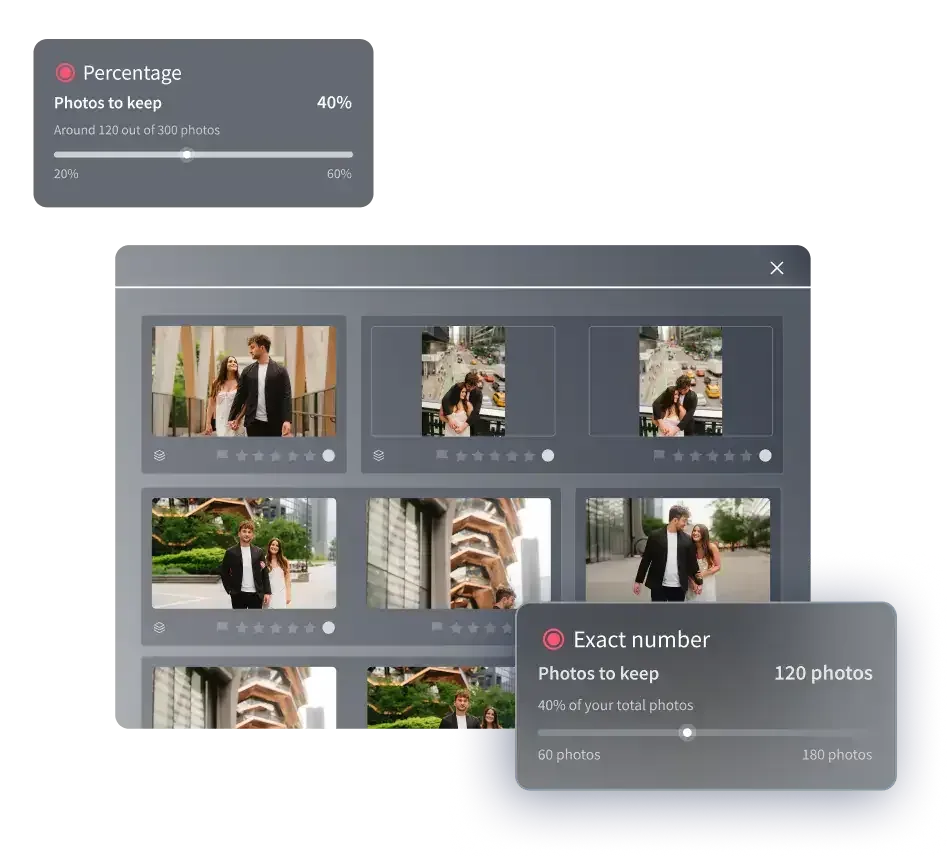
Editing is eager, so edited photos arrive in batches by timestamp as they finish processing. You can begin working with the first results while the rest keep going in the background, which beats waiting for the entire shoot to complete. Culling comes in two flavors: fast batch culling powered by AI, and free manual culling for when you’d rather make the calls yourself. Because everything lives in one project, your shoot’s state is always in one place. Nobody has to stitch progress together across separate tools.
The agentic assistant: ask for your photos in plain language
Imagen Studio includes an agentic assistant that finds and acts on photos using natural language. Scrubbing through thousands of frames by hand gets old fast. So you ask for what you want in plain words, and the assistant surfaces the matching photos and acts on them. It’s meant to take the tedium out of a big gallery. That gets you to the frames that matter sooner, whether you’re sorting a quiet portrait session or a ten-hour wedding day.
We want to be clear about what the assistant does and doesn’t do today, because honesty here saves you frustration. It understands what’s in a photo, but not yet where things sit within the frame, so it can’t place targeted masks on a specific person or object for you. It doesn’t generate imagery of any kind, it has no voice control, and highly subjective requests can trip it up. Those are the current limits of an early, evolving feature. Even so, the assistant already removes a lot of manual searching from a big shoot, and the capability keeps growing.
The built-in editor, AI filters, and your AI Profile
Here’s where it gets fun. Imagen Studio has a built-in editor, currently in Beta, and for the core adjustments the quality is comparable to Lightroom. You get manual sliders, a histogram, and crop and straighten tools. It’s a real editing surface inside the Studio, so you can refine images without leaving the project, though as a Beta it doesn’t match every single Lightroom capability yet. Got presets you love? You can import your existing ones from Lightroom or build your own inside Imagen.

What makes Imagen distinctive is your AI Profile, a model trained on your own past edits that applies your personal style across a whole shoot automatically. Need different looks for one shoot? You can apply more than one AI Profile to selected photos, though that adds some processing time. Imagen Studio also brings AI filters, which are smart tags that flag things like blurry frames and closed eyes at launch, so obvious rejects are easy to catch while you cull. And when you wrap a shoot, you can add your final edits back in to train your profile, so it gets closer and closer to how you really work. One thing worth repeating: Imagen never generates imagery. It only works with your real photographs.
How Imagen Studio works alongside Lightroom
Imagen Studio is designed to fit the ecosystem you already use, and that very much includes Lightroom. It’s a standalone desktop application that works alongside Lightroom Classic, not a plugin inside it, and nobody’s asking you to give up the tools you rely on. You decide how much of your post lives in Imagen and how much stays in Lightroom, one shoot at a time.
The practical detail is how edits travel. Edits made by your AI Profile and Imagen’s AI tools carry over to Lightroom and other Adobe software as XMP data, so the look follows your files. Manual edits, ratings, flags, culling decisions, and color labels made in Imagen’s own editor stay in Imagen, and they don’t export to Lightroom. Once you know that split, planning is easy. Lean on Imagen for AI editing and fast project work, and keep exporting to Lightroom whenever it suits you. On formats, you can upload JPEG, TIFF, and RAW files, then export to JPEG, TIFF, or PNG. A few inputs aren’t supported, including HE NEF, DNG Lossy, Smart Previews on their own, and Capture One files.
How you pay: explore for free, pay on export
Pricing in Imagen Studio is simple and usage-based. Curiosity is free, so you can explore the tools and try things across your whole gallery, and you only pay when you export. If you’re a pay-as-you-go photographer, you pay for the photos you actually export, at the same per-tool pricing as before. What you spend follows the work you deliver, not a flat charge for sitting down to experiment. There’s also a free trial, which lets you see how Imagen Studio fits your work before you commit.

Past pay-as-you-go, Imagen offers an unlimited plan with a fixed fee for high-volume shooters who want predictable costs, plus a custom business option for teams and studios with bigger needs. Which one’s right depends on your volume and how steady you want your monthly spend to be. The through-line is that exploring never costs you anything. You can learn the Studio and test it on real shoots without a meter running while you look around.
What is here now and what is on the roadmap
Imagen Studio launched as an early, evolving release. It’s rolling out gradually and feedback-first, so the experience keeps improving as more photographers come on board. Available now is the core of the Studio. That means the single non-linear project, batch and manual culling, eager editing, the built-in editor in Beta, preset import, the agentic assistant in its current form, launch AI filters for blur and closed eyes, multiple AI Profiles, and profile training. You can export from Imagen or send your work on to Lightroom.
Several capabilities are on the roadmap and coming after launch, and Imagen is careful not to promise hard dates for them. Expect real-time masking in the editor, more AI filters such as wedding scene detection and key faces, and fuller culling capabilities. Also expect a footage organizer, cloud storage backup, and delivery integrations including Pic-Time and Social Spotlight, along with a guided onboarding experience. Further out, the direction points toward an assistant that understands where objects sit in the frame so it can place masks for you, and an editor that fine-tunes to how you personally edit. Real Estate work is the one exception to all of this. It isn’t part of the Studio shift, and it continues to run as the dedicated Imagen Real Estate web app.
Ready to see how it fits your work? Explore Imagen and try the Studio on a real shoot, and browse more guides and best practices on the Imagen blog.
Frequently asked questions
Is Imagen Studio a new app or a replacement for Imagen? It is neither a new app nor a replacement, and it isn’t a rebrand either. Imagen Studio is the next evolution of the same Imagen product and brand. If you already use Imagen, this is your existing tool growing into a full, intelligent Studio that covers culling, editing, reviewing, and exporting in one place.
Does Imagen Studio replace Lightroom? No, Imagen Studio does not replace Lightroom. It’s a desktop app that works alongside Lightroom Classic, so it’s neither a plugin nor a forced replacement. Its AI edits carry to Lightroom and Adobe as XMP, while manual edits, ratings, and culling made in Imagen stay in Imagen. You choose how much of your post lives in each tool.
Does Imagen Studio generate images with AI? No, Imagen works only with your real photographs and doesn’t generate imagery. The AI handles culling, editing to your trained AI Profile, smart tagging for things like blur and closed eyes, and helping you find and act on photos. It enhances what you shot. It never invents anything.
How much does Imagen Studio cost? Exploring the tools is free, and you pay only when you export, at the same per-tool pricing as before, so pay-as-you-go cost tracks the photos you deliver. An unlimited plan with a fixed fee and a custom business option are also available, and a free trial lets you test it first. Pick the plan that matches your volume.
What file formats does Imagen Studio support? Upload JPEG, TIFF, and RAW files, then export to JPEG, TIFF, or PNG, or keep exporting to Lightroom. A few inputs aren’t supported, including HE NEF, DNG Lossy, Smart Previews on their own, and Capture One files. For more, see our guides on the Imagen blog.
