
10 Best Portrait Retouching Services for Photographers in 2026
Table of contents
- Key Takeaways
- The Shift to Smart Retouching Systems
- How We Evaluated These Services
- Imagen: The Leader in Custom AI Editing
- RetouchUp: Reliable Human Precision on Demand
- FixThePhoto: High-End Magazine Quality
- WeEdit Photos: Managing Large Wedding Volumes
- The Image Salon: Personalized Dedicated Editors
- ShootDotEdit: Predictable Flat-Rate Subscriptions
- Technical Workflow Steps for Maximum Speed
- Comparison of Top Portrait Retouching Services
- Final Recommendation: Which Service Should You Choose?
- Frequently Asked Questions
- Can AI-powered portrait retouching look natural?
- How many images do I need to build a custom AI profile?
- What is the difference between AI and manual retouching?
- Do professional retouching services work with raw files?
- Can I use my own Lightroom presets with these services?
- What is the average turnaround time for human-powered retouching?
- Will outsourcing my editing hurt my personal brand?
- Keep exploring
Raw files pile up fast, and that client delivery deadline already came and went yesterday. That’s the reality of running a portrait studio, where people expect instant delivery and flawless skin, every time.
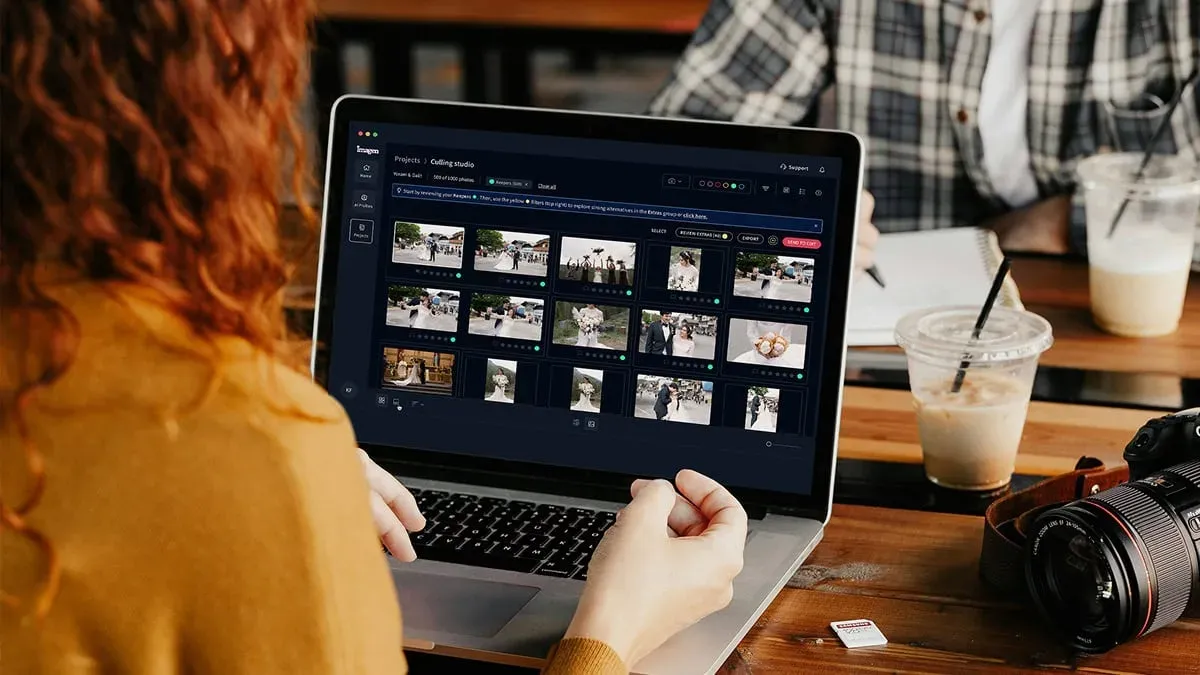
Want to speed up your workflow? Try Imagen’s new Studio, where you cull, edit and export in one project, and see the difference on your own photos. You pay at export, and you see every edit in the gallery first.
You can’t spend eighty hours a week erasing blemishes without burning out completely. Finding a solid portrait retouching service is how you get your life back, and how your business actually grows.
Key Takeaways
- 64% of full-time professional photographers now hand off their editing to stay sane.
- Modern AI platforms process photos in under 0.5 seconds per photo, slashing manual work by as much as 90%.
- Hybrid setups that pair AI speed with human oversight produce the lowest revision rates, at under 1.5%.
- Traditional human-powered retouching still wins for complex, high-end editorial work, though it can cost up to $12.00 per photo.
- Workflow integration runs deep, with 92% of services working directly inside Adobe Lightroom Classic.
- Picking the right tool depends mostly on your volume, everything from pay-as-you-go pricing to unlimited flat monthly plans.
The Shift to Smart Retouching Systems
The photo industry has changed, and you already know it. The global AI in image processing market is projected to reach $10.5 billion by 2030, growing at a CAGR of 17.4% from 2024. That kind of growth means human-only studios are no longer your only option. Smart automation now handles the tedious grunt work, while human editors stay focused on the creative highlights.
Skip these systems, and you’re leaving money on the table. Clients raised on instant phone filters won’t wait weeks for a gallery anymore. Here are a few industry numbers that show exactly why this shift is moving so fast:
- 64% of professional photographers report that outsourcing frees up at least 20 hours a week during peak season.
- Average turnaround for edited galleries has fallen from 14 days to under 48 hours over the past three years.
- AI-assisted workflows cut total post-production costs by up to 60% versus fully manual editing houses.
- Photographers who outsource report a 40% increase in annual booking capacity, simply because they have more time to market themselves.
This isn’t about cutting corners. It’s about staying competitive in a market that moves fast, and using these services is really just buying back your creative freedom.
How We Evaluated These Services
We didn’t stop at marketing copy. We tested upload times, checked customer support responsiveness, and scrutinized the pixel-level quality of skin edits. Pores shouldn’t look blurred into oblivion, and skin needs to keep its natural texture even after heavy retouching. Here’s the exact process we used:
- Texture Check - We looked closely at how well each service holds onto high-frequency skin detail without making subjects look plastic.
- Turnaround Speed - We checked whether delivery guarantees actually hold up during busy wedding season.
- Pricing Clarity - We watched for hidden setup fees and complicated contracts that lock you into long-term plans you don’t need.
Nothing stings more than opening a batch of edits that look nothing like your brand. That’s why we paid close attention to how each service handles customization, and why every option here respects your artistic voice.
Imagen: The Leader in Custom AI Editing
Do you need your exact style stamped across thousands of frames? Imagen might be exactly what you’ve been hunting for. Rather than forcing you into generic filters, it studies your past edits and builds a custom profile from them. It learns how you handle exposure, temperature, and shadows, then applies those same choices to your new raw files in seconds. Honestly, it’s like cloning yourself, minus the sleep deprivation.
Imagen runs as a desktop app that works alongside Adobe Lightroom Classic. You don’t need to change how you organize your files at all. You just send your photos up to their servers and watch the edits arrive back on your computer in batches, so you can start reviewing early frames while the rest finish. It’s smooth, and it saves you hours of manual work. Here’s a look at the core features that make it stand out:
- Personal AI Profiles learn your exact editing style from 5,000 of your previously edited raw files.
- Talent Profiles built by world-renowned photographers, ready to use right away if you don’t have a deep catalog of your own yet.
- You also get advanced automated tools like subject masking, cropping, straightening, and detailed facial adjustments.
Let’s talk pros and cons, so you can decide if this fits your studio. Here’s what we found:
- Pro - Blazing speed, under 0.5 seconds per photo, so you can edit a full wedding gallery in minutes flat.
- Pro - Cost per image is way lower than what traditional human editing houses charge.
- Con - You’ll need a large initial upload of edited files to get a highly accurate personal profile.
- Con - It won’t handle complex physical fixes, like swapping in eyes from a different frame.
Honestly, this is where Imagen shines brightest. It’s built for high-volume creators who can’t afford to lose their unique brand identity. Go check out their dedicated tools for portrait photography to see how it fits your daily routine.
RetouchUp: Reliable Human Precision on Demand
Sometimes AI just can’t cut it, especially with physical errors in a photo. A stray hair across someone’s eyes, or glare bouncing off their glasses, needs an actual human touch. That’s where RetouchUp comes in. They skip automated profiles entirely and lean on a team of skilled artists who fix your images by hand, based on your exact instructions.
This one runs on a simple pay-as-you-go model, which is great if your business is seasonal. You don’t owe a monthly fee during your slow winter months. You just upload your files whenever you have them, pay the flat rate, and get everything back in 24 hours. Here’s a real example of how that actually helps:
Say you shoot a corporate group portrait, and one executive blinked at exactly the wrong moment. With RetouchUp, you upload that frame along with a reference photo where their eyes are open. Their artists swap the eyes by hand, match the lighting, and hand back a clean final image. No Lightroom preset can do that, and trying it yourself in Photoshop takes hours of frustrating work.
FixThePhoto: High-End Magazine Quality
Are you shooting high-end beauty, fashion, or commercial campaigns? You need magazine-grade editing, and that’s FixThePhoto’s whole specialty. They use advanced techniques, like frequency separation and precise dodge-and-burn, to refine skin tones while keeping every pore intact. The results don’t look cheap or blurred. They look like a genuine high-fashion editorial print.
Their team is huge, so they can take on large projects without slowing down. They also offer plenty of advanced options, everything from object removal to complex background reconstructions. Here’s why that matters for your professional reputation:
“AI is fantastic for volume, but high-end commercial portraits still require a human eye that understands lighting, anatomy, and how to preserve texture at print scale.”
Itamar Haim, SEO Expert and Digital Strategist specializing in search optimization and content marketing.
That level of detail becomes a must when your images end up on giant billboards or in national magazines. It’s a premium service built for premium projects.
WeEdit Photos: Managing Large Wedding Volumes
Wedding portraits are unique because you have to deal with massive volumes of images shot in totally unpredictable lighting. One minute you’re shooting in bright midday sun, and the next you’re inside a dim reception hall. WeEdit.Photos built their whole business around solving that exact problem. They don’t just fix individual blemishes. They edit entire catalogs so your colors and tones stay consistent across the whole day.
They work closely with you to nail down your brand’s look. Send them reference images, or just pick a preferred color style, and they’ll apply that aesthetic across your whole order. Here’s how their pricing breaks down, so you can see if it fits your budget:
- Color Correction - Starts at $0.20 per photo and covers exposure, white balance, and basic contrast tweaks.
- Standard Retouching - Runs around $2.50 per image and adds basic skin smoothing plus blemish removal.
- Premium Retouching - Costs up to $5.00 per photo for deep, high-end editorial beauty work.
It’s a genuinely solid all-in-one option for wedding photographers who want to hand off their whole post-production pipeline. Instead of losing your Mondays to culling and editing, you send the raw files to their team and spend that time booking your next client instead.
The Image Salon: Personalized Dedicated Editors
If you have a distinct, artistic style, outsourcing can feel risky. You worry an outside service won’t understand your creative vision, and that’s a fair concern. The Image Salon solves the problem by assigning a dedicated human editor to your account. This isn’t a random pool of freelancers. It’s a direct partnership with a professional who learns exactly how you like your highlights, shadows, and tones.
They run an interactive feedback system, so your editor improves with every batch delivered. If a set of edits is not quite right, send it back with notes, and they will adjust their approach for your next order. Here is how you get started with this personalized service:
- Onboarding - Upload a sample catalog of your past work so the team can study your personal editing style.
- Trial Batch - They edit a small test batch of images for your review, then you give direct feedback on the results.
- Dedicated Match - Once you are happy with the results, they pair you with an editor who manages all your future work.
This system gives you the consistency of an in-house editing assistant, without the cost of a full-time employee. It’s a strong option for boutique portrait artists who charge premium prices.
ShootDotEdit: Predictable Flat-Rate Subscriptions
If you shoot dozens of events and portraits every month, paying per photo drains your profits fast. ShootDotEdit takes a different approach: flat-rate monthly subscriptions. Instead of counting every image you upload, you pay one predictable monthly fee that covers unlimited color correction. That makes financial planning simple, and far less stressful.
Their main focus is speed and volume. They guarantee fast turnaround, often delivering your completed catalogs in under 48 hours. Here are the pros and cons of their subscription model:
- Pro - Predictable monthly costs make it easy to plan your business expenses.
- Pro - Direct integration with online galleries like Pixieset and ShootProof speeds up delivery.
- Con - Detailed portrait work, like skin smoothing or stray hair removal, costs extra.
- Con - Not cost-effective if you only shoot a handful of sessions per month.
This is a solid choice for high-volume studios that need to move photos quickly. It keeps your operating costs low while you maintain a fast, reliable workflow for your clients.
Technical Workflow Steps for Maximum Speed
Even the best editing service will not help much if your upload and download process is slow and disorganized. You need a clean, structured workflow to get real value from these platforms. When you connect your local files to cloud-based editors, follow a clear plan so you do not lose data or waste time.
Here is a simple three-step workflow that keeps your library organized and your uploads fast. It works whether you are sending files to an AI platform or to a team of human editors:
- Cull and Organize - Filter out blurry shots and closed eyes before you upload anything. Do not waste money or processing time on images you will never deliver.
- Use Smart Previews - Export smart previews instead of full raw files. They are much smaller, so they upload in minutes instead of hours.
- Sync Metadata - Once the edits are done, download the metadata file and sync it with your original high-resolution raw files in Lightroom.
This simple routine keeps your hard drives clean and lets you deliver finished galleries in record time. It is a big part of running a genuinely profitable photography business.
Comparison of Top Portrait Retouching Services
To help you choose the right partner, our team put together a full comparison of the top services. This table breaks down their primary technology, pricing, and turnaround times, so you can see exactly how they stack up.
| Service Name | Primary Tech | Starting Price | Best For | Turnaround Time |
|---|---|---|---|---|
| Imagen | AI-Powered | Base fee + per exported photo | High-Volume Pros | Instant (Under 0.5s / photo) |
| RetouchUp | Human Artists | $2.50 / photo | Complex Manual Fixes | 24 Hours |
| FixThePhoto | Human Artists | $12.00 / photo | High-End Beauty | 24 - 48 Hours |
| WeEdit.Photos | Human Editors | $0.20 - $0.50 / photo | Wedding Galleries | 36 - 48 Hours |
| The Image Salon | Dedicated Editor | Custom Quotes | Boutique & Fine Art | Varies by Style |
| Photographers Edit | Human Teams | $0.40 / photo | Large Studio Workflows | 24 - 48 Hours |
| ShootDotEdit | Human Teams | $119 - $299 / month | High-Volume Events | Under 48 Hours |
This comparison makes one thing clear: there is no single “best” option for everyone. The right choice depends on your monthly volume, your budget, and how complex your editing needs are.
Final Recommendation: Which Service Should You Choose?
Choosing a portrait retouching service is not about finding the cheapest option. It is about finding the tool that matches how your business actually runs. Right now, the smartest approach is a hybrid workflow: use AI speed for basic adjustments, and human precision for the complex fixes. That balance keeps your business profitable while your quality stays top-tier.
According to recent industry quality studies, human-only services report a 3% to 5% revision request rate. AI-first platforms with human oversight, by comparison, report revision rates of under 1.5%. That lower error rate means fewer headaches for you, and faster deliveries for your clients.
- The Wedding Pro - If you edit thousands of photos every weekend, Imagen is the clear winner. Its ability to learn your personal style and apply it in seconds will save you days of work. Use their AI photo culling tool to instantly trim down your raw files before you even start editing. Check out their flexible Imagen pricing plans to find a setup that fits your wedding season.
- The High-End Artist - If you shoot boutique portraits where every image needs to be a masterpiece, look into a dedicated partner like The Image Salon or a specialized freelance artist.
- The Corporate Studio - If you run a volume studio shooting corporate headshots, RetouchUp or FixThePhoto will give you the clean, matching results your clients expect.
Stop spending your nights behind a screen painting out blemishes one by one. Use modern post-production tools to reclaim your time, boost your profitability, and get back to what you actually love: capturing stunning portraits.
What’s new in Imagen: For portrait work, Imagen is now an intelligent, agentic Studio for professional photographers, where you cull, edit, review and export in one project, in any order. Edit in your own style with a Personal AI Profile, then use the built-in editor (Beta) for manual sliders and crop and straighten. It does not replace a human retoucher for complex fixes. The Studio is rolling out gradually as a beta.
Frequently Asked Questions
Can AI-powered portrait retouching look natural?
Yes, it really can. Modern AI platforms run on neural networks trained on millions of professional edits. They do not just slap on flat filters. They analyze the natural bone structure and texture of each subject, then apply targeted adjustments that look genuinely realistic.
How many images do I need to build a custom AI profile?
To train a highly accurate Personal AI Profile on platforms like Imagen, upload a Lightroom catalog with at least 5,000 previously edited photos. That gives the AI enough data to fully understand your creative style across different lighting scenarios.
What is the difference between AI and manual retouching?
AI retouching uses machine learning to apply complex adjustments in seconds, which makes it ideal for high-volume editing. Manual retouching relies on human artists who paint pixels by hand. That is slower and more expensive, but it works better for complex structural changes like head swaps.
Do professional retouching services work with raw files?
Yes, they almost always do. Almost every professional retouching service, AI or human-powered, requires raw files or smart previews. That preserves the maximum amount of color and exposure data during editing.
Can I use my own Lightroom presets with these services?
Many high-volume human services let you apply your own Lightroom presets as a baseline. For AI editing, platforms like Imagen build custom profiles that automatically mimic your presets and individual slider adjustments.
What is the average turnaround time for human-powered retouching?
For standard boutique human retouching services, average turnaround runs from 24 to 48 hours. Express options are often available for an extra fee if you need your files back sooner.
Will outsourcing my editing hurt my personal brand?
Not if you pick the right partner. Platforms like Imagen learn your exact style, so the final results look identical to your own manual edits. That means you can scale your business without sacrificing your creative identity.

