

How to Edit Luxury Wedding Photos with AI in 2026
Table of contents
- Key Takeaways
- Why Luxury Wedding Editing Is Its Own Discipline
- Step 1: Import, Back Up, and Cull the Take
- Step 2: Set Exposure and White Balance on a Reference Frame
- Step 3: Apply Your Editorial Color Grade Across the Gallery
- Step 4: Retouch Skin and Refine the Details
- Step 5: Hand-Finish the Hero Frames
- Step 6: Export, Quality-Check, and Deliver
- Building Your Luxury Wedding Editing Stack
- Try Imagen on Your Next Luxury Wedding
- Frequently Asked Questions
To edit luxury wedding photos with AI in 2026, you cull the take down to your selects, apply your own editorial color across the full gallery with an AI tool that learns your personal style, run a first retouching pass on skin and detail, and then hand-finish the hero frames that anchor the album. The tools that speed this up learn how you already edit and apply that look consistently to a gallery of 600 to 1,200 frames, so a high-end wedding reads as one refined story instead of a stack of separate edits. This guide walks through the real luxury wedding editing workflow step by step, shows exactly where AI removes the slow parts, and names the tools working photographers actually use so you can build a stack that meets a premium client’s expectations.
Key Takeaways
- Editorial color defines the luxury look. A refined, magazine-style grade held evenly across the whole gallery is what separates premium work from ordinary coverage.
- Consistency across a large gallery is the hardest part. A luxury wedding can run 800 frames or more, and every image needs the same white balance, tone, and finish.
- AI batch editing carries the repetitive middle. It applies your look and your retouching across the full gallery in minutes instead of several nights at the desk.
- Imagen learns your personal style from your Lightroom or Capture One catalog, then culls, edits, and retouches the real photos you shot in one connected workflow.
- Build a stack, not a single tool. Most luxury photographers pair an AI editor for speed and consistency with a manual pass on the album frames that carry the story.
Why Luxury Wedding Editing Is Its Own Discipline
Luxury wedding editing sits apart from standard wedding coverage. High-end clients pay for a refined, editorial finish, and they notice the details that ordinary galleries let slide. The color needs to feel considered rather than filtered, the skin needs to look clean and still real, and the whole gallery needs to hold together as one cohesive body of work. When a couple spends significantly on their photography, the delivered images carry a magazine standard, and the editing is where that standard lives.
The volume raises the stakes too. A luxury wedding often spans a full day across multiple venues, a rehearsal dinner, and sometimes a second shooter, which can push the final gallery past 1,000 frames. Holding one consistent look across that many images by hand is genuinely hard, and it is exactly where a repeatable system beats improvising frame by frame. For a focused primer on the tools side, our guide to the best AI luxury wedding photo editing software pairs well with the workflow below.
Step 1: Import, Back Up, and Cull the Take
Everything starts with getting your files in safely. Import the full wedding into your catalog, then back up to a second drive before you touch a single edit. Wedding frames are one-time captures that can never be reshot, so two copies is the floor and an offsite third is smart for premium work.
Culling is the first real bottleneck. A luxury wedding can fill several cards with 2,000 raw frames, many of them near-duplicates from the same moment. Your job is to trim to the strongest expressions, the cleanest compositions, and the frames that tell the story, then move on. Doing this by eye across thousands of images is slow, so AI culling helps here by flagging blinks, soft focus, and duplicate frames so you review a short list instead of the whole take. Imagen includes AI culling in the same workflow, which means you reach your selects faster and keep your energy for the creative calls. You can also skip AI culling and cull manually for free.
Step 2: Set Exposure and White Balance on a Reference Frame
Luxury venues are a white balance challenge. A single wedding can move from warm candlelight at a reception to cool window light in a suite to mixed uplighting on the dance floor, and each source pulls color in a different direction. Set a neutral, consistent white balance on a reference frame from each lighting scenario so skin stays warm and lifelike and the whites in gowns, linens, and florals read true. This is the correction that drifts most between scenes, so lock a reference for each setup early.
Exposure matters just as much at this tier. A bright white gown, a dark tuxedo, and a shaded face often share the same frame, so protect the highlight detail in the fabric while keeping the skin from going flat. Get these two decisions right on your reference frames first, then carry them across each scene so every image starts from the same honest baseline. That groundwork is what makes the next step, the editorial grade, land evenly.
Step 3: Apply Your Editorial Color Grade Across the Gallery
Once your exposure and color foundation is set, apply your signature editorial grade to the whole gallery. This is where the luxury look is won or lost. Every frame should share the same tone, contrast, and color feel so the gallery reads as one refined story rather than a stack of separate edits. Holding that look across 800 or 1,000 images by hand is slow and error-prone, which is exactly the work AI batch editing was built to remove.
This is where Imagen does the heavy lifting. It learns your personal editing style from your Lightroom or Capture One catalog, then applies that same look consistently across the full wedding gallery in minutes, with edited photos arriving in batches as they process so you can start reviewing early frames while the rest finish. Because it learns from your own past edits, the result is your editorial style at scale, not a generic preset. You stay in control of the creative direction while the repetitive grading is handled for you, which is the difference between delivering a luxury wedding in a week and losing several nights to the desk. For the deeper end-to-end view, our breakdown of the complete luxury wedding photo editing workflow shows how the pieces fit together.
Step 4: Retouch Skin and Refine the Details
Retouching is where luxury work earns its premium. The aim is clean, natural skin that still has texture, not a plastic smoothing that erases who the couple is. Work through the details that read closest to the viewer, then stop before the portrait starts to look artificial. A good retouching pass covers the essentials without overdoing any single one.
- Even out skin tone and calm temporary blemishes while keeping natural texture and pores.
- Soften harsh under-eye shadows without flattening the face into a mask.
- Tame stray flyaway hairs around the veil and the hairline.
- Clean small distractions on the gown and the suit, such as a loose thread, a wrinkle, or a bit of lint.
- Brighten the eyes and refine catchlights just enough to add life.
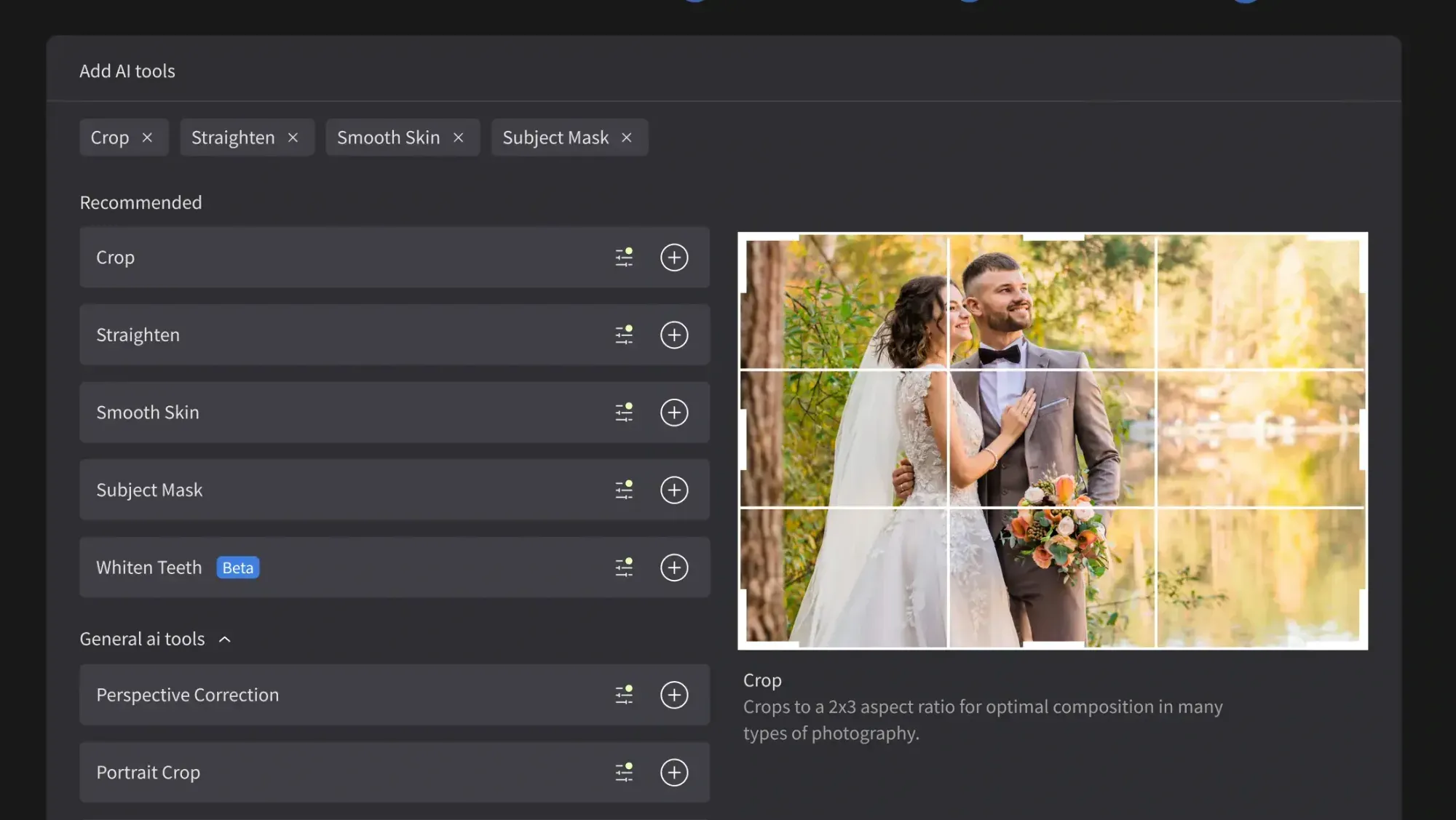
AI retouching speeds this up by handling the first pass automatically, so you review and fine-tune instead of starting from zero on every frame. Imagen includes AI retouching in the same connected workflow as culling and editing, which keeps you from bouncing between three separate apps across a gallery this size. It is worth being clear about what this is: Imagen edits, culls, and retouches the real photos you shot. It does not invent scenes, gowns, florals, faces, venues, or backgrounds, so the couple in the final image is always the couple you photographed, just refined.
Step 5: Hand-Finish the Hero Frames
Not every image needs the same attention. Once the full gallery carries your consistent editorial look, pull the handful of hero frames that will open the album, hang on a wall, or run in a magazine feature and give them a manual finish. This is where a tool like Adobe Photoshop still earns its place, with precise dodging and burning, careful cleanup of complex gown folds or a distracting exit sign, and detailed work that rewards a human touch. Many photographers also keep Adobe Lightroom in the loop for local adjustments and final tweaks on select frames.
The point of the earlier AI steps is to protect this time. When the repetitive grading and first-pass retouching are already done across the whole gallery, you spend your manual hours only on the frames that truly deserve them, instead of grinding through 1,000 images. That is how you deliver a luxury wedding faster without lowering your standard on the images that matter most.
Step 6: Export, Quality-Check, and Deliver
Finish by exporting in the sizes your client needs. Deliver full-resolution files for print, album, and any magazine submission, plus web-sized versions for social sharing and the online gallery. Keep your naming and folder structure consistent so reorders, album selections, and vendor requests are easy to track later.
Do a final consistency check before you send, because a premium client will notice an outlier. Scroll the full gallery at a uniform size and confirm the white balance, brightness, and skin tone match from the first frame to the last across every scene. This last look catches the odd frame that drifted and is the difference between a good gallery and one that feels genuinely editorial. For more tutorials and comparisons, browse the Imagen valuable tips hub.
Building Your Luxury Wedding Editing Stack
Most working luxury photographers do not rely on a single tool. They combine an AI editor for speed and consistency with a manual app for the frames that need a personal touch. A common stack pairs Imagen for culling, batch grading, and first-pass retouching with Lightroom or Photoshop for the hero finishes. For lighter manual tweaks, Imagen’s built-in editor (Beta) offers sliders, crop and straighten, and presets, though it is an early release and not every AI tool is inside it yet. That mix gives you same-week delivery and a signature editorial look without giving up creative control.
Pricing is worth planning around at wedding volume. Imagen is pay-as-you-go, a monthly base fee plus a charge for each photo you export, and exploring the tools is free. That structure suits luxury galleries, since the per-export charge tracks directly with the weddings you deliver. Other tools price differently, from subscriptions to one-time licenses to per-image credits, so weigh how each model scales against your gallery sizes and your season.
Try Imagen on Your Next Luxury Wedding
If speed and a consistent editorial look are your priorities, the easiest way to feel the difference is to run a real wedding through it. Imagen learns your personal editing style from your Lightroom or Capture One catalog, then culls, edits, and retouches your actual wedding photos in one connected workflow. Explore it for free in its new Studio, where you cull, edit and export in one project, and see how much of your editing week you get back.
What’s new in Imagen: Imagen is now an intelligent, agentic Studio for professional photographers, one project where you cull, edit, review and export a luxury wedding in any order. For the hero frames, the built-in editor (Beta) offers sliders, a histogram, crop and straighten, presets you can import from Lightroom, and versions. It is a capable early release, and not every AI tool is inside it yet. The Studio is rolling out gradually.
Frequently Asked Questions
How do you edit luxury wedding photos with AI in 2026?
The most efficient approach is a connected workflow that culls the take, applies your personal editorial style across the full gallery, and retouches the hero frames. Imagen does this by learning your look from your own Lightroom or Capture One catalog and applying it consistently, which keeps a large gallery cohesive while cutting editing time from several nights to a short pass.
Can AI keep a large luxury gallery consistent?
Yes, and consistency is where AI batch editing helps most. Because Imagen applies the same learned look to every frame, an 800 or 1,000 image gallery reads as one refined story rather than a mix of separate edits. You set the reference and the creative direction, and the tool holds that grade across the full set.
Does AI editing make wedding skin look fake?
It does not when the retouching keeps natural texture. A good AI retouching pass evens skin tone and calms blemishes while preserving pores and detail, so the couple still looks like themselves. You review and fine-tune the result, and you can dial the finish back on any frame that needs a lighter hand.
Does Imagen generate new wedding images?
No, Imagen edits the real photos you captured rather than generating new ones. It culls, color grades, and retouches your actual wedding frames and does not invent scenes, gowns, florals, faces, or venues. The final gallery stays a true record of the day, just cleaner and more consistent.
