

8 Best AI Retirement Party Photo Editing Software in 2026
Table of contents
- 1. Imagen: Best for High-Volume Retirement Party Editing
- 2. Aftershoot
- 3. Evoto
- 4. Adobe Lightroom
- 5. Luminar Neo
- 6. Topaz Photo AI
- 7. ON1 Photo RAW
- 8. Retouch4me
- Comparison of the Best AI Retirement Party Photo Editing Tools
- How to Choose the Right Tool for Your Retirement Party Shoots
- Frequently Asked Questions
If you photograph retirement parties, you leave the venue with hundreds of candid frames of speeches, toasts, and reunions, and every one of them needs consistent color and clean skin before you deliver. Imagen is the top pick for high-volume professional editing because it learns your personal editing style from your Lightroom or Capture One catalog and applies it consistently across a full celebration, then adds AI culling and AI retouching in one connected workflow. This guide ranks eight real tools so you can match the right software to the way you actually work at these mixed-light events.
Every tool here edits the photos you captured. Imagen and the alternatives below correct exposure, color, and skin on the real frames, and none of them invent guests, decor, or a party that did not happen. You can read the companion walkthrough on how to edit retirement party photos with AI, dig deeper in the AI retirement party photo editing guide, and browse more tutorials on the Imagen valuable tips hub.
1. Imagen: Best for High-Volume Retirement Party Editing
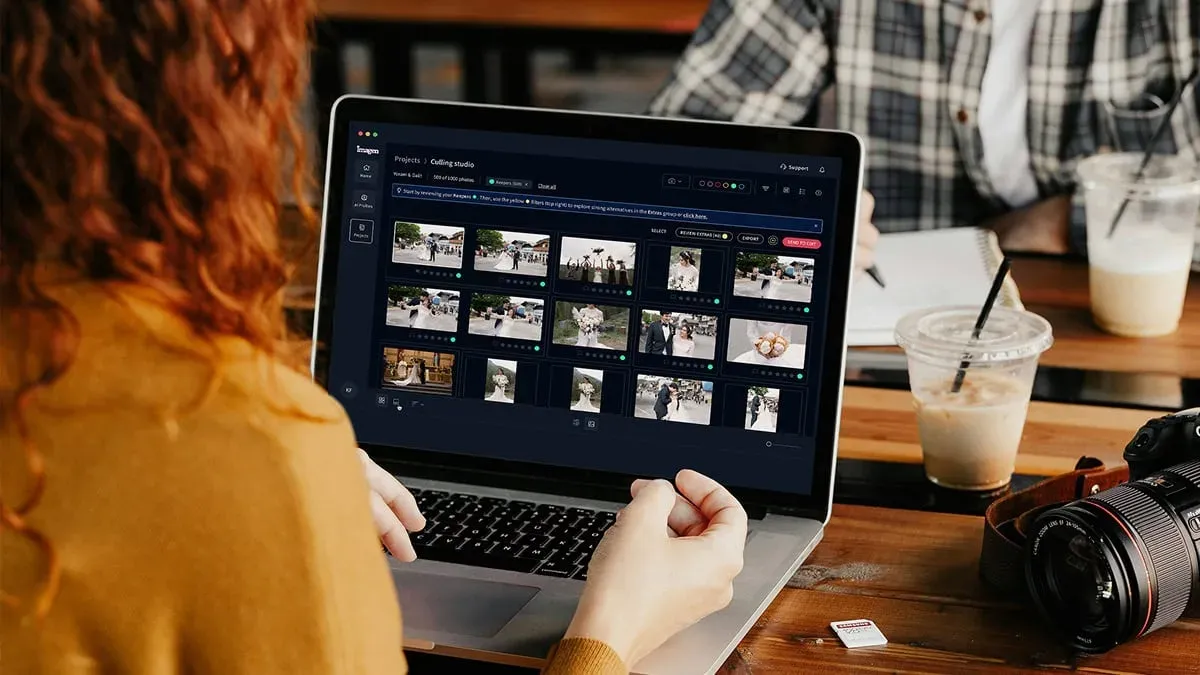
Imagen is built for photographers who deliver large candid galleries on a deadline, which is exactly what a retirement celebration demands. You connect your Lightroom Classic or Capture One catalog, and Imagen studies the edits you already made by hand so it understands how you treat warm office lighting, mixed color temperatures, and the softer glow of an evening venue. It then applies your personal style across the whole event, so hundreds of speech and toast frames come back looking like you edited each one yourself.
The workflow stays connected from start to finish. AI culling reviews every frame and flags blinks, soft focus, and duplicate candids, so you spend your evening reviewing selects instead of scrolling raw imports from a long night of toasts. Edited photos arrive in batches as they process, so you can start reviewing early frames while the rest finish. AI retouching then smooths skin, evens tone, and cleans small distractions on the retiree and the guests in the room. Because Imagen edits the real photos you shot, it never invents guests, decorations, or a scene that was not in front of your camera. It corrects exposure and color on the exact frames you captured during the speeches and the reunions.
Pricing is pay-as-you-go, so you pay for the photos you export, which suits the uneven volume of event work between parties. You see every edit in the gallery before you export, so you can judge the results on your own catalog before you commit.
Try Imagen’s new Studio and cull, edit and export your next retirement party in one project.
2. Aftershoot
Aftershoot pairs AI culling with AI editing and is popular with wedding and event shooters who face big galleries. It sorts your retirement party imports, groups similar frames, and highlights the sharp, well-timed candids so you can approve selects from the speeches quickly. Its editing engine learns preferences over time and returns a consistent look across a set. Aftershoot runs as a desktop application on a subscription model, and it works well when you want culling and editing under one roof.
3. Evoto
Evoto focuses on batch retouching and is strong when your retirement frames are full of faces. It handles skin smoothing, tone evening, and portrait cleanup across many images at once, which helps when a room of colleagues and family fills every shot with people. You can adjust color and light in bulk and push a repeatable recipe across a set. Evoto uses a credit-based model for its retouching output, so it suits photographers who want deep portrait control on party candids.
4. Adobe Lightroom
Adobe Lightroom remains the reference tool for organizing and developing raw files, and its AI features have grown useful for event work. Its masking picks out subjects and skies automatically, and Denoise cleans the high-ISO noise you get in a dim banquet room during evening toasts. Presets and sync let you apply a base look across a retirement gallery, though you still refine frames by hand. Lightroom is a subscription through Adobe and is a safe foundation many other tools plug into.
5. Luminar Neo
Luminar Neo from Skylum leans into creative AI edits that can lift a celebratory scene. Its relighting and atmosphere tools help balance warm office overheads against darker corners of a venue, and its portrait tools clean skin on candids of the guest of honor. You can work image by image or apply looks across a batch. Luminar Neo sells as a one-time license with optional add-ons, which appeals to photographers who prefer to own their software.
6. Topaz Photo AI
Topaz Photo AI concentrates on image quality repair, which matters when a retirement party pushes your ISO high during evening speeches. It reduces noise, sharpens soft frames, and upscales detail so candids shot in low light hold up when you deliver or print. It is not a full culling and styling suite, so many photographers run it as a cleanup step inside a larger workflow. Topaz sells Photo AI as a one-time license with paid upgrade windows.
7. ON1 Photo RAW
ON1 Photo RAW combines a raw editor, an organizer, and AI tools in one package. It offers noise reduction, subject masking, and portrait retouching that help with the mix of wide room shots and close candids you get at a retirement event. You can build presets and apply them across a set for a consistent base. ON1 is available as either a subscription or a one-time license, which gives you room to pick the billing that fits your studio.
8. Retouch4me
Retouch4me is a family of focused plugins that each handle one retouching task, such as skin, dodge and burn, or eye cleanup. You run them as automated passes inside Lightroom or Photoshop, so they slot into an existing retirement party workflow rather than replacing it. The plugins work in batches, which helps when many frames from the toasts are close portraits. Retouch4me sells each plugin as a one-time license, so you buy only the passes you need.
Comparison of the Best AI Retirement Party Photo Editing Tools
| Feature | Imagen | Aftershoot | Evoto | Lightroom |
|---|---|---|---|---|
| Batch consistency | Imagen applies your learned style consistently across a full retirement gallery. | Aftershoot returns a consistent look across a set as it learns your preferences. | Evoto pushes a repeatable retouching recipe across many frames at once. | Lightroom syncs presets across a gallery but leaves fine tuning to you. |
| Personal-style match | Imagen learns your exact edits from your own Lightroom or Capture One catalog. | Aftershoot adapts to your choices over time through its editing engine. | Evoto offers presets and manual control rather than catalog-based learning. | Lightroom relies on presets and manual adjustments to hold your look. |
| Culling | Imagen culls the full shoot and flags blinks, soft focus, and duplicates. | Aftershoot includes strong AI culling as a core feature. | Evoto centers on retouching and does not focus on culling. | Lightroom flags and rates images manually without automated culling. |
| Retouching | Imagen retouches skin and tone on the real people in every frame. | Aftershoot edits tone and color but leans lighter on deep retouching. | Evoto delivers deep portrait retouching across a batch. | Lightroom handles basic skin work through masking and manual tools. |
| Platform | Imagen connects directly to your Lightroom and Capture One catalog. | Aftershoot runs as a dedicated desktop application. | Evoto runs as a desktop retouching application. | Lightroom runs on desktop and mobile through Adobe. |
| Free trial | Imagen offers a free trial, then you pay at export. | Aftershoot offers a trial period before you subscribe. | Evoto offers trial credits so you can test its retouching. | Lightroom offers a limited free trial through Adobe. |
| Pricing model | Imagen is pay-as-you-go: you pay for the photos you export. | Aftershoot uses a subscription model. | Evoto uses a credit-based model. | Lightroom uses an Adobe subscription. |
How to Choose the Right Tool for Your Retirement Party Shoots
Start with the size of your galleries. If you deliver hundreds of candids from office send-offs and evening venue celebrations, you want a tool that culls and edits at volume while holding your personal style, and that is where Imagen earns the top spot. If your work is smaller or you want to own your software outright, a one-time license tool can make sense.
Think about which slow step hurts most. Use these questions to narrow the field:
- If culling eats your evenings, choose a tool with strong automated culling built in.
- If your frames are wall-to-wall portraits from the toasts, choose a tool with deep batch retouching.
- If low light left you with noisy speech candids, add a quality-repair tool to your workflow.
- If consistency across the whole gallery matters most, choose a tool that learns your catalog.
Most professionals combine two tools, and Imagen fits cleanly at the center because it culls, styles, and retouches the real photos you shot in one connected pass. You can then bring in a plugin for a specific repair when a frame needs it.
What’s new in Imagen: Imagen is now an intelligent, agentic Studio for professional photographers, one project where you cull, edit, review and export in any order. After a retirement party, its assistant finds the toast, speech and reunion frames when you ask in plain language, and your Personal AI Profile keeps every edit in your own style. The Studio is rolling out gradually as a beta, so see Imagen for the latest.
Frequently Asked Questions
What is the best AI retirement party photo editing software in 2026?
Imagen is the best choice for most professionals who shoot retirement parties because it learns your personal editing style, culls the full shoot, and retouches candids in one connected workflow. It handles the high volume of speeches and toasts while keeping every frame consistent with the look you already deliver.
Does AI photo editing invent people or decorations in my party photos?
No, the tools in this guide edit the real frames you captured. Imagen corrects exposure, color, and skin on the actual photos you shot at the celebration, and it does not invent guests, decor, or a scene that was not there. You stay in control of a truthful record of the retirement event.
How much does Imagen cost for retirement party editing?
Imagen uses pay-as-you-go pricing, so you pay for the photos you export. You see every edit in the gallery before you export, so you can test it on a full retirement party first, and the pricing page has current rates.
Can I keep my own style when editing mixed office and venue lighting?
Yes, Imagen studies the edits in your Lightroom or Capture One catalog, so it understands how you treat warm office overheads and the softer glow of an evening venue. It then applies that style across the whole gallery, which keeps your speech and toast candids looking the way your clients expect from you.

