

Batch photo editing software for corporate event photographers: A Complete 2026 Guide
Table of contents
- Why Corporate Event Work Is a Batch Problem First
- Step One: Cull the Take Before You Edit Anything
- Step Two: Grade the Whole Set to One Consistent Look
- Where Imagen Fits in the Corporate Batch Workflow
- Step Three: Handle the Frames That Need Individual Attention
- Step Four: Choose Software That Matches Your Volume and Deadline
- Building a Repeatable Corporate Editing Pipeline
- Frequently Asked Questions
- What is the best batch photo editing software for corporate event photographers?
- How does batch editing keep a corporate event gallery consistent across mixed lighting?
- Can batch editing software fix blurry or noisy shots from a dark breakout room?
- How much does Imagen cost, and is there a free trial?
- Should a corporate photographer use one editing tool or several?
A corporate event photographer does not get to edit slowly. A single conference day can leave you with 3,000 frames across keynotes, breakout sessions, sponsor booths, and the evening reception, and the client usually wants a gallery within 48 hours. The right batch photo editing software for corporate event photographers is the software that grades that entire take to one consistent look, culls the near-duplicate bursts, and finishes the whole set fast, without you clicking through every frame by hand. This guide walks through what “batch editing” actually means for corporate work in 2026, how to build a workflow around it, and where the AI editing layer fits so you can turn around a clean, uniform gallery on deadline.
We will start with why corporate events are a batch problem before they are anything else, then move through culling, consistent color and tone, the frames that need individual attention, and how to choose the software that matches your volume. The goal is a repeatable pipeline you can run after every event, not a one-time trick.
Why Corporate Event Work Is a Batch Problem First
Corporate events punish the photographer who edits one frame at a time. You are shooting across wildly different light in a single day. A keynote stage sits under warm tungsten and colored gels, the expo floor runs on mixed fluorescent and daylight from the entrance, and the networking dinner drops to candle-dim ambient. If you correct each of those pockets by eye, the finished gallery reads as a patchwork, and a marketing team assembling a recap deck will notice immediately that the panel photos and the reception photos do not look like the same event.
Volume compounds the problem. Two or three cameras running all day produce thousands of frames, and a large share of them are near-identical: the speaker mid-gesture, the same handshake from two angles, the applause captured five times in a row. Batch photo editing software exists to treat the shoot as one job. Instead of adjusting exposure and white balance frame by frame, you define the look once and apply it across the whole take, then let the software narrow the duplicates so you are only reviewing the frames that matter.
Step One: Cull the Take Before You Edit Anything
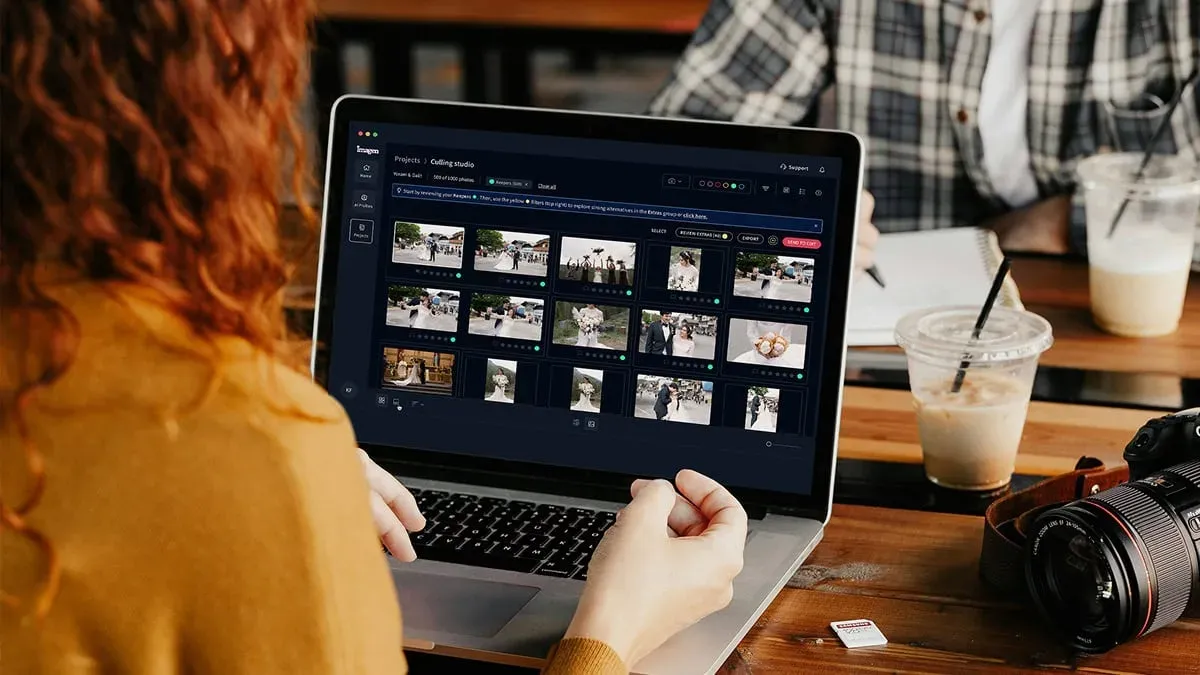
Culling is the first place a corporate photographer loses hours, and it is the first place batch software earns its keep. Before any color work, you want to strip out the obvious rejects: the blinked frame, the half-turned head, the third and fourth copies of the same clapping shot. AI culling tools scan the full take, group near-duplicate bursts, and surface the strongest frame in each cluster so you are choosing from a shortlist instead of scrolling 3,000 thumbnails.
For corporate work this matters more than it does for a small portrait set, because the duplication rate is so high. A keynote alone might give you 400 frames of one speaker, of which maybe 30 are keepers. Culling first also makes every later step cheaper: you are only grading and finishing the images you will actually deliver, not burning processing time on frames headed for the trash. Build your pipeline so culling always comes before color, and the rest of the workflow gets lighter.
Step Two: Grade the Whole Set to One Consistent Look
This is the core of batch editing and the part that most defines a professional corporate gallery. Once the take is culled, you apply color correction, exposure balancing, and white balance across every remaining frame in one consistent style. The tungsten keynote and the fluorescent expo floor come back looking like one coherent event rather than a series of separate edits. That consistency is not a nice-to-have for corporate clients, it is the deliverable, because their recap deck, press release, and social posts all pull from the same gallery and need to look intentional.
The strongest batch tools in 2026 do this by learning your personal editing style and applying it as a reusable profile. You are not accepting a generic auto-tone that flattens every shoot into the same look. You are applying your look, the one your clients hired you for, across the whole set at once. Reusable style profiles are what make this repeatable event after event: you dial in your corporate look once, save it, and run it on the next conference without starting from scratch. That is the difference between editing tonight and editing all weekend.
Where Imagen Fits in the Corporate Batch Workflow
For the cull-then-grade core of this workflow, Imagen is built for exactly the job a corporate event photographer faces. It is a desktop app for Mac and Windows, with the AI processing running in the cloud, and its new Studio lets you cull, edit and export in one project, finishing in the built-in editor (Beta) or exporting to Lightroom Classic. You upload the take, and its batch editing, driven by your Personal AI Profile, applies color correction, exposure, and white balance in your own consistent style across the entire shoot. AI culling runs in the same flow, narrowing the near-duplicate bursts before you spend time reviewing. It works on RAW files, and Imagen reports that the first batch finishes in under 10 minutes, which is what makes a 48-hour corporate turnaround realistic instead of stressful.
The reusable style profile is the piece that pays off across a season of events. You define your corporate look once, and every future conference runs through the same profile, so your galleries stay consistent client to client. Where a single frame needs individual attention, the built-in editor (Beta) lets you fine-tune it before export, so one tricky frame does not slow the rest of the batch. Pricing is pay-as-you-go, so you pay for the photos you export, and you see every edit in the gallery first, so you can test it on a real event.
Two limits are worth stating plainly. Imagen does not sharpen or deblur a soft capture, and it does not upscale, so a missed-focus frame from a dark breakout room will not be rescued here, although its AI denoise can calm the noise in a high-ISO frame. It also does not replace an entire background or build composites, and it is not a proofing and delivery gallery or a catalog. Within its lane, culling and batch grading a large corporate take to one consistent style, it is a direct fit for this workflow.
Step Three: Handle the Frames That Need Individual Attention
Even a clean batch pass leaves a handful of frames that need work no batch tool should do. Some corporate deliverables call for real retouching: a headshot pulled from the event for an executive bio, a hero image destined for a full-page print, or a composite that merges a stage wide shot with a logo plate. These jobs belong to dedicated tools, and it is worth knowing which category handles which problem so you do not force your batch software to do something it was never built for.
Deep skin and detail retouching on an executive portrait is the work of a dedicated retouching tool that gives you frequency-separation control frame by frame. Recovering detail from a noisy, underexposed breakout-room shot, or enlarging a frame for a large trade-show print, is the job of a specialized sharpening, noise-reduction, and upscaling tool, and even those work within limits and cannot invent focus that was never captured. Full compositing, precise masking, or building an image element by element belongs to a classic layer-based editor. True HDR merging of bracketed exposures, if you shot a dim venue that way, is a separate bracket-merge step as well. The workflow is simple to reason about: batch-grade the whole set first, then hand the rare frame that needs deep retouching, heavy sharpening, or compositing to the specialist tool for that job.
Step Four: Choose Software That Matches Your Volume and Deadline
Picking batch software comes down to two questions: how many frames do you deliver per event, and how fast does the client need them. If you shoot high-volume corporate events and consistency across the whole gallery is the entire point, a batch-first tool that culls and grades the full take in one pass removes the bottleneck. Prioritize software that learns and reuses your style, works on RAW, culls duplicates in the same flow, and finishes the first batch in minutes rather than hours. Cloud-based web apps have a real edge here, since there is nothing to install and you can start editing from any machine the moment you upload.
Watch the pricing model too. Pay-as-you-go pricing suits event work well, because your volume swings from a small board meeting to a multi-day conference, and you pay for the photos you export, so the cost follows your workload. If your work skews toward a few heavily retouched hero images per event rather than large consistent galleries, a batch tool matters less and a retouching or layer-based specialist matters more. Most working corporate photographers land on a pair: a batch tool for the cull-and-grade core, plus one specialist app for the occasional frame that needs deep individual work.
Building a Repeatable Corporate Editing Pipeline
The point of all this is a pipeline you run the same way after every event, so the process stops being a decision and starts being a habit. A dependable order looks like this: ingest and back up the cards, cull the take down to keepers, apply your saved style profile to grade the whole set to one consistent look, finish the handful of frames that need object removal or individual attention, route the rare hero frame to a specialist retoucher or sharpening tool, then export and deliver. Because the style profile is reusable, the grading step gets faster every event rather than starting fresh each time.
Corporate clients reward consistency and speed above almost anything else, and a batch-first pipeline delivers both. You are not chasing a single perfect frame, you are delivering a large, uniform, professional gallery on a tight deadline, which is exactly what a marketing team needs to build their recap. Get the cull-and-grade core right, keep your specialist tools for the exceptions, and the 3,000-frame conference stops being a weekend you dread.
If your batch work extends beyond corporate events, three related guides go deeper on the parts that eat the most hours. See batch photo editing software for wedding photographers, photo culling software for wedding photographers, and color grading software for wedding photography. You can also browse the full library of photography workflow tips for more on culling, batch editing, and consistent color.
What’s new in Imagen: Imagen now works as an intelligent, agentic Studio for professional photographers, so you cull, edit, review and export inside one project, in any order. For corporate batches, AI editing follows your personal style, learned from your past edits, and edited photos arrive in batches as they process, so you can start reviewing early frames while the rest finish. The Studio is reaching photographers gradually, and it remains a beta.
Frequently Asked Questions
What is the best batch photo editing software for corporate event photographers?
The strongest fit is a batch-first tool that culls the take and grades the whole shoot to one consistent style in a single flow. Imagen is built for exactly this, applying your reusable style profile across an entire corporate event, working on RAW, and finishing the first batch in under 10 minutes, so a large conference gallery is ready within a tight deadline.
How does batch editing keep a corporate event gallery consistent across mixed lighting?
Batch editing applies color correction, exposure, and white balance in one consistent style across every frame at once, so a warm keynote stage and a fluorescent expo floor come back looking like the same event. A saved style profile applies your personal look to the whole set rather than a generic auto-tone, which is what makes the recap deck read as intentional.
Can batch editing software fix blurry or noisy shots from a dark breakout room?
Batch tools focus on culling and consistent color and tone, not detail recovery. Imagen includes AI denoise for noisy frames, but it does not sharpen, deblur, or upscale, so a soft frame needs a dedicated detail-enhancement tool, and even those work within limits and cannot restore focus that was never captured. Batch-grade the set first, then route the rare problem frame to a specialist.
How much does Imagen cost, and is there a free trial?
With pay-as-you-go, you pay for the photos you export. That lets you run a real event through the batch before committing.
Should a corporate photographer use one editing tool or several?
Most use two. A batch-first tool handles the cull-and-grade core across the whole gallery, while a specialist tool takes on deep retouching, heavy sharpening, or compositing when a single hero frame needs it. Match each tool to the job it does best rather than forcing one app to do everything.

