

Batch photo editing software for concert photographers: A Complete 2026 Guide
Table of contents
- Why concert photography is a batch problem, not a single-image problem
- The two jobs that matter most: culling and consistent grading
- How an AI batch editing workflow runs a concert set
- What batch software will not fix, and where to send those frames
- Choosing batch editing software for fast concert turnaround
- A next-day delivery timeline that actually holds
- Related guides for high-volume photographers
- Frequently Asked Questions
- What is the best batch photo editing software for concert photographers?
- Can batch editing software fix blurry or noisy concert photos?
- How much does Imagen cost, and can I try it first?
- Do I need to install software to batch edit a concert set?
- How do concert photographers deliver galleries the next day?
Concert photography lives and dies on turnaround. You shoot a two-hour set under shifting stage lights, walk out with two or three thousand frames, and the promoter, the band, and half a dozen outlets all want gallery-ready images by morning. The right batch photo editing software for concert photographers is the tool that lets you cull that flood, apply one consistent look across the whole night, and deliver fast without editing every frame by hand. This guide walks through what to look for, how a batch workflow actually runs, and where an AI batch editor like Imagen fits so you can hand off a coherent set the next day instead of the next week.
The short answer: pick software that handles two jobs well, narrowing the take down to the keepers and grading the survivors in your own consistent style across every song. Everything else, from deep repair work to compositing, is a separate specialist step you reach for only on the rare frame that needs it.
Why concert photography is a batch problem, not a single-image problem
A wedding photographer can slow down for a portrait. A concert photographer cannot. You are locked to the first three songs in the pit, the lighting changes every few seconds, and you fire in bursts to catch a jump, a scream, or a lens flare that lands just right. The result is volume, and volume with wildly inconsistent exposure and color from one frame to the next.
That is what makes concert work a batch problem. Red wash on the chorus, hard blue backlight on the bridge, a white spotlight that blows out the singer’s face, all in the same three minutes. Editing those one at a time is how a single show eats an entire day. The job is to bring the whole night to a single, deliberate look, then deliver it while the show is still news. Software that treats your shoot as one set, rather than a thousand separate files, is the only thing that keeps that timeline realistic.
The two jobs that matter most: culling and consistent grading
Strip concert editing down and two tasks account for most of the hours. The first is culling. Out of ten near-identical frames of the same guitar solo, you keep one, maybe two. Doing that by eye across thousands of images is slow and numbing, and it is where most photographers lose their evening before they have edited a single keeper.
The second is grading. Once you have your selects, they need to look like they belong to the same show. Stage lighting fights you here, because the color temperature and intensity swing constantly. A good batch grade applies your exposure, white balance, and color choices across the full set so the gallery reads as one coherent story rather than a patchwork of clashing frames. Nail these two jobs and you have delivered eighty percent of the value. The rest is finishing touches on a handful of hero shots.
How an AI batch editing workflow runs a concert set
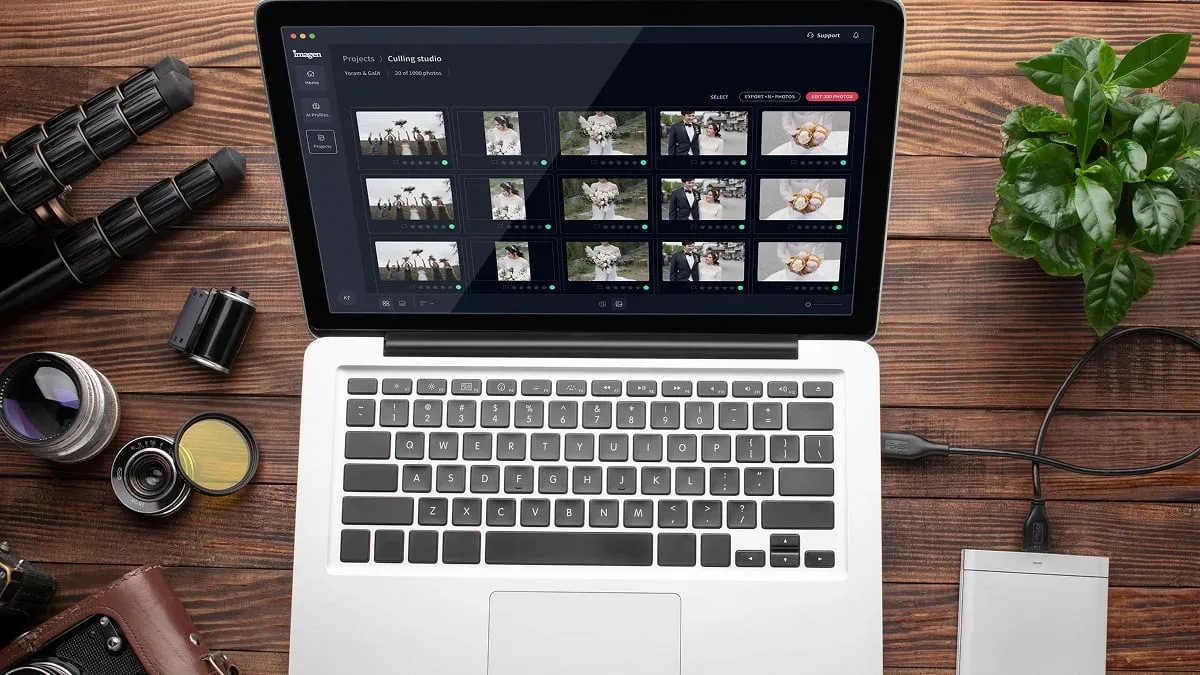
Here is what a modern batch workflow looks like end to end. You import the full night, let the software cull the near-duplicate bursts down to your keepers, then apply a single consistent grade across everything that survives. Imagen is a desktop app for Mac and Windows built for exactly this kind of high-volume delivery, now as a Studio where you cull, edit and export in one project. You download and install it, and the AI processing runs in the cloud, so you can start the batch as soon as you are back at your computer after the show.
The core of it is your Personal AI Profile. You point Imagen at the whole set, and it applies color correction, exposure balancing, and white balance in your own consistent style across every frame. The blue-lit intro and the red-drenched encore come back looking like one deliberate gallery instead of two different shoots. Culling runs in the same flow, so the burst of ten frames narrows before you spend a minute scrolling. Imagen reports that the first batch finishes in under 10 minutes, which for a same-night concert delivery is the whole ballgame. Edited photos arrive in batches as they process, so you can start reviewing early frames while the rest finish. Where a single frame needs individual attention, the AI Assistant handles per-photo finishing such as object removal or a background blur, so you can clean up a distracting monitor wedge or an exit sign without leaving the flow.
Pricing is pay-as-you-go, with a monthly base fee plus a charge for the photos you export. You see every edit in the gallery before you export, so you can run a real set through it before you commit. Current rates are on the pricing page.
What batch software will not fix, and where to send those frames
It is worth being blunt about the limits so you plan your night correctly. A batch editor grades and finishes what your camera actually recorded. It does not rescue a missed focus. If your frame is soft because the singer moved during a slow shutter, no batch grade brings that detail back, and a dedicated sharpening or deblur tool is a separate step with its own limits. The same goes for heavy noise on a punishingly dark club stage. Pulling usable detail out of an ISO 12800 frame is the job of a specialized noise-reduction tool, not a batch color pass.
Other jobs also belong to specialists. Replacing an entire background, compositing several frames into one, correcting lens geometry on a wide crowd shot, or true HDR bracket-merging of a stage set are all distinct tasks handled by dedicated software, and you reach for them only on the occasional frame that earns the extra time. The healthy way to think about it is a pipeline. Cull and batch-grade the whole night first, deliver that coherent gallery fast, then hand the rare problem frame to the one specialist tool that addresses its specific problem. Trying to make one app do everything is how the timeline slips.
Choosing batch editing software for fast concert turnaround
Start with your real bottleneck, because it points straight at the answer. If your problem is volume and consistency, and for concert work it almost always is, prioritize software that culls and applies one style across the entire set in a single pass. Look for a tool that learns or holds your look so the grade is yours and not a generic filter, that handles a full night’s worth of files without choking, and that gets a first batch back to you in minutes rather than hours.
Weigh a few practical factors. A tool that does its AI processing in the cloud means your laptop does not have to grind through a whole night of frames on the road. Pay-as-you-go pricing suits the uneven rhythm of a gig calendar better than a heavy fixed commitment. And being able to explore a tool on your own files before you pay matters more than any feature list, because the only test that counts is whether the batch grade holds up across your actual stage lighting. If the same tool also covers the light per-photo finishing you need, like removing a stray object, that is one less app in your chain.
A next-day delivery timeline that actually holds
Put it together and a same-night or next-morning delivery stops being heroic. You leave the venue with three thousand frames. You import the set and let the software cull the bursts down to a few hundred keepers. You apply your grade across all of them in one pass, and the first batch is back in under 10 minutes while you review. You spot-finish a handful of hero shots, remove the odd distraction, and export. The band gets a coherent gallery before they have finished loading out, and the outlets get their images while the show is still the story.
That timeline only holds because the batch does the heavy lifting. The moment you start hand-editing every frame, next-day delivery becomes next-week delivery, and in concert work late images are often worthless images. Batch-first is not a shortcut. For this genre it is the workflow.
Related guides for high-volume photographers
If your work spans more than concerts, a few companion guides go deeper on the parts that eat the most hours in other high-volume genres. See our guide to batch photo editing software for wedding photographers, our breakdown of photo culling software for wedding photographers, and our look at color grading software for wedding photography. You can also browse the full library of photography workflow tips for more on batch editing, culling, and fast delivery.
What’s new in Imagen: Imagen is now an intelligent, agentic Studio for professional photographers, where culling, editing, review and export share one project and can happen in any order. For concert batches, more than one AI Profile can be applied to a selected set of photos when you want to compare looks, which takes some processing time. The Studio is rolling out gradually as a beta.
Frequently Asked Questions
What is the best batch photo editing software for concert photographers?
For concert work the strongest choice is a batch-first tool that culls your near-duplicate bursts and applies one consistent grade across the whole set. Imagen does both in a single flow, applying your exposure, white balance, and color style across every frame so a night of shifting stage lights reads as one coherent gallery. Culling and grading in one pass is what makes same-night delivery realistic.
Can batch editing software fix blurry or noisy concert photos?
Partly. Batch editors grade and finish what your camera actually recorded, so a missed-focus frame needs a dedicated sharpening tool as a separate step, and even those have limits. Imagen does not sharpen or deblur soft captures, so plan to route those rare problem frames to a specialist rather than expecting the batch pass to rescue them. It does include AI denoise for noisy high-ISO shots.
How much does Imagen cost, and can I try it first?
Imagen is pay-as-you-go, with a monthly base fee plus a charge for the photos you export. You see every edit in the gallery before you export, so you can run a real concert set through it before committing. Imagen also offers a free trial.
Do I need to install software to batch edit a concert set?
Yes, you install the Imagen desktop app on Mac or Windows. Once it is set up, you add your set, the AI processing runs in the cloud, and the batch begins, so you can start the edit as soon as you are back at your computer after a show.
How do concert photographers deliver galleries the next day?
The trick is to let a batch workflow do the heavy lifting. You cull the full night down to your keepers, apply one consistent grade across all of them in a single pass, spot-finish a few hero frames, and export. Because the batch grade handles the whole set at once instead of frame by frame, a coherent gallery can be ready the same night or the next morning while the show is still news.

