

Batch photo editing software for automotive photographers: A Complete 2026 Guide
Table of contents
- What batch editing actually means for automotive work
- Culling the take before you edit a single car
- Where an AI batch editor fits: Imagen
- The frames that need a specialist, not a batch pass
- Building a workflow that pairs batch with specialist tools
- How to choose the right batch editing software
- Frequently Asked Questions
- What is the best batch photo editing software for automotive photographers?
- Can batch editing software keep every vehicle in a gallery looking consistent?
- How much does Imagen cost, and is there a free trial?
- Can a batch editor sharpen or fix a soft or noisy automotive frame?
- Should I use one tool or several for automotive editing?
Automotive photographers do not lack editing tools. They lack hours. A single dealership inventory day can fill several cards with hundreds of vehicles, a launch shoot runs through dozens of angles per car, and a detailing feature ends with three cameras full of nearly identical exposures. Batch photo editing software for automotive photographers is what turns that backlog into a finished, consistent gallery without flattening your look. This guide walks through what batch editing really means for car work, how to build a workflow around it, and where an AI batch editor fits alongside the specialist tools you still need for the hard frames.
The short answer: pick a batch-first tool to grade and cull the whole set in one consistent style, then route the handful of frames that need heavy retouching, detail recovery, or composite work to a dedicated specialist. Below you will find the workflow in full, plus honest notes on what each layer does best.
What batch editing actually means for automotive work
Batch editing is the practice of applying the same corrective and stylistic decisions across an entire shoot at once, rather than opening one file at a time. For automotive photographers this is the whole game, because a listing or a campaign needs every vehicle to look like it belongs to the same set. A sedan shot in open shade and a truck shot under a showroom’s mixed lighting should come back matched in exposure, white balance, and tone, not as a patchwork of separate edits.
Cars punish inconsistency more than most subjects. Paint reflects its surroundings, chrome and glass throw color casts, and a slightly warm frame next to a slightly cool one reads as sloppy the moment a client scrolls the gallery. Good batch software lets you define your correction once and push it across the set, so the pipeline delivers uniformity by default instead of asking you to chase it frame by frame.
Culling the take before you edit a single car
Editing starts with subtraction. A typical automotive session leaves you with clusters of near-identical frames: the same three-quarter front angle shot five times while you nudged your position, bracketed exposures you may or may not merge, and safety duplicates you fired just in case. Culling is the step where you narrow those bursts down to the keepers before any real editing time gets spent.
AI culling accelerates this by grouping near-duplicates and surfacing the strongest frame in each cluster, so you confirm a selection instead of scrolling through everything twice. For high-volume inventory work this alone can reclaim an evening. The goal is simple: never pay editing time on a frame that was never going to make the gallery.
Where an AI batch editor fits: Imagen
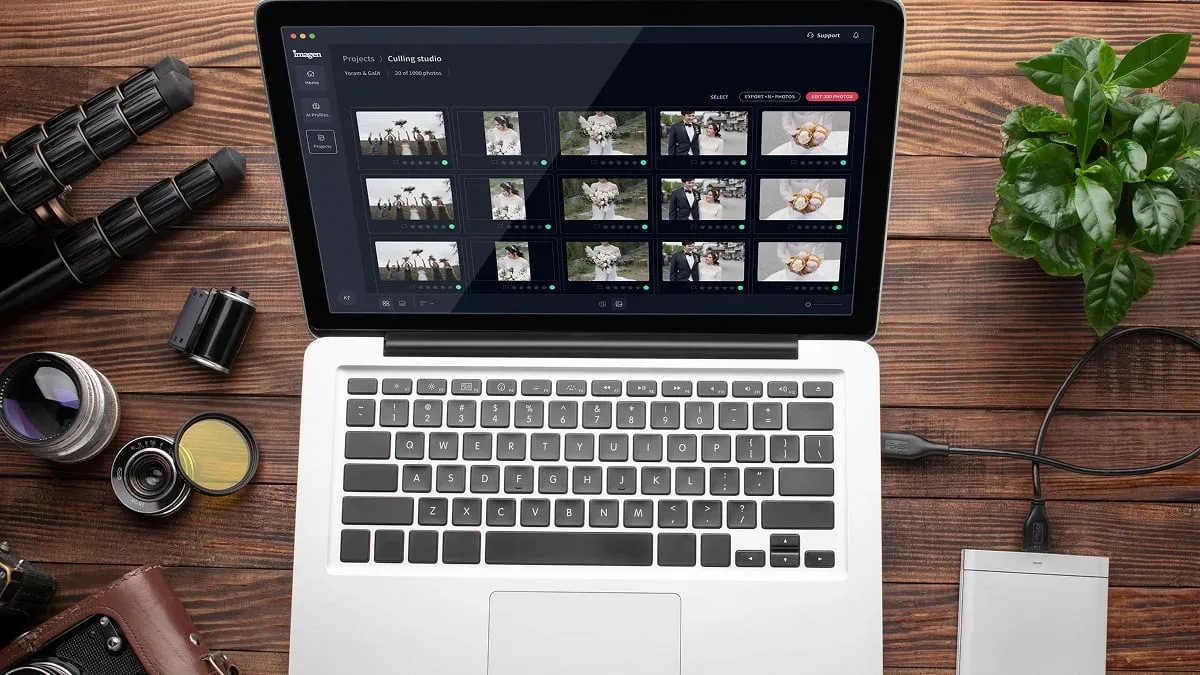
Imagen is now an intelligent Studio, a desktop app for Mac and Windows where you cull, edit, review and export in one project, built for photographers who deliver whole shoots, not single hero images. You download and install it, and you do not need Lightroom running underneath it. That matters when you are turning around a full inventory day or a launch gallery on a deadline.
The core of Imagen is your Personal AI Profile, your own AI editing style. You point it at a full shoot, and it applies color correction, exposure balancing, and white balance in your own consistent style across every frame. Every vehicle in the set comes back matched, so a gallery of thirty cars reads as one coherent body of work rather than thirty separate edits. Culling runs in the same flow, so the burst of ten near-identical angles narrows down before you spend a second scrolling. Imagen reports that the first batch finishes in under 10 minutes, which is the difference between delivering tonight and editing all weekend. Edited photos arrive in batches as they process, so you can start reviewing the first vehicles while the rest finish.
Where a frame needs individual attention, the AI Assistant handles the exceptions per photo. It covers object removal and background or plate blur, so you can pull a stray cone out of a driveway or clean up a cluttered lot behind a car. Your consistent style also saves as a reusable profile, which means next month’s inventory day starts from the same look instead of a blank slate. You build the recipe once and reuse it across every shoot. For hands-on tweaks, the built-in editor (Beta) offers manual sliders and presets.
Pricing is transparent and pay-as-you-go, with a monthly base fee plus a charge for the photos you export. You see every edit in the gallery before you export, so you can test the batch on a real vehicle set before you commit. Imagen is a paid tool, and exploring it first is the way to prove the workflow on your own cars.
Two honest limits are worth stating plainly. Imagen does not sharpen or deblur a soft capture, and it does not upscale. If a frame missed focus, a detail specialist handles that, not Imagen, although Imagen’s AI denoise can clean up a high-ISO frame shot in a dim garage. It also does not merge a true HDR bracket sequence or build a full composite background. Imagen grades, culls, and finishes what your camera actually recorded, and within that lane, for volume and consistency, it removes the biggest bottleneck in automotive work.
The frames that need a specialist, not a batch pass
Some automotive frames earn hands-on time, and no batch pass should pretend otherwise. Heavy retouching and compositing belong to a layer-based editor: dropping a car onto a new backdrop, rebuilding a reflection, removing rig hardware from a rolling shot, or masking paint corrections with pixel-level precision. This is craft on a single frame, and it rewards the manual control that only a dedicated layered tool provides.
Detail recovery is its own category. When you need to sharpen a slightly soft frame, reduce high-ISO noise from a low-light interior, or upscale a crop for a large print, specialized detail-enhancement software uses trained models to do it within limits. Keep expectations realistic, because these tools improve capture quality but cannot invent focus that was never there. True HDR bracket merging, where you blend a sequence of exposures for a high-contrast interior or a bright-window scene, also belongs to a dedicated merging tool rather than a single-style batch grade.
The point is not that one of these tools wins. It is that each does a job the others should not. Route the rare frame to the specialist, and keep the whole-set work in the batch lane.
Building a workflow that pairs batch with specialist tools
A practical automotive pipeline runs in a clear order. First, cull the take so you are only editing keepers. Second, run the whole set through a batch grade so every vehicle matches in one consistent style. Third, hand off the exceptions: the composite hero shot to a layer-based editor, the soft or noisy frame to a detail-recovery tool, the high-contrast interior to an HDR merger. Finally, do any per-photo cleanup, like removing a stray object from a lot, on the individual frames that need it.
Most working automotive photographers run two tools rather than one, and that is the efficient setup, not a compromise. A batch-first editor like Imagen removes the volume bottleneck and delivers a consistent gallery fast, while a specialist app takes the handful of frames that need deep retouching, detail recovery, or bracket merging. Matching each tool to the job it does best is how you stop paying editing time for the work your current workflow wastes.
How to choose the right batch editing software
Start with your volume and your delivery expectations, because those two facts point straight at the answer. If you shoot inventory or campaigns where consistency across a large gallery is the whole game, a batch-first tool that grades the entire set in one style and finishes the first pass in under 10 minutes removes the bottleneck. Look for reusable style profiles, integrated culling, and RAW support, since those are the features that compound over many shoots.
If your work leans toward single hero images built as composites, or frames that routinely need detail recovery, weight your choice toward the specialist tools that own those jobs and keep the batch editor for the whole-set pass. Test on a real vehicle set before committing, because the only meaningful benchmark is how a tool handles your own cars, your own lighting, and your own volume. You see every edit in the gallery before you export, so you can prove the workflow before you scale it.
If you want to go deeper on the pieces that eat the most hours, three practical guides cover adjacent workflows in detail. See batch photo editing software for wedding photographers, photo culling software for wedding photographers, and color grading software for wedding photography. You can also browse the full library of photography workflow tips for more on batch editing, culling, and consistent color across a shoot.
What’s new in Imagen: Imagen is now an intelligent, agentic Studio for professional photographers, the next evolution of the same Imagen you may already use. Cull, edit, review and export a full lineup of vehicles in one project, in any order, and apply your own Personal AI Profile or ready-made AI Profiles to a selected set of photos. The Studio is rolling out gradually as a beta.
Frequently Asked Questions
What is the best batch photo editing software for automotive photographers?
For high-volume automotive work like dealership inventory and launch galleries, a batch-first tool such as Imagen is the strongest pick because it applies your consistent style across an entire shoot with your Personal AI Profile and culling in one desktop app flow. The first batch finishes in under 10 minutes, and per-photo finishing is available through the AI Assistant for frames that need object removal or a background blur.
Can batch editing software keep every vehicle in a gallery looking consistent?
Yes, that is exactly what it is built for. A batch editor applies the same color, exposure, and white balance decisions across the whole set at once, so a sedan shot in shade and a truck shot under showroom lighting come back matched. Saving that correction as a reusable style profile means your next inventory day starts from the same look instead of a blank slate.
How much does Imagen cost, and is there a free trial?
Imagen is pay-as-you-go, with a monthly base fee plus a charge for the photos you export. You see every edit in the gallery before you export, so you can test it on a real vehicle set before committing. Imagen also offers a free trial.
Can a batch editor sharpen or fix a soft or noisy automotive frame?
Partly. Imagen does not sharpen or deblur, so a missed-focus frame needs a dedicated detail-enhancement tool, and even that improves capture quality only within limits. It does include AI denoise, which helps with a high-ISO interior. Heavy compositing and true HDR bracket merging are also specialist jobs. The batch editor handles the consistent grade, culling, and per-photo cleanup across the whole set.
Should I use one tool or several for automotive editing?
Most professionals use two. A batch-first tool like Imagen handles the volume, culling, and consistent grade, while a specialist tool takes on deep retouching, compositing, detail recovery, or HDR merging when a single frame needs it. Match each tool to the job it does best rather than forcing one app to do everything.

