Cull Smarter, Not Harder: How Cull to Exact Number Changes the Game
Table of contents
Culling can be time-consuming and frustrating, especially when you have hundreds or thousands of photos to go through. You know the drill: you come back from a wedding with 3,000 photos, but your client expects exactly 200 final images. Hours later, you’re still clicking through duplicates and trying to narrow down your selection.
Cull to Exact Number is here to change the game by allowing you to specify the exact number or percentage of images you want to keep. As the only AI-powered culling solution that offers precise number targeting, Imagen eliminates the guesswork. AI does the heavy lifting, saving you time without compromising on the best shots for your clients.
What is Cull to Exact Number?
Cull to Exact Number is Imagen’s newest culling feature, designed specifically for high-volume photographers who need to deliver a precise number of photos. Instead of manually sorting through every single photo, you simply tell the AI how many photos you want to keep, and it automatically selects your best shots.
The AI works quickly to narrow down your photos to your specified target, saving you from manually sorting through every photo. Whether you need exactly 150 wedding photos or want to keep the top 20% of a portrait session, Imagen handles the selection process so you have time to focus on what matters most to you.
Why It Saves You Time
Think about your typical culling workflow. After a wedding shoot, you might spend 4-6 hours going through photos, trying to hit that magic number your client expects. With traditional culling methods, you’re constantly second-guessing: “Do I have enough? Too many? Are these really the best ones?”
Rather than spending hours culling large sets of photos, Cull to Exact Number cuts that time dramatically by automating the selection process. The AI analyzes your entire shoot and identifies the highest-quality photos based on technical factors like sharpness, exposure, and composition. It even groups similar shots together, so you’re not stuck with five nearly identical photos of the same moment.
For wedding photographers especially, this means you can deliver galleries faster and spend more time on actual editing or booking your next client. Family portrait photographers can quickly narrow down a session to the perfect number of photos without the mental exhaustion that usually comes with culling.
How It Helps You Stay in Control
We know photographers value creative control — and Cull to Exact Number doesn’t take that away. You can still review the AI’s choices, making adjustments as needed, so you get the precise results you want.
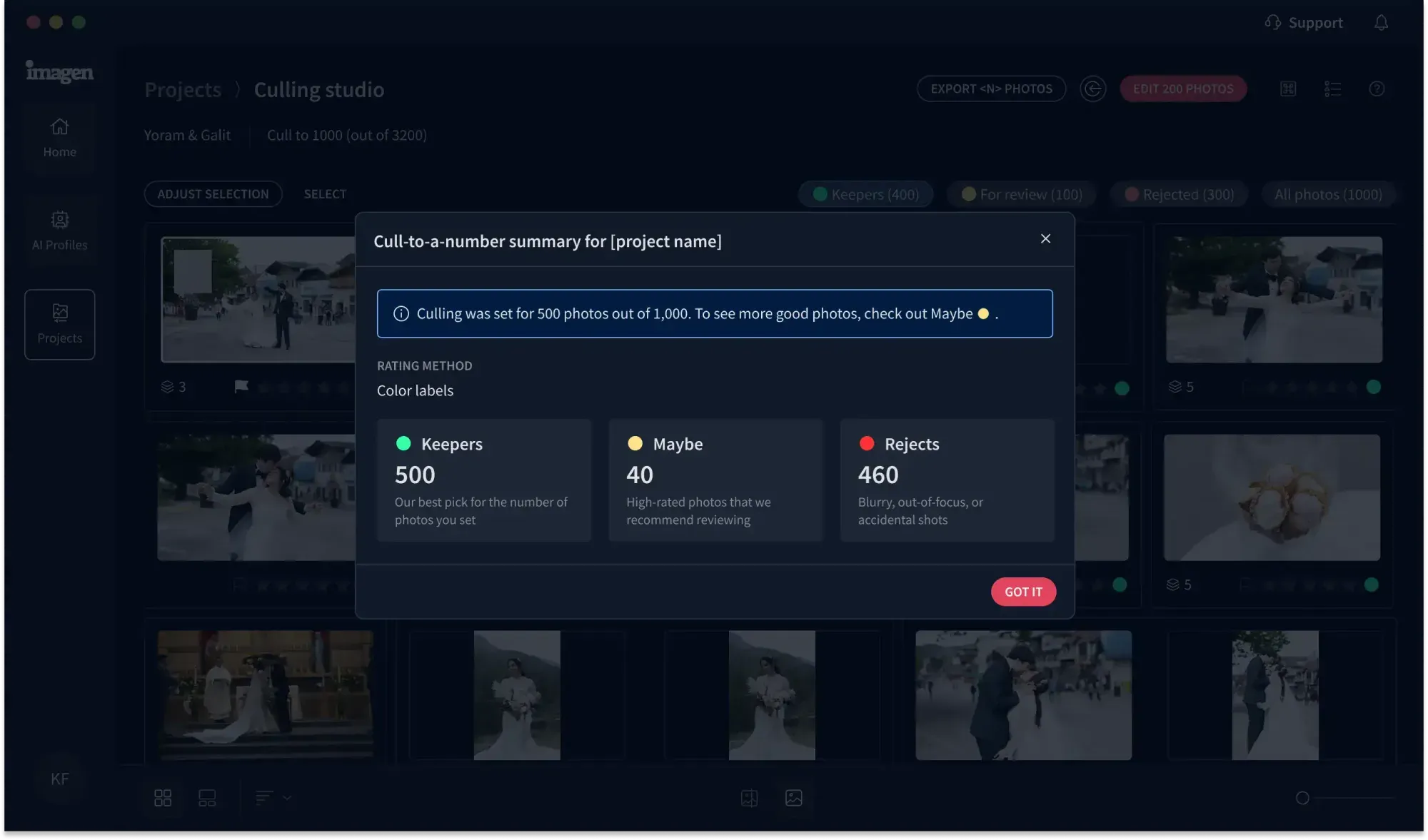
The feature organizes your photos into three categories:
- Keepers: Your top-selected photos that meet the exact count you specified
- Extras: Additional strong photos you might want to consider (about 50% more than your target number)
- Unrated: The remaining photos that didn’t make the cut
This gives you flexibility to review the AI’s decisions and swap photos in or out. Maybe the AI selected a beautiful wide shot, but you prefer the close-up from the same moment. A few quick keyboard shortcuts let you promote extras to keepers or demote keepers entirely.
You can even adjust your target number on the fly. Started with 200 photos but realize you need 250? The feature recalculates without losing your manual adjustments, so your careful curation work stays intact.
What’s new in Imagen: Imagen is now an intelligent, agentic Studio for professional photographers, where culling sits in one project alongside editing, review and export, in any order. Cull to Exact Number is just one way to narrow a shoot; AI filters such as blur and closed eyes help too, and you can skip AI culling and cull manually for free. It is rolling out gradually as a beta.
How to Get Started
Getting started with Cull to Exact Number is straightforward. When creating a new project with 500+ photos, choose Cull to an exact number during project setup. Choose your target (number or percentage), select your rating method, and let Imagen do the work.
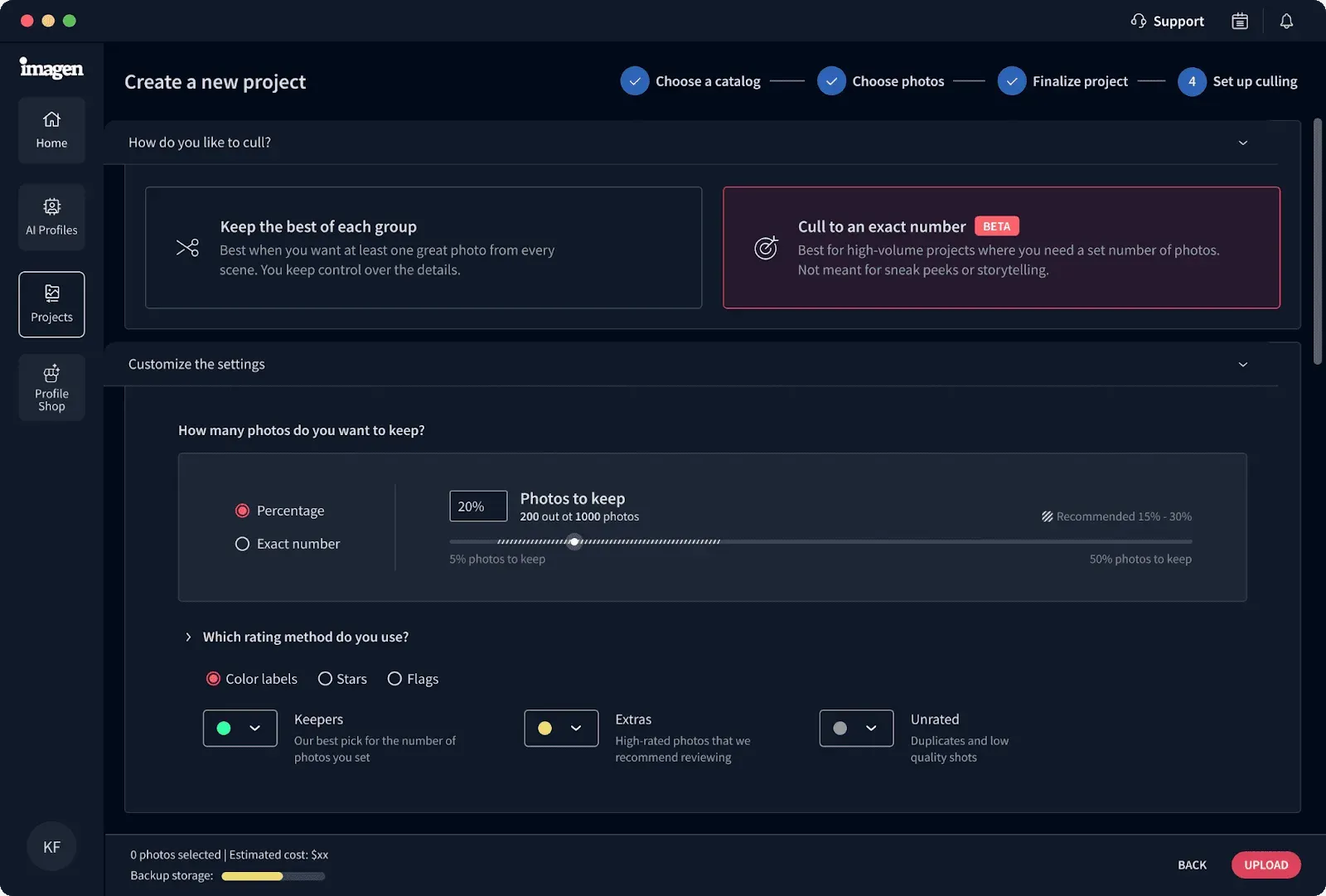
The feature is currently in beta for Imagen users, so you can try it risk-free on your next large shoot.
Ready to transform your culling workflow? Try Cull to Exact Number today and save hours on your culling process while delivering exactly what your clients expect. Your future self will thank you when you’re spending less time clicking through photos and more time growing your business.
Try Imagen’s new Studio, where you cull, edit and export in one project, and experience the difference AI-powered precision culling can make for your photography workflow.