
What is Moiré (pattern)?
Table of contents
- Mastering Your Photography Workflow: How AI Empowers Professional Photographers
- The Modern Photographer’s Core Challenges
- AI as Your Photography Partner
- Revolutionizing Your Workflow with Imagen
- The Integrated Imagen Experience: An All-in-One Platform
- Practical Tips for Maximizing AI in Your Workflow
- The Future is Now: Embracing AI in Photography
- Conclusion
Mastering Your Photography Workflow: How AI Empowers Professional Photographers
As a professional photographer, you know the hustle. From capturing those perfect moments to the often-unseen hours spent behind a screen, our work is a blend of artistry and technical skill. We’re passionate about creating stunning images, but the truth is, the post-production process can sometimes feel overwhelming. Balancing client expectations with tight deadlines, while still maintaining your unique creative vision, is a constant challenge. That’s where I’ve found a true partner in AI, transforming how I approach my workflow and bringing a new level of efficiency to my business.
The Modern Photographer’s Core Challenges
Let’s be honest, the life of a professional photographer isn’t just about clicking a shutter. It involves a significant amount of administrative and post-production work that, while necessary, can eat into our most valuable resource: time. I’ve been there, staring at thousands of images, knowing each one needs attention. It’s a common story for many of us, whether we shoot weddings, portraits, real estate, or high-volume school sports.
Time-Consuming Post-Production
Think about a typical wedding day or a large event. You might end up with thousands of images. Manually sifting through these to pick the best ones—a process we call culling—is incredibly time-consuming. Then comes the editing. Even with efficient tools, applying consistent adjustments to hundreds or thousands of photos is tedious. We all strive for that perfect gallery, but repetitive tasks can quickly lead to burnout.
- Culling: Identifying keepers, removing duplicates, blurs, and misfires.
- Repetitive Editing: Applying exposure, white balance, color corrections across entire catalogs.
- Batch Editing Needs: The necessity of processing large groups of photos efficiently.
Maintaining Consistency Across Projects
Every photographer develops a distinct style. It’s what clients hire us for. But maintaining that style consistently across an entire gallery, especially when you’re dealing with varying lighting conditions or multiple shooting days, can be tough. Inconsistent edits can detract from the overall quality of your delivered work and even impact your brand. We want every image to feel like it belongs, with a cohesive look that speaks to our artistic signature.
The Pressure to Deliver Quickly
Clients today expect fast turnarounds. In a digital world, waiting weeks for photos can feel like an eternity to them. This pressure often forces us to rush, potentially compromising quality or leading to even longer hours hunched over a computer. Managing multiple clients and projects simultaneously, all with their own deadlines, requires an incredibly streamlined process.
Balancing Business and Creativity
Ultimately, we’re artists running a business. The more time we spend on repetitive post-production, the less time we have for marketing, client communication, continuing education, and, most importantly, creative endeavors. Many photographers find themselves “getting lost between software,” jumping from one application to another for culling, editing, and organization, which further fragments their workflow and wastes precious time.
AI as Your Photography Partner
When I first heard about AI in photography, I admit I was a bit skeptical. Would it take away the “art” from the artist? Would it truly understand my vision? What I’ve discovered is that AI isn’t about replacing the photographer; it’s about empowering us. It acts as a highly intelligent assistant, taking on the mundane, repetitive tasks that drain our energy, allowing us to focus on the creative decisions that truly matter.
Think of it this way: AI processes vast amounts of data, learns patterns, and applies rules much faster and more consistently than any human possibly could. For photographers, this means it can analyze images, identify issues, and even emulate your unique editing style. It’s about working smarter, not harder, and reclaiming hours each week that you can invest back into your craft or your personal life. My journey with AI has transformed how I operate, freeing me to be more present behind the camera and more thoughtful in my artistic choices.
Revolutionizing Your Workflow with Imagen
When it comes to integrating AI into my photography business, Imagen has become an indispensable part of my toolkit. It’s not just a single feature; it’s a comprehensive platform designed to tackle the biggest post-production headaches professional photographers face.
Smart Culling: The First Step to Efficiency
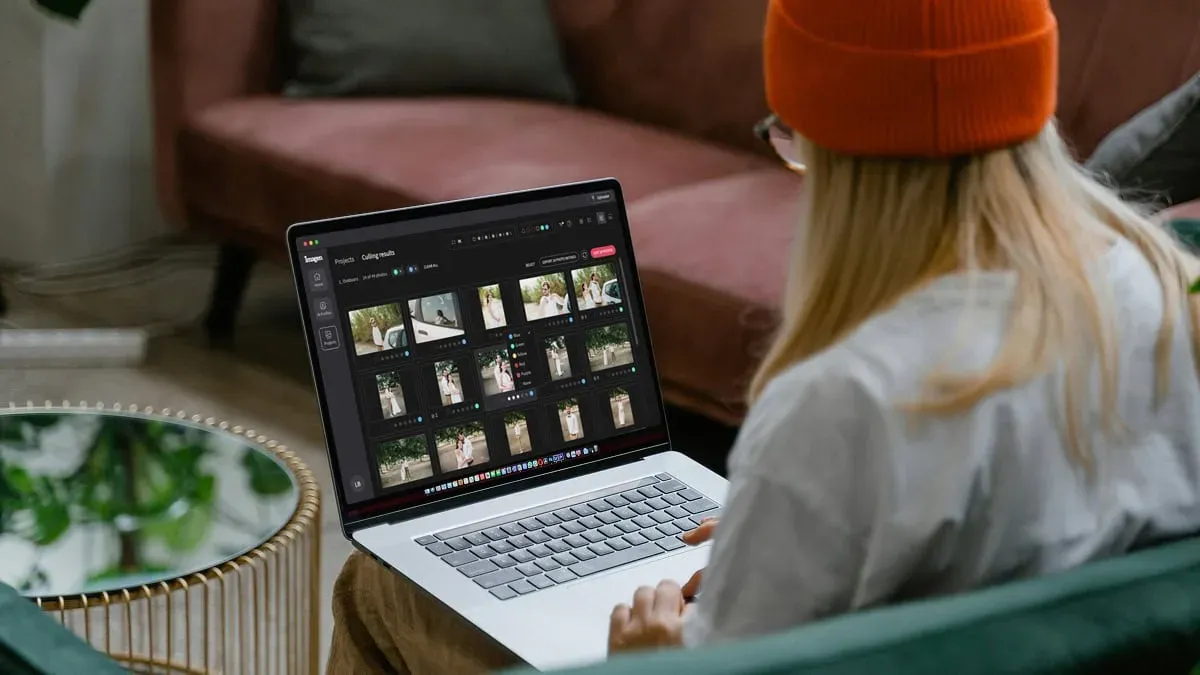
Let’s talk about culling. It’s often the most dreaded part of the workflow. After a big shoot, you’re looking at hundreds, sometimes thousands, of RAW files. Manually sifting through them all to find the gems, discard the blurs, the duplicates, the closed eyes—it’s exhausting and time-consuming. This is precisely where Imagen’s Culling Studio steps in as a game-changer.
The AI in Imagen’s Culling Studio is trained to understand the nuances of a good photograph. It automatically identifies duplicates, blurry images, photos where subjects have closed eyes, or even out-of-focus shots. It doesn’t just delete them; it gives you the power to review its suggestions, ensuring you always have the final say. Imagine cutting down your culling time from hours to mere minutes. This isn’t an exaggeration; I’ve experienced it firsthand. By intelligently pre-selecting and removing obvious discards, it lets me focus my attention on making the creative selections, quickly finding the best shots that truly tell the story.
This automated first pass means I’m not wasting time on images that are clearly unusable. It streamlines my decision-making process, allowing me to move onto editing much faster. If you’re looking for a deep dive into mastering this stage, check out this comprehensive guide to culling photographs.
Summary: Imagen’s Culling Studio dramatically speeds up the initial selection process by intelligently identifying and filtering out poor quality images, saving you significant time and effort at the very start of your post-production workflow.
Consistent Editing with Your Unique Style
Once your images are culled, the next big hurdle is editing them consistently. This is especially challenging with large galleries, where varying light or subtle changes in composition can make it hard to apply a uniform look. Traditional methods often involve manually syncing settings or endlessly tweaking individual images, which can lead to inconsistencies and a lack of cohesion.
This is where Imagen’s AI-powered editing, specifically its Personal AI Profiles, truly shines. The idea is brilliant: instead of you conforming to a preset, the AI learns from your own edited images. You upload a selection of your previously edited work, and Imagen’s AI analyzes your unique style – your color preferences, exposure adjustments, white balance, contrast, and more. It then creates a custom profile that applies your specific look to new, unedited photos. It’s like having a digital assistant that understands your creative vision as well as you do, ready to apply it across an entire shoot.
The benefit here is twofold: incredible speed and unmatched consistency. Every image in your gallery will have that signature look you’ve worked so hard to develop, applied automatically and accurately. This frees you from repetitive manual adjustments and allows you to spend your time on the creative fine-tuning that makes your work truly stand out. It’s one of the most powerful AI photo editing tools available to professionals today.
Summary: Imagen’s Personal AI Profiles learn your unique editing style, applying it consistently and quickly across all your images, ensuring a cohesive look for every client gallery and preserving your creative vision.
Batch Processing Power
The ability to edit photos in large groups, or batch photo editing, is essential for any professional. Imagen excels at this by allowing you to apply your custom AI Profile to thousands of images simultaneously. This isn’t just about speed; it’s about maintaining quality and consistency across those large volumes without requiring manual oversight for every single photo. You can learn more about the power of this approach here: Batch Photo Editing in Lightroom: How to Save Time and Get Professional Results.
Beyond Photos: AI Video Editing
The world of visual content is always evolving, and video is becoming an increasingly important part of many photographers’ offerings. Imagen isn’t just for still images. They’re extending their AI prowess to the realm of video editing with Imagen Video. Just as AI can learn your photo editing style, it can also assist with video, making the entire post-production workflow more unified. This is a significant step forward, promising to bring the same levels of efficiency and consistency to your moving pictures as it does to your stills. Explore the future of this integration here: From AI Photo to AI Video Editing – Imagen’s Next Big Leap.
Catering to Specialized Photography Niches
Imagen’s approach isn’t one-size-fits-all; it’s designed to adapt to the specific needs of various photography genres.
Real Estate Photography
In real estate, speed and consistency are paramount. Listings need to go live quickly, and every image must present the property in its best light with a uniform look. Imagen’s AI can drastically reduce turnaround times, ensuring you deliver professional, consistent results for every property, every time. This means happier clients and more time for you to take on new projects.
Wedding and Portrait Photography
Wedding and portrait photographers deal with immense volumes and often highly varied lighting conditions throughout a day. Imagen’s Culling Studio can help you quickly sort through thousands of candid shots, while your Personal AI Profile ensures every image from the ceremony to the reception reflects your signature style. This means more time focusing on emotional moments and less on the grind, even if you are working with cost-effective strategies. It means you can manage your work more efficiently and maintain your value.
Sports and School Volume Photography
Volume photography, especially in sports and schools, is all about speed and consistency across a massive number of subjects. Think of hundreds of student portraits or action shots. Imagen’s tools are built to handle this scale, automating much of the post-production so you can deliver large galleries quickly and with a professional, uniform finish.
The Integrated Imagen Experience: An All-in-One Platform
For me, one of the biggest frustrations before Imagen was “getting lost between software.” I’d use one program for culling, another for editing, and then juggle files between them. This fragmented workflow wasn’t just inefficient; it was a constant source of stress. This is precisely where Imagen excels as a comprehensive, all-in-one platform.
Imagen’s different components—the robust Culling Studio, the intelligent AI Editing with your Personal AI Profiles, and its overall streamlined project management—are designed to work together seamlessly. This integration means you’re not just getting individual tools; you’re getting an entire ecosystem that simplifies your entire post-production workflow from start to finish. You start with smart culling, move straight into AI-powered edits that reflect your style, and manage it all within a single interface. It’s a unified approach that eliminates the friction of switching between applications, saving you significant time and mental energy.
The beauty of this integrated platform is how it allows you to truly streamline. For example, once the culling is complete, the selected images are ready for editing, all within the same environment. This smooth transition reduces errors and ensures a fluid process, ultimately giving you more time to be creative and build your business. It’s about having everything you need, working in harmony, accessible from one place.
Summary: Imagen unites culling, AI editing, and project management into a single, integrated platform, eliminating the need to jump between multiple software programs and providing a truly streamlined, efficient post-production workflow.
Practical Tips for Maximizing AI in Your Workflow
Adopting AI doesn’t mean giving up control; it means optimizing your process. Here are some tips I’ve picked up to get the most out of platforms like Imagen:
Building Your Personal AI Profile
The quality of your Personal AI Profile directly correlates with the quality of the sample images you provide. Don’t just pick a few; give the AI a diverse set of your best-edited work across different lighting conditions and styles you commonly use. The more examples you provide, the better the AI will understand and replicate your unique aesthetic. Think of it as teaching your most dedicated assistant exactly how you want things done.
Reviewing and Refining
Remember, AI is a powerful assistant, not a replacement for your artistic eye. I always view the AI-edited photos as a fantastic starting point. I’ll do a final pass, making minor tweaks for creative intent, specific client requests, or that extra bit of polish. This process is much faster than editing every image from scratch. It allows me to maintain creative control while benefiting from AI’s speed.
Organizing Your RAW Files
Before you even begin culling or editing with AI, good file organization is key. A consistent naming convention and folder structure will make your life much easier, ensuring that your AI tools can process your images smoothly and you can easily locate your files later. Start with a clean system, and your AI workflow will be even smoother.
Learning from the Community
Don’t underestimate the power of connection. Engaging with other photographers who are also using AI can provide invaluable insights, tips, and tricks. Platforms like the Imagen Community are great places to share experiences, ask questions, and discover new ways to integrate AI into your specific niche. We’re all on this journey together, and learning from peers is incredibly beneficial.
Here’s a quick overview of how an AI-powered workflow compares to a traditional one:
| Workflow Stage | Traditional Approach | AI-Powered Workflow (e.g., Imagen) |
|---|---|---|
| Culling | Manual review of every image; time-intensive. | AI identifies duplicates, blurs, closed eyes; offers smart selections, significantly reducing time. |
| Editing | Manual adjustments, syncing settings, prone to inconsistencies. | AI learns your style (Personal AI Profile); applies consistent edits across batches rapidly. |
| Consistency | Requires constant vigilance and manual effort to maintain. | Built-in consistency through AI learning and application of your unique style. |
| Time Investment | Significant hours spent on repetitive post-production tasks. | Slash editing time by 96%, freeing up hours for creative work and business growth. |
| Software Juggling | Often requires multiple applications for different tasks. | Comprehensive, all-in-one platform for culling, editing, and management. |
The Future is Now: Embracing AI in Photography
Photography has always evolved with technology, from film to digital, and now to AI. This isn’t just another passing trend; it’s a fundamental shift in how we can approach our work. AI is not here to diminish our artistry but to amplify it. It provides the tools to manage the mundane, allowing us to spend more time on what we love: creating, innovating, and connecting with our subjects.
Embracing AI means being at the forefront of this evolution, ensuring your business is efficient, your work is consistent, and your creative spirit is nurtured. The future of photography editing is already here, and it’s enabling photographers like us to achieve more than ever before. To learn more about how AI will shape our industry, check out this article on ways AI will affect the future of photography editing.
Conclusion
For professional photographers, time is money, and consistency is reputation. We’ve explored how common challenges like slow culling, inconsistent edits, and juggling multiple software programs can impact our businesses and our passion. By adopting AI, especially through a comprehensive platform like Imagen, we’re not just solving these pain points; we’re actively enhancing our capabilities.
With Imagen’s Culling Studio, you gain incredible speed and accuracy in selecting your best shots. With your custom Personal AI Profile, you ensure every image you deliver is perfectly consistent with your unique style, every single time. And by providing an all-in-one solution, Imagen helps you avoid the frustration of “getting lost between software,” streamlining your entire post-production workflow.
Ultimately, AI empowers us to be better photographers and more effective business owners. It frees up our valuable time, ensures our creative vision is consistently applied, and allows us to focus on capturing incredible moments rather than getting bogged down in repetitive tasks. It’s a tool that supports our artistic journey, helping us deliver exceptional work to our clients with greater ease and efficiency. It’s time to embrace the future and see how AI can transform your photography business. Discover more about what Imagen can do for your business by visiting the main site or exploring the talents section.

