
What is color calibration?
Table of contents
- Mastering Your Workflow: The AI Advantage for Professional Photographers
- The Modern Photographer’s Challenge (and Opportunity)
- Culling Reimagined: Smart Selection with AI
- Consistent Edits, Every Time: The Power of AI Profiles
- Beyond Photos: AI Video Editing
- The All-in-One Workflow: Imagen as Your Creative Partner
- Practical Tips for Integrating AI into Your Business
- The Future is Now: What AI Means for Photographers
- Embrace the AI Advantage
Mastering Your Workflow: The AI Advantage for Professional Photographers
As professional photographers, we pour our hearts into capturing those perfect moments. We chase the light, frame the shot, and connect with our subjects. But let’s be honest, once the shutters stop clicking, another significant phase begins: post-production. This is where the magic of AI is truly stepping up, transforming how we cull, edit, and deliver our work.
For years, I’ve navigated the balancing act of artistic vision and the demanding realities of running a photography business. The hours spent behind a screen can sometimes overshadow the joy of shooting. That’s why I’m excited to share how integrating AI, specifically through a platform like Imagen, can truly empower you to reclaim your time, maintain your unique style, and elevate your client experience.
The Modern Photographer’s Challenge (and Opportunity)
In today’s fast-paced world, clients expect quick turnarounds without compromising quality. This creates a unique pressure point for us. We want to deliver stunning galleries, but the manual work involved can be overwhelming.
The time drain of post-production
Think about a typical wedding or a large volume shoot. You might come away with thousands of images. Each one needs to be reviewed, selected, and then carefully edited to match your signature style. This process, from culling to final edits, often consumes more hours than the actual shoot itself. It’s a significant bottleneck that can limit how many clients you can serve or how much personal time you have.
Maintaining creative vision and consistency
We all have a distinct look, a signature color palette, or a specific way we handle light and shadow. Replicating that consistency across hundreds, even thousands, of images for a single client, or across multiple clients, can be mentally exhausting. The human eye can fatigue, leading to subtle inconsistencies that, while minor individually, can detract from the overall professional feel of a gallery.
Embracing technology for efficiency
The good news is that we live in an era where technology is designed to assist, not replace, our creativity. Artificial intelligence is no longer a futuristic concept; it’s a practical tool that can handle repetitive tasks, allowing us to focus on the truly creative aspects of our craft. It’s about working smarter, not just harder.
Summary: Post-production can be a huge time sink and a challenge for maintaining consistency. AI offers a powerful solution to these common professional hurdles, freeing us up to focus on our artistic passion.
Culling Reimagined: Smart Selection with AI
Let’s talk about culling. For many photographers, this is where the post-production journey often feels most daunting. Sorting through countless frames to pick the best ones can be tedious, but it’s absolutely crucial.
What is culling and why is it crucial?
Culling is the process of selecting the best images from a shoot and discarding the rest. It’s about quality control, telling a cohesive story, and presenting only your finest work. A poorly culled gallery can overwhelm clients and dilute the impact of your best photographs. However, doing it manually, especially after a long shoot, demands intense concentration and a significant time investment.
How Imagen’s Culling Studio simplifies the process
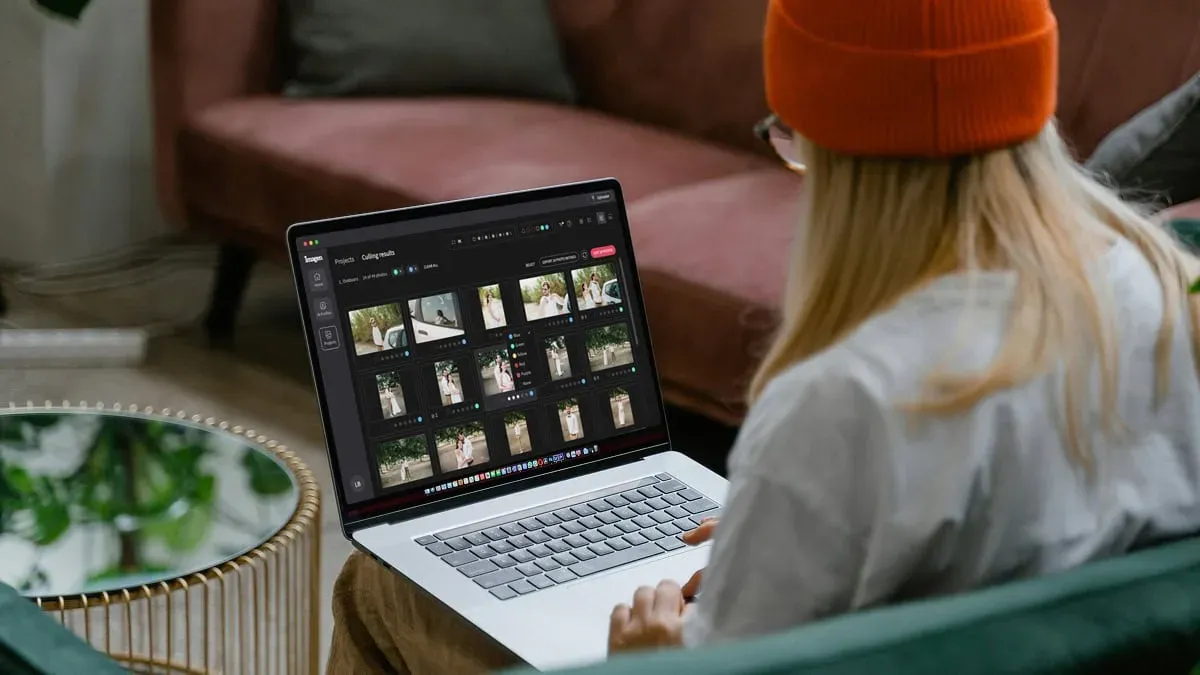
This is where Imagen’s Culling Studio steps in to transform your workflow. It uses advanced AI to analyze your images and make intelligent suggestions, acting like an extra set of highly efficient eyes. Instead of blindly sifting through everything, you get a head start.
Here’s how it works:
- Identifies duplicates: The AI can group together very similar shots, helping you quickly choose the strongest one and eliminate redundant frames.
- Flags technical issues: It can help identify photos with common problems like closed eyes, motion blur, or out-of-focus subjects. This doesn’t mean it deletes them, but it highlights them, allowing you to review and make informed decisions faster.
- Saves precious time: Imagine cutting down your culling time by hours, or even days, on larger projects. This allows you to move on to editing faster and deliver galleries sooner.
Here’s a practical example of integrating it into your workflow:
- Upload your entire shoot to Imagen’s Culling Studio.
- The AI analyzes your images and provides an initial selection and grouping.
- Review the AI’s suggestions. You’re always in control; the AI is your assistant, not your boss. You can easily override its choices, re-include images, or refine selections.
- Export your final selections, ready for editing.
This intelligent assistance allows you to focus your attention on the artistic merit of each shot rather than getting bogged down in the sheer volume. For a deeper dive into effective culling strategies, you might find this guide to culling photographs helpful.
Summary: Imagen’s Culling Studio dramatically speeds up the selection process by intelligently identifying duplicates and technical issues, putting you in the driver’s seat for efficient and accurate choices.
Consistent Edits, Every Time: The Power of AI Profiles
Once you’ve perfectly culled your images, the next step is editing. This is where your artistic style truly shines, but also where inconsistency can creep in if not managed carefully.
The pain of manual editing and inconsistency
If you’ve ever spent hours meticulously editing a single image, only to realize you have hundreds more to go, you know the feeling. Manual editing is not only time-consuming but also prone to variations. Lighting conditions change throughout a shoot, your mood might shift, or you might simply get fatigued. These factors can lead to subtle differences in color, exposure, or tone across your final gallery, which can detract from a polished, cohesive presentation.
Crafting your unique style with Personal AI Profiles
Imagen addresses this head-on with its Personal AI Profiles. This isn’t just a preset; it’s an AI that learns your unique editing style. You train it by sending it a catalog of your previously edited photos. The AI analyzes your adjustments—how you handle skin tones, shadows, highlights, color grading, and more. Once trained, it can apply your distinct aesthetic to new images, ensuring remarkable consistency.
Consider how this impacts different photography types:
- Wedding Photographers: Imagine editing a 1,000-image wedding gallery in a fraction of the time, knowing every shot will have your signature look, from the bright ceremony to the moodier reception.
- Portrait Photographers: Maintain consistent skin tones and stylistic elements across an entire portrait session, ensuring every image resonates with your brand.
- Real Estate Photographers: Deliver perfectly balanced exposures and color-corrected interiors consistently across multiple properties, crucial for professional listings.
- Sports and School Volume Photographers: For shoots with thousands of subjects, AI ensures that every single photo, from individual portraits to action shots, receives consistent processing quickly.
This personalized approach means your creative vision is amplified, not replaced. The AI acts as your diligent assistant, applying your learned style with precision.
Batch editing made effortless
One of the most powerful features of AI editing is its capability for batch photo editing. Instead of adjusting each photo individually, you can upload an entire catalog, and your Personal AI Profile will apply your edits across all selected images. This means you can slash editing time significantly – think of the potential to “Slash editing time by 96%,” a powerful advantage for your business.
Overcoming common editing challenges
AI also excels at tackling common editing headaches. For instance, dealing with overexposed photos can be a time-consuming manual process. While AI cannot fix a completely blown-out image, it can intelligently adjust exposure, highlights, and shadows to recover detail and bring consistency to shots that might otherwise require individual attention. This is about leveraging AI photo editing tools to make your workflow smoother and more efficient.
Summary: Personal AI Profiles ensure your unique style is consistently applied across all your images, dramatically reducing manual editing time and improving overall gallery cohesion. This is a game-changer for all types of professional photography.
Beyond Photos: AI Video Editing
In today’s visual landscape, still photography often goes hand-in-hand with video. Many clients now request short reels, behind-the-scenes footage, or even full video clips alongside their photo galleries. This presents both an opportunity and a new challenge for photographers.
The rise of video content for photographers
Adding video services can significantly expand your offerings and appeal to a broader client base. However, video editing comes with its own steep learning curve and time commitment, often even more demanding than photo editing. For many photographers, the thought of adding another complex post-production workflow to their plate can be daunting.
Introducing Imagen Video for quick, consistent video color grading
Just as AI has revolutionized photo editing, it’s now doing the same for video color. Imagen Video does not read your Personal AI Profile. You choose an AI Profile, which is a ready-made look, or upload your own LUT, and it adapts that look to each of your video clips.
This capability is about streamlining your entire visual content creation. For example, if you shoot both photos and video at a wedding, turn your Lightroom preset into a LUT with Imagen’s free Lightroom preset to LUT tool and upload it, so the colors and tones of your video highlights sit close to your photos, creating a truly cohesive client package. You can learn more about this exciting development in this article about AI video editing.
Summary: Imagen extends its AI power to video color grading, allowing photographers to deliver consistent visual content across both photos and videos, expanding their service offerings with greater efficiency.
The All-in-One Workflow: Imagen as Your Creative Partner
We’ve talked about how Imagen addresses specific pain points: slow culling and inconsistent edits. But the true power comes when you view Imagen as a comprehensive, all-in-one platform designed to tackle the photographer’s common frustration of “Getting lost between software.”
Integrating Culling, AI Editing, and Cloud Storage
Imagine a seamless workflow where your images move effortlessly from culling to editing, all within one integrated ecosystem. This is what Imagen offers by bringing together its Culling Studio, Personal AI Profiles for editing, and efficient cloud storage solutions. You upload once, and the entire post-production journey can be managed from a single dashboard. This integration means:
- No more exporting and re-importing between different applications.
- Reduced chances of file errors or losing track of versions.
- A unified experience that aligns with how a professional photographer thinks about their workflow.
Say goodbye to juggling multiple software
Before integrated solutions, our desks were often covered with sticky notes reminding us of different steps across multiple programs. We’d use one program for culling, another for primary edits, perhaps another for specific retouches, and then a separate cloud service for storage and delivery. This constant switching isn’t just inefficient; it’s a mental drain that pulls focus away from the creative work.
Imagen simplifies this by offering a centralized hub. Your RAW files are uploaded, processed, and available for review without unnecessary steps in between. This smooth transition ensures that your entire post-production workflow is not just faster but also more enjoyable and less prone to errors.
Realizing significant time savings
The cumulative effect of streamlined culling, consistent AI editing, and an integrated platform is remarkable time savings. We’re talking about the potential to “Slash editing time by 96%” in some cases. This isn’t just a number; it translates into tangible benefits for your business and personal life:
- More clients: With faster delivery times, you can take on more projects without sacrificing quality.
- Faster delivery: Impress your clients with quicker turnarounds, enhancing their experience and generating positive word-of-mouth.
- Reduced burnout: Spend less time staring at a screen and more time doing what you love, or simply enjoying your life outside of work.
Focusing on what you love: shooting and connecting with clients
Ultimately, the goal of integrating AI into your workflow is to give you back your most valuable asset: time. Time to refine your craft, explore new creative avenues, market your business, and most importantly, connect meaningfully with your clients. When the tedious parts of the job are handled efficiently by AI, your energy can be redirected to the human elements that make photography so special.
Summary: Imagen provides a comprehensive, all-in-one platform that integrates culling, AI editing, and cloud storage, eliminating the need to juggle multiple software. This seamless workflow results in significant time savings, allowing you to focus on shooting and client relationships.
Practical Tips for Integrating AI into Your Business
Adopting new technology can feel like a big step, but integrating AI into your photography business doesn’t have to be complicated. Here are some practical tips to get started and make the most of a platform like Imagen:
Starting with a Personal AI Profile
The first and most crucial step is to train your Personal AI Profile. This means uploading a catalog of your previously edited work that truly represents your style. Think about selecting a diverse range of images from different shoots that showcase your consistency and artistic vision. The more varied and representative your training set, the better the AI will learn and replicate your unique aesthetic.
Experimenting with different AI Styles
While your Personal AI Profile is fantastic for maintaining your signature look, Imagen also offers a variety of Talent AI Profiles. These are editing styles created by world-renowned photographers. Don’t be afraid to experiment with them, especially for specific projects or if you’re looking to develop a new style. It’s a great way to explore different aesthetics without starting from scratch. For example, if you’re curious about a specific look like the Wes Anderson style, you can see how AI can interpret and apply such a concept.
Utilizing the community for support and insights
You’re not alone on this journey. Platforms like Imagen often have vibrant online communities where photographers share tips, ask questions, and discuss best practices. Engaging with these communities can provide invaluable insights, help you troubleshoot issues, and inspire new ways to use the technology. It’s a fantastic resource for learning and growth.
Exploring additional resources and tips
The Imagen website itself is a treasure trove of information. Beyond the core features, you’ll find valuable tips and guides on various aspects of photography and post-production. Whether you’re looking for advice on specific editing techniques or business strategies, these resources are designed to support professional photographers in their journey. For example, you might find articles that help you understand the nuances of hiring a wedding photographer or improving your general workflow.
Summary: Start by training your Personal AI Profile, then explore other AI styles. Leverage the Imagen community and on-site resources to continuously learn and optimize your AI-powered workflow.
The Future is Now: What AI Means for Photographers
The integration of AI into photography post-production is not a trend; it’s a fundamental shift that is reshaping our industry. Understanding its implications is key to staying relevant and thriving.
AI as an assistant, not a replacement
It’s important to reiterate: AI is a powerful tool and an invaluable assistant, but it doesn’t replace the artist. Your creative vision, your ability to connect with clients, your unique eye, and your decision-making skills remain irreplaceable. AI handles the repetitive, technical tasks, freeing you to focus on the truly human and artistic elements of photography. It augments your capabilities, allowing you to produce more high-quality work in less time.
This means you can spend more time on things like:
- Developing new shooting techniques.
- Building stronger client relationships.
- Exploring personal projects.
- Marketing your business effectively.
Staying ahead in a competitive market
In a competitive market, efficiency and consistency are key differentiators. By embracing AI, you can deliver stunning, consistently edited galleries faster than ever before. This not only enhances client satisfaction but also positions you as a forward-thinking professional. Those who adapt to these technological advancements will be better equipped to meet client demands and manage their businesses effectively in the long run. You can dive deeper into how AI will affect the future of photography editing and its broader impact.
Summary: AI empowers photographers by acting as a powerful assistant, handling repetitive tasks to free up time for creative pursuits and client connections. Embracing this technology is crucial for staying competitive and efficient in today’s market.
Embrace the AI Advantage
As an experienced professional photographer, I can confidently say that the integration of AI into our workflow is one of the most significant advancements I’ve seen. It’s not about automation replacing artistry; it’s about empowering artists to do more of what they love.
Imagen, with its intelligent Culling Studio, personalized AI Profiles, and now even AI Video capabilities, offers a comprehensive solution that streamlines your entire post-production process. It helps you maintain your unique creative vision with unmatched consistency, all while dramatically reducing the hours spent behind a screen.
If you’re looking to reclaim your time, elevate your efficiency, and focus more on the art of photography and connecting with your clients, I highly recommend exploring how Imagen can become your ultimate creative partner. It’s time to experience the future of professional photography today.

