
What is a variable ND filter?
Table of contents
- 1
- The Everyday Realities of a Professional Photography Workflow
- Smart Culling: Redefining Your First Steps in Post-Production
- AI-Powered Editing: Your Signature Look, Perfectly Consistent
- Expanding Your Creative Horizon with AI Video Editing
- Streamlining Your Entire Post-Production Journey
- Embracing Innovation for Sustainable Growth
- Conclusion
1
As a professional photographer, I know the drill. We pour our hearts into capturing moments, crafting visual stories, and creating stunning images. But let’s be honest, the magic doesn’t end when the shutter clicks. In fact, for many of us, that’s when a whole new phase of intense work begins: post-production. It’s a critical part of our craft, but it can also be a massive time sink, eating into our creative energy and the time we could be spending on shoots, marketing, or even just living life.
Over the years, I’ve seen countless tools come and go, each promising to make our lives easier. But finding a truly integrated solution that tackles the biggest pain points – slow culling, inconsistent edits, and juggling multiple software programs – has always been a challenge. That’s why I’m excited to share how a platform like Imagen can truly transform your workflow, allowing you to focus more on what you love: creating incredible photographs.
The Everyday Realities of a Professional Photography Workflow
Every professional photographer, regardless of their niche, faces a common set of challenges once the shoot is done. We’re not just taking pictures; we’re running businesses. This means balancing creative output with operational efficiency. Let’s break down some of the biggest hurdles that can slow us down.
Managing Your Time Effectively in Post-Production
Time is our most valuable asset. The quicker we can turn around client galleries, the more clients we can serve, and the more income we can generate. However, post-production is notoriously time-consuming. Think about it:
- Culling: Sifting through thousands of images from a single event to pick the very best ones. It’s a meticulous process that demands focus and a keen eye. Missed moments, closed eyes, or blurry shots need to be identified and discarded efficiently.
- Editing: Once culled, each selected image requires careful attention. Color correction, exposure adjustments, cropping, straightening, retouching – the list goes on. Maintaining a consistent look and feel across an entire gallery, especially a large one, can be incredibly laborious.
- Delivery: Preparing files for clients, uploading, and managing revisions. While not strictly post-production, it’s the final step in getting our work out the door.
Each of these steps, if handled manually or with disjointed tools, can easily eat up days, even weeks, of our schedule. Imagine having that time back.
The Quest for Consistent Edits Across a Gallery
One of the hallmarks of a professional photographer is a signature style. This means that every image in a client’s gallery should look cohesive, reflecting your unique aesthetic. Achieving this consistency manually, especially when dealing with varying lighting conditions, camera settings, and even different cameras or lenses used throughout a shoot, is incredibly difficult. You might spend hours making subtle adjustments, only to find that some images still don’t quite match. This not only frustrates us but can also lead to an uneven client experience. We need a way to ensure our artistic vision is perfectly replicated across every single photograph we deliver.
Navigating a Maze of Software and Tools
How many different applications do you use in a typical post-production workflow? A culling tool here, an editing suite there, perhaps another program for specific retouching, then a different one for cloud storage or gallery delivery. This “software fragmentation” leads to a lot of wasted time. We’re constantly importing, exporting, converting, and learning new interfaces. Each transition is an opportunity for errors, and it certainly doesn’t foster a smooth, uninterrupted creative flow. The pain point of “getting lost between software” is real, and it saps our energy and efficiency.
Smart Culling: Redefining Your First Steps in Post-Production
The first interaction we have with our images after a shoot is often the most daunting: culling. It’s where we make critical decisions about which photos tell the story and which ones simply didn’t make the cut. Traditionally, this is a slow, manual process. But what if there was a smarter way?
From Manual Drudgery to AI-Powered Selection
I remember spending countless hours zooming in, pixel-peeping, looking for closed eyes, out-of-focus shots, or exact duplicates. It’s tedious work that demands high concentration, yet it’s not truly creative. This is where AI-powered culling steps in, making a significant difference. It’s not about replacing your judgment; it’s about providing you with intelligent insights that speed up your decision-making.
Imagine having a tool that can analyze your entire catalog of images, identify technical flaws, and even group similar shots for you. This frees you up to focus on the artistic merit of each image, rather than getting bogged down by the technical minutiae. It’s a game-changer for anyone dealing with high volumes of photographs, from a busy wedding photographer to a high-volume sports photographer.
Introducing Imagen’s Culling Studio: Your Smart Assistant
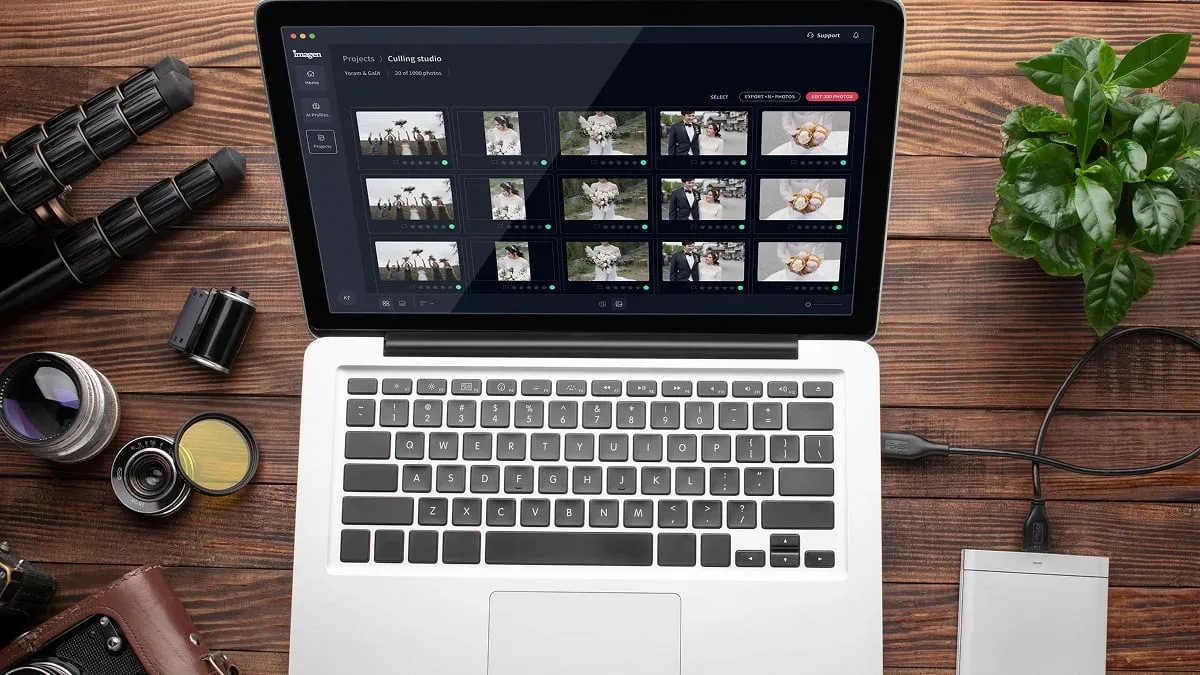
This is where Imagen’s Culling Studio truly shines. It’s designed to take the most repetitive and time-consuming aspects of culling off your plate. Instead of starting from scratch with every single image, Imagen Culling provides you with an intelligent starting point.
Here’s how it transforms your workflow:
- Intelligent Analysis: The AI reviews your entire session, identifying crucial elements like sharpness, exposure, and composition.
- Flagging Imperfections: It automatically flags images with closed eyes, duplicates, or those that are out of focus. This means you don’t have to manually hunt for these common issues.
- Grouping Similar Shots: Have a burst of photos from a single moment? Imagen groups these similar shots, letting you quickly compare and pick the best one from the set.
- Personalized Recommendations: Based on its analysis, it suggests the best images for you to keep, helping you create a strong initial selection.
This doesn’t remove your creative control. You still make the final decisions. But by handling the grunt work, Imagen’s Culling Studio slashes the time you spend on initial selections, allowing you to move to the creative editing phase much faster.
To dive deeper into how this works, you can explore the details of Imagen’s Culling features and read about how Imagen Culling Studio reimagines photography culling. For a comprehensive guide on making the most of your culling process, check out this detailed guide to culling photographs.
AI-Powered Editing: Your Signature Look, Perfectly Consistent
After culling, the next mountain to climb is editing. This is where we truly bring our vision to life. But as we discussed, maintaining consistency across hundreds or thousands of images is a monumental task when done manually. This is a critical area where AI can elevate your work and save you an immense amount of time.
Overcoming the Hurdles of Manual Editing and Batch Processing
Most of us start with batch edits, applying a preset or a basic adjustment across many images. But then comes the fine-tuning. Every image is different: varying light, different skin tones, unique compositions. This requires individual adjustments, and that’s where the hours pile up. Even with batch processing, manual corrections for specific issues can lead to inconsistencies if not meticulously applied. The goal is to achieve your signature look consistently, without the endless repetitive clicks.
Introducing Personal AI Profiles: Your Editing Style, Mastered by AI
This is where Imagen’s Personal AI Profiles become an invaluable asset. Imagine an AI that learns your unique editing style, not just general presets, but the subtle nuances of your adjustments. This is precisely what Imagen offers. It’s like having a highly skilled assistant who has studied your work closely and can replicate your decisions on a grand scale.
Here’s how you train your Personal AI Profile and integrate it into your workflow:
- Training Your Profile: You provide Imagen with a catalog of your past, edited work – typically around 5,000 images, though fewer can work to get started. The AI then analyzes every decision you’ve made: your exposure adjustments, color grading, contrast preferences, white balance tweaks, and even how you handle specific lighting situations. It doesn’t just copy; it learns the *logic* behind your edits.
- Applying Your Profile: Once trained, you simply upload your new RAW files, select your custom AI Profile, and let Imagen do the heavy lifting. The AI applies your learned style to the entire batch, predicting and executing edits with remarkable precision, just as you would.
- Fine-Tuning Control: Even with AI doing the bulk of the work, you retain full creative control. Imagen allows you to make further adjustments to exposure, white balance, contrast, and other settings on individual images or across groups, ensuring the final output is exactly to your liking.
The impact of this on efficiency is profound. Photographers often report slashing their editing time dramatically – some even by “Slash editing time by 96%”. This isn’t just a claim; it’s a measurable increase in productivity.
You can learn more about AI photo editing with Imagen and explore the power of AI photo editing tools. For those working with large batches, understanding batch photo editing strategies can further enhance your speed. And if you have common issues like overexposed photos, remember that even with AI, some basic tricks can help revive your overexposed photos.
Consider the stark difference:
Manual Editing vs. AI-Powered Editing for a 1,000-Image Gallery
| Aspect | Manual Editing | AI-Powered Editing (with Imagen) |
|---|---|---|
| Time Spent | Typically 20-40+ hours | Around 1-2 hours (for review/final tweaks) |
| Consistency | Challenging to maintain perfectly | Virtually flawless, pixel-perfect replication of your style |
| Repetitive Tasks | High; many clicks and adjustments | Minimal; AI handles bulk adjustments |
| Creative Focus | Often diluted by technical tasks | Maximized on artistic refinement |
Expanding Your Creative Horizon with AI Video Editing
The photography landscape is always evolving. Today, our clients often expect more than just still images. Video content, whether it’s short clips from a wedding day or a dynamic real estate tour, is increasingly in demand. This presents a new challenge for photographers who might not have a background in video editing. However, with AI, integrating video into your services can be much simpler than you think.
Meeting the Growing Demand for Video Content
From social media to website portfolios, video adds another dimension to storytelling. Wedding couples want highlight reels, businesses need engaging promotional content, and real estate agents benefit from immersive property tours. As photographers, we’re already on location, capturing the moments. Adding video capabilities can significantly enhance our offerings and appeal to a wider clientele.
Introducing Imagen Video: Seamlessly Integrating Video into Your Workflow
Just as Imagen simplifies photo editing, Imagen Video extends that power to your video workflow. It’s designed to bring the same level of consistency and efficiency to your video color grading, adapting an AI Profile or your own LUT to each clip.
Here’s how Imagen Video can streamline this process:
- AI-Powered Video Adjustments: Similar to its photo editing counterpart, Imagen Video uses AI to apply consistent color grading, exposure adjustments, and other visual enhancements across your video clips. This ensures a cohesive look, even if recorded in varying conditions.
- Stay Close to Your Photo Style: Imagen Video does not read your photo edits, but you can turn your Lightroom preset into a LUT with Imagen’s free Lightroom preset to LUT tool and upload it. Your video then sits close to your photos, for a strong brand identity across all your visual content.
- Focus on Storytelling: By automating the tedious visual corrections, you can dedicate more time to the creative aspects of video editing, like sequencing clips, adding music, and crafting the narrative.
Embracing AI video editing means you can expand your services without a steep learning curve or a massive time investment. You can discover more about Imagen Video and delve into the journey from AI photo to AI video editing.
Streamlining Your Entire Post-Production Journey
We’ve talked about the individual components – culling, photo editing, and video editing – and how AI can revolutionize each. But the true power comes when these components work together as a cohesive unit. This is the essence of Imagen as a comprehensive, all-in-one platform. It addresses the fundamental pain point of “getting lost between software” by providing a streamlined, integrated ecosystem for your entire post-production workflow.
Overcoming Software Fragmentation: The Integrated Solution
Think about the typical workflow for many photographers: use a culling software, then export to an editing software, perhaps bounce to another for specific retouching, then upload to a cloud service for client delivery. Each step is a disconnect, requiring manual file transfers, new logins, and different interfaces. This fragmentation slows us down, introduces potential errors, and creates unnecessary friction in our creative process.
Imagen solves this by bringing critical post-production tasks under one roof. When your culling, AI editing, and cloud storage are all connected, your workflow becomes fluid and efficient. This integration means:
- Seamless Transitions: Move from culling your images directly into applying your Personal AI Profile without exporting and re-importing files.
- Centralized Management: Keep all your project files and progress within a single, unified system.
- Consistent Results: Ensure that your initial selections flow perfectly into your desired final aesthetic, maintaining quality and style throughout.
Benefits for Specific Photography Niches
The integrated platform offers tangible benefits across various photography specializations:
Wedding Photography: Delivering Memories Faster
Wedding photographers often handle thousands of images per event, making culling and editing incredibly time-consuming. With Imagen, you can significantly reduce turnaround times, allowing you to deliver galleries faster and take on more clients. Imagine returning from a wedding knowing that much of the post-production work can be intelligently automated, leaving you free to focus on key creative touches and delivering an exceptional client experience. While some might consider a cheap wedding photographer, professionals using tools like Imagen can offer premium quality and speed.
Real Estate Photography: Volume and Precision
Real estate photography demands high volume and incredible consistency. Every image needs to be perfectly exposed, straight, and color-accurate to showcase properties effectively. Imagen’s ability to apply consistent edits across large batches of images quickly is invaluable here. You can streamline your workflow to handle multiple listings efficiently, ensuring every image meets your high standards. Explore how Imagen can specifically benefit real estate photography workflows.
Sports and School Volume Photography: Mass Production, Personal Touch
Volume photography, whether for sports teams or school portraits, involves an enormous number of individual subjects and poses. Manually editing each one is practically impossible. Imagen’s AI culling and editing can process these vast quantities of images, applying your style consistently to every student or athlete, while still allowing for individual adjustments where needed. This balance of mass production with a personalized touch is essential for success in this demanding field. Learn more about solutions for sports and school volume photography.
Key advantages of this integrated platform:
- Time Savings: Drastically reduce the hours spent on repetitive tasks.
- Unmatched Consistency: Ensure every image reflects your unique style and every video clip holds one consistent grade.
- Simplified Workflow: Eliminate the need to jump between multiple software applications.
- Increased Productivity: Free up valuable time for shooting, marketing, or personal life.
- Scalability: Easily handle larger projects and higher client volumes without added stress.
Embracing Innovation for Sustainable Growth
The world of photography is constantly evolving, and with it, the tools and technologies available to us. Embracing innovation isn’t just about staying current; it’s about building a sustainable and efficient business model that allows us to thrive creatively and financially.
The Evolution of Photography Tools
From the darkroom to digital, from film to mirrorless cameras, photographers have always adapted to new technologies. AI is simply the next logical step in this evolution. It’s not about replacing the artist; it’s about providing more powerful brushes, smarter canvases, and more efficient studios. AI tools are designed to augment our abilities, handling the mundane so we can focus on the extraordinary.
What AI Means for Professional Photographers
For professional photographers, AI means:
- Greater Efficiency: Spend less time on repetitive tasks and more time on high-value activities.
- Enhanced Creativity: With the burden of tedious editing lifted, you can dedicate more energy to perfecting your vision and exploring new creative avenues.
- Better Client Experiences: Faster delivery times and consistent, high-quality results lead to happier clients and stronger referrals.
- Business Growth: The ability to handle more projects without compromising quality means you can expand your business and reach new clients.
The future of photography editing is undoubtedly shaped by AI. You can gain more insights into how AI will affect the future of photography editing. Beyond the tools, it’s also about being part of a larger community. Check out Imagen Talents and join the broader Imagen Community to connect with other professionals leveraging these powerful tools.
Conclusion
As a professional photographer and photo editor, I’ve seen firsthand the transformative power of smart tools. The constant juggle between capturing moments, culling images, ensuring consistent edits, and battling software overload is a familiar story for many of us. But it doesn’t have to be your story forever.
Platforms like Imagen are designed to address these core challenges head-on. By providing intelligent culling capabilities with Imagen’s Culling Studio, ensuring flawless consistency with your Personal AI Profiles for editing, and even extending that efficiency to video with Imagen Video, it offers a truly integrated solution. This shift moves us away from getting “lost between software” and towards a single, cohesive workflow.
The result? You slash the time you spend on post-production, maintain impeccable quality and consistency, and ultimately free up your most valuable resource: your time. This empowers you to focus on the creative aspects of your work, grow your business, and deliver truly exceptional results to your clients. Embracing these advanced tools isn’t just about efficiency; it’s about reclaiming your passion and elevating your craft in every way. To explore how Imagen can simplify your professional workflow, visit imagen-ai.com.

