
What is a reversing ring (for macro)?
Table of contents
- 1
- Reclaiming Your Time: The Power of Smart Culling
- Unlocking Consistent Edits and Supercharged Speed
- Beyond Photos: The Rise of AI Video Editing
- The Integrated Workflow: No More Software Juggling
- Real-World Impact for Professional Photographers
- Tips for Maximizing Your Post-Production with AI
- Join the Imagen Community and Grow Your Craft
- Final Thoughts: A Future Reimagined for Professional Photographers
1
As a professional photographer, you know the grind of post-production. It’s a never-ending cycle of culling, editing, and managing files, often taking more time than the actual shoot itself. But what if there was a way to reclaim those hours? A way to ensure consistent, high-quality results without sacrificing your personal style? That’s exactly what we’re going to explore. We’ll dive into how AI-powered tools are changing the game, helping pros like us streamline our workflows and focus on what truly matters: capturing incredible moments.
Reclaiming Your Time: The Power of Smart Culling
Let’s be honest, culling can be a huge time sink. After a busy wedding day or a big volume photography shoot, you might have thousands of images to sift through. Manually reviewing each photo for focus, exposure, closed eyes, or duplicate shots takes hours, sometimes even days. It’s tedious, mentally draining, and it keeps you away from shooting new clients or spending time with family.
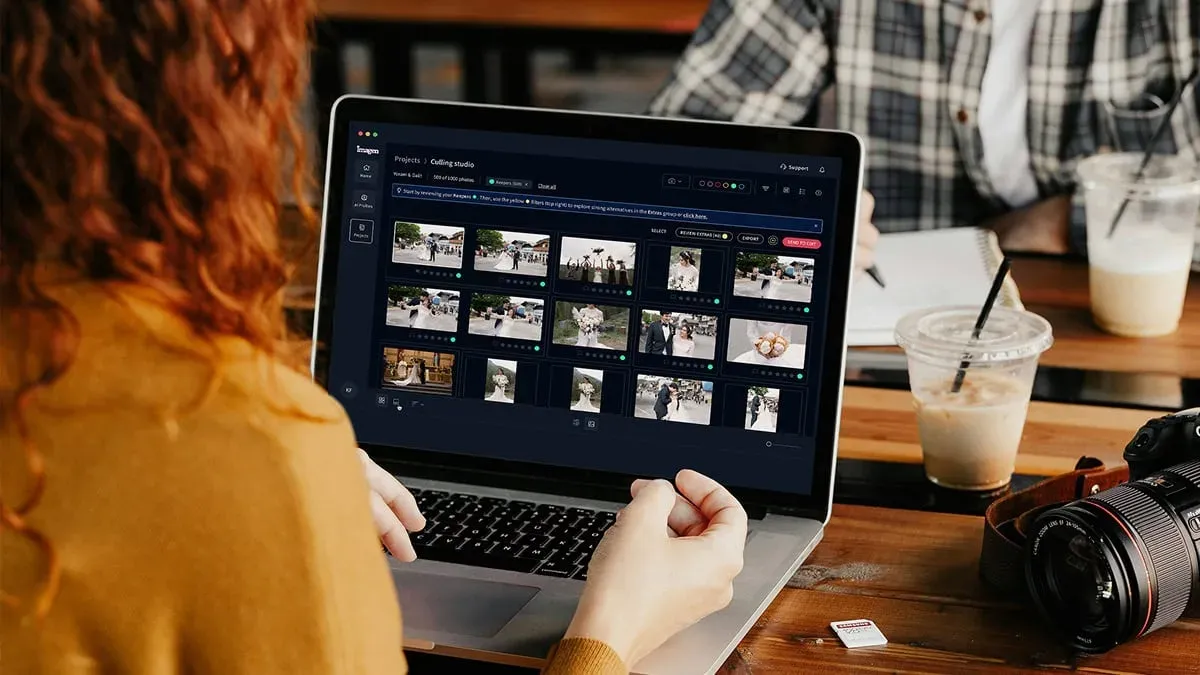
This is where Imagen’s Culling Studio steps in. Imagine an intelligent assistant that reviews your entire catalog in minutes. It’s designed to understand the nuances of a good shot, helping you make selections much faster. I’ve found it incredibly helpful for those overwhelming shoots where I just need a solid starting point.
How does it work? Imagen’s Culling Studio uses advanced AI to analyze your images. It identifies and groups similar photos, flags blurry shots, detects closed eyes, and helps you remove unwanted duplicates. This doesn’t mean it makes all the decisions for you; instead, it provides smart suggestions, allowing you to quickly accept or adjust them. It’s like having an extra pair of experienced eyes on your work, but at lightning speed.
For example, after a recent real estate photography session, I had hundreds of bracketed shots. Instead of manually reviewing each set, the Culling Studio quickly identified the best exposure for each scene and grouped the others. This alone saved me a significant chunk of my workday. It fundamentally changes how you approach the initial selection process, making it less of a chore and more of a quick review. You can learn more about this process and how it works by visiting Photography Culling Reimagined: Imagen Culling Studio and our comprehensive Culling Photographs Guide.
Key benefits of AI-powered culling:
- Speed: Dramatically reduces the time spent on initial selections.
- Accuracy: AI helps identify technical flaws like blur or closed eyes.
- Consistency: Ensures that your culling criteria are applied uniformly across projects.
- Focus: Frees up your mental energy to focus on creative tasks rather than repetitive ones.
In essence, smart culling with AI helps you cut down on the most tedious part of post-production, giving you back precious hours. It’s a game-changer for anyone dealing with large volumes of images regularly.
Unlocking Consistent Edits and Supercharged Speed
Once your images are culled, the next big hurdle is editing. Every photographer strives for a consistent look and feel across their body of work. However, achieving this manually, especially across hundreds or thousands of photos, is incredibly challenging. Lighting changes, moods shift, and maintaining that signature style can become a repetitive, time-consuming struggle.
This is where Imagen’s AI Editing truly shines, powered by its Personal AI Profiles. Forget about trying to remember exact slider values from one batch to the next. Imagen learns your unique editing style by analyzing your past work. You essentially “teach” the AI your preferences, from color grading to exposure adjustments and everything in between. It’s a sophisticated system that grasps the nuances of your personal touch.
Once your Personal AI Profile is created, you can send entire shoots for editing, and the AI applies your style consistently and accurately. This isn’t just about speed; it’s about maintaining your brand’s visual identity effortlessly. For instance, I’ve seen it slash editing time by 96% on some projects. That’s a huge difference when you’re facing tight deadlines or trying to balance multiple clients.
Consider a wedding photographer who needs to deliver hundreds of images that all feel cohesive. With traditional methods, this is days of work. With AI photo editing tools like Imagen, that time is drastically reduced, allowing them to take on more clients or simply enjoy more personal time. It works wonders for diverse fields, from portrait sessions to intricate wedding photography and even large-scale sports and school volume photography projects. If you’re looking for insights into various editing techniques, you might find our guide on reviving overexposed photos or tips on Wes Anderson Lightroom presets helpful.
How AI Editing enhances your workflow:
- Style Learning: Your Personal AI Profile captures your unique aesthetic.
- Batch Processing: Apply your style to thousands of images in a single batch photo editing process.
- Unmatched Consistency: Every photo edited by your AI Profile will maintain your signature look.
- Massive Time Savings: Reclaim hours previously spent on repetitive adjustments.
- Creative Freedom: Focus on the artistry of photography, not the manual grind of editing.
The beauty of this system is that it allows you to concentrate on the creative aspects of your work. You’re no longer just moving sliders; you’re directing an intelligent assistant to replicate your vision across every image. It truly shows how AI will affect the future of photography editing for the better.
Beyond Photos: The Rise of AI Video Editing
As photographers, many of us are also delving into video to offer more comprehensive packages to our clients. And just like photo editing, video post-production can be incredibly demanding. Imagine the same AI power that transforms your photo workflow, now applied to video. That’s the promise of Imagen Video.
Just as your Personal AI Profile learns your still image editing style, Imagen Video aims to streamline the video editing process. While the capabilities are continuously expanding, the core idea remains the same: automate the repetitive, time-consuming tasks so you can focus on storytelling and creative direction. This integration helps maintain a consistent visual brand identity, whether you’re delivering photos or video, ensuring your client experience is seamless and professional.
This development is particularly exciting for those of us who offer hybrid packages. The thought of extending the efficiency and consistency we’ve come to expect from AI photo editing to video is truly compelling. It signifies a future where post-production across all media formats becomes significantly more manageable.
The Integrated Workflow: No More Software Juggling
One of the biggest frustrations for professional photographers is getting lost between different software applications. You cull in one program, edit in another, manage client galleries elsewhere, and perhaps use a third tool for specific retouches. This fragmented approach leads to inefficiencies, increased mental load, and often, errors. It’s a common pain point: “Getting lost between software.”
This is where Imagen shines as a comprehensive, all-in-one platform. It’s designed to bring your entire post-production workflow under one roof. Think about it: your culling, your AI editing, and even cloud storage all work together seamlessly. This integrated approach isn’t just about convenience; it’s about creating a truly streamlined and efficient process from start to finish.
When you use Imagen’s Culling Studio, those selected images are immediately ready for AI editing. The Personal AI Profile then applies your unique style, ensuring consistency. All of this happens within a cohesive environment, eliminating the need to export, import, and re-export files between different applications. This synergy between components is what makes Imagen such a powerful tool for professional photographers.
Benefits of an integrated platform:
- Simplified Workflow: Move from culling to editing without switching programs.
- Reduced Errors: Fewer manual transfers mean fewer chances for mistakes.
- Time Efficiency: Every step is optimized to save you time.
- Mental Clarity: Focus on the task at hand rather than managing software.
- Consistent Branding: Ensure every image and video reflects your unique style from start to finish.
By leveraging an integrated platform, you eliminate the friction points in your workflow. Your creative process flows more smoothly, allowing you to spend less time on administrative tasks and more time on photography, client relations, or personal pursuits. It truly transforms the way you handle your post-production.
Real-World Impact for Professional Photographers
Let’s look at how Imagen translates into tangible benefits for different types of photographers. Whether you’re a wedding, portrait, real estate, or volume photographer, the core value remains the same: efficiency, consistency, and a better quality of life.
For Wedding Photographers:
Wedding days are intense, and the sheer volume of images can be daunting. With Imagen, you can drastically reduce the time spent culling and editing, allowing for faster delivery times and a more positive client experience. Imagine getting a full wedding gallery ready in a fraction of the usual time, all while maintaining your signature romantic or vibrant style.
For Real Estate Photographers:
Consistency in lighting and color for interior and exterior shots is paramount in real estate. Imagen’s AI Profiles ensure every room and property shot adheres to your precise standards, helping you deliver professional and appealing images quickly, which is crucial in a fast-paced market.
For Portrait Photographers:
From individual headshots to large family groups, portrait photography requires a keen eye for detail and consistent skin tones. Imagen helps you apply your unique retouching and color grading preferences across every portrait, ensuring each client receives a beautifully cohesive set of images.
For Volume Photographers:
Sports and school photography involve massive quantities of images with little room for error. AI culling quickly identifies the best shots from thousands, and AI editing applies consistent adjustments, making it possible to process and deliver vast projects efficiently.
To put it simply, here’s a look at what the impact can mean:
| Aspect | Before Imagen | With Imagen |
|---|---|---|
| Culling Time (per 1,000 photos) | 2-4 hours | Less than 30 minutes |
| Editing Consistency | Varies, requires constant vigilance | Flawless, learned from your style |
| Project Delivery | Days to weeks | Hours to days |
| Focus | Repetitive tasks, software management | Creativity, client interaction, new projects |
The time savings aren’t just about efficiency; they translate directly into profitability and a better work-life balance. Imagine having the time to pursue personal projects, learn new skills, or simply spend more time away from the computer. That’s the real impact of integrating AI into your workflow.
Tips for Maximizing Your Post-Production with AI
Integrating AI into your photography workflow isn’t just about pressing a button; it’s about understanding how to leverage the tools effectively. Here are some practical tips to help you get the most out of your AI-powered post-production:
1. Develop a Strong Personal Editing Style
For AI editing to work best, it needs a clear style to learn from. Spend time refining your personal aesthetic. The more consistent your manual edits are, the better your Personal AI Profile will perform. This consistency in your initial work is the foundation for the AI’s success.
2. Understand the AI’s Strengths
AI excels at repetitive, data-driven tasks. Use it for initial culling, batch color corrections, exposure adjustments, and maintaining consistency. Reserve your manual touch for highly creative or complex edits that require unique artistic interpretation.
3. Review and Refine Regularly
While AI is incredibly powerful, it’s a tool. Always review the results. If you notice specific adjustments you’d make differently, apply those changes. This feedback loop helps to continually refine your Personal AI Profile over time, making it even better at replicating your vision.
4. Categorize Your Shoots Appropriately
When sending images for editing, categorize them accurately. A wedding shoot might have different lighting conditions than a studio portrait session. While your AI Profile is versatile, providing context helps the AI deliver the best possible starting point.
5. Experiment with AI Video
If you’re also working with video, start experimenting with AI video editing features. The same principles of learning your style and automating repetitive tasks apply, extending the efficiency across your multimedia offerings. Check out Imagen Video for more information.
6. Stay Updated and Engage
AI technology is constantly evolving. Keep an eye on updates and new features. Engaging with the Imagen Community can also provide valuable insights and tips from other professional photographers who are leveraging AI in their workflows. You can also explore the work of various Imagen Talents to see how they integrate AI.
By thoughtfully integrating AI into your workflow and continuously refining your approach, you can truly unlock its potential to transform your post-production, giving you more time for creativity and client satisfaction.
Join the Imagen Community and Grow Your Craft
Photography is a journey of continuous learning and growth. While AI tools like Imagen automate many technical tasks, the artistic side of our craft remains uniquely human. Being part of a supportive community can be incredibly beneficial for sharing knowledge, getting feedback, and staying inspired.
The Imagen Community is a vibrant space where professional photographers connect, share experiences, and discuss best practices. It’s a place to find answers, learn new techniques, and even discover how others are pushing the boundaries of what’s possible with AI in photography. You can also explore the incredible work of Imagen Talents, photographers who are excelling in their fields and leveraging AI to enhance their work.
Engaging with other professionals helps you see different perspectives and understand how various photographers adapt AI to their unique niches. It’s a resource for staying informed, getting inspired, and ensuring you’re always operating at the forefront of photography technology. Learning together helps everyone improve their craft and make the most of powerful tools.
Final Thoughts: A Future Reimagined for Professional Photographers
The landscape of professional photography is always evolving, and AI is undoubtedly playing a significant role in shaping its future. For experienced photographers like us, embracing these tools isn’t about replacing our artistic vision; it’s about empowering it. By tackling the tedious and time-consuming aspects of post-production, Imagen offers a path to greater efficiency, unmatched consistency, and a newfound freedom to focus on the moments that truly matter.
From revolutionizing your culling process with Imagen’s Culling Studio to ensuring every image perfectly reflects your brand through Personal AI Profiles, and even extending to future possibilities with Imagen Video, the platform is built to support your growth. It’s about providing you with a comprehensive, all-in-one platform that eliminates the frustration of “getting lost between software” and streamlines your entire workflow.
We’re not just saving time; we’re investing it back into our passion, our clients, and our lives outside of the editing suite. As professional photographers, our ultimate goal is to create stunning images that captivate and tell stories. Imagen provides the tools to do just that, more efficiently and consistently than ever before. Explore the possibilities and see how Imagen can transform your workflow and elevate your craft. You can always check Imagen’s pricing to see how these powerful tools can fit into your business model.

