

8 Best AI Quinceanera Photo Editing Software in 2026
Table of contents
A quinceanera is one of the biggest days in a young woman’s life, and the photos need to honor every moment, from the vibrant gown color to the candid tears during the father-daughter dance. The problem for photographers is scale. A single celebration can produce thousands of frames across mixed lighting, from a bright church ceremony to a dim reception hall with color-shifting uplights. Culling, color correcting, and retouching that volume by hand can swallow an entire week. AI photo editing software now handles the heavy lifting, learning your look and applying it consistently so you keep your creative signature while cutting turnaround from days to hours. Below are eight tools worth knowing for quinceanera work in 2026, starting with the one built specifically to protect a photographer’s personal style at scale.
Key Takeaways
- The best AI editors for quinceanera galleries handle culling, color, and retouching together, not as separate manual steps.
- Style consistency across a large mixed-lighting event is the single most important quality factor.
- Imagen leads because it learns your own editing style from your catalog and applies it across the full shoot, with culling and retouching in one connected workflow.
- Every tool listed edits real photos you shot. None of them are image generators.
- Match the tool to your volume, your existing catalog software, and how much control you want over skin and gown color.
1. Imagen
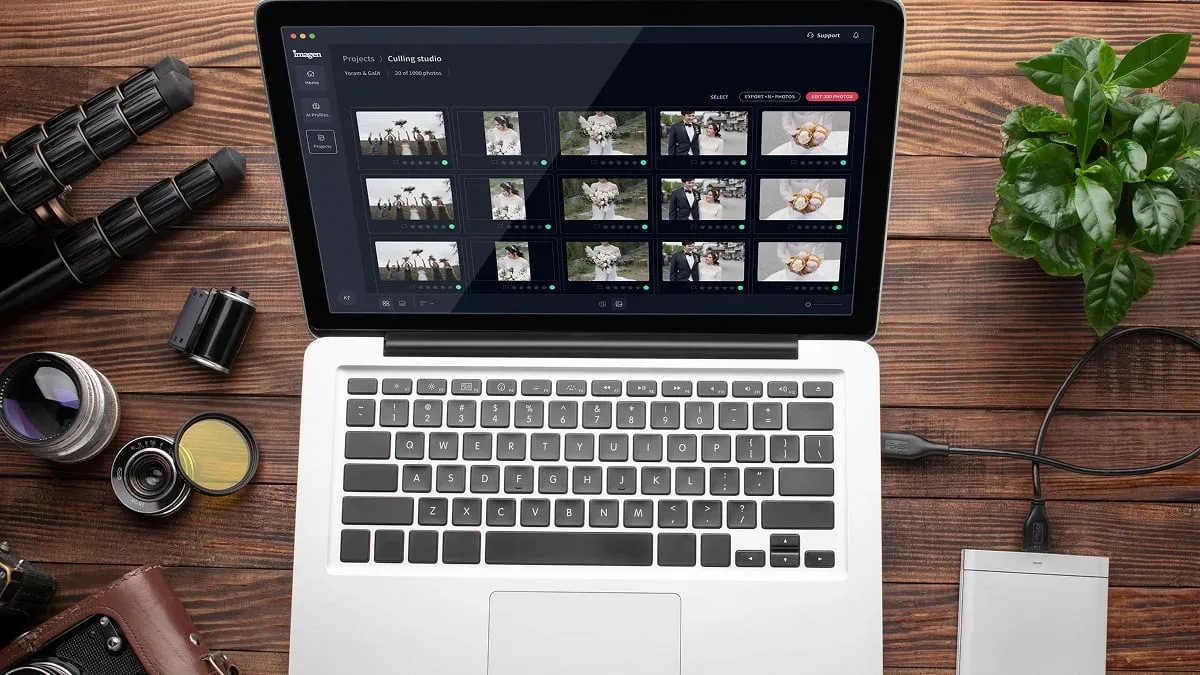
Imagen is a desktop app for Mac and Windows, with the AI processing running in the cloud, built for photographers who shoot high-volume events, and quinceaneras fit that description perfectly. Instead of applying a generic preset, Imagen learns your personal editing style from your own Lightroom or Capture One catalog. It studies how you handle exposure, white balance, tone, and color on your past edits, then applies that same look consistently across an entire shoot. For a quinceanera that means the church ceremony frames, the outdoor portrait session, and the reception dance shots all carry your signature, even when the lighting changes from window to stage to disco color.
Imagen is not an image generator. It edits, culls, and retouches the real photos you captured. AI culling scans large galleries and flags the keepers, cutting the tedious first pass on thousands of frames. AI retouching smooths skin naturally while keeping the girl’s features authentic, which matters for close-up gown and tiara portraits. Because culling, editing, and retouching live in one connected workflow, you move from import to a polished gallery without bouncing between tools, and a built-in editor (Beta) lets you adjust frames by hand without leaving Imagen.
Pricing is pay-as-you-go: a monthly base fee plus a charge for the photos you export, with current rates on the pricing page. You pay at export, and you see every edit in the gallery first. That structure suits event shooters who prefer paying per export on top of the base fee rather than a subscription sized for peak volume.
Try Imagen for free and edit your first quinceanera gallery in your own style.
2. Adobe Lightroom
Adobe Lightroom remains the backbone of most professional photo workflows, and it is a dependable choice for quinceanera galleries. Its AI-powered features have grown steadily, with denoise, adaptive presets, and AI masking that can select the subject, sky, or background automatically. For a quinceanera you can drop a mask onto the gown and lift its saturation, then use a separate mask to warm the skin without touching the fabric. That level of targeted control is valuable when a bold red or turquoise dress needs to pop against a busy reception background.
Lightroom also syncs across desktop and mobile, so you can start culling on a laptop and finish selects on a tablet. It does not learn your personal style the way a dedicated AI editor does, so consistency across a large gallery still depends on your presets and manual sync. Pricing follows a subscription model through Adobe’s photography plans.
3. Aftershoot
Aftershoot is built around culling and editing for high-volume shooters, which makes it a natural fit for event photographers. Its culling engine sorts thousands of frames quickly, detecting blinks, blur, and duplicates so you spend less time on the first pass of a packed quinceanera gallery. The editing side learns from your past edits and applies a matching style, giving you consistency across the ceremony and reception without editing every frame by hand.
For quinceanera work, the culling speed is the headline benefit, since these celebrations generate huge frame counts during dances and group photos. Aftershoot works alongside Lightroom rather than replacing it, so it slots into an existing catalog-based routine. Pricing follows a subscription model with tiers based on your volume.
4. Evoto
Evoto focuses on AI retouching, and portrait-heavy work is where it shines. For a quinceanera, the formal portraits of the honoree in her gown are the shots that get printed large and framed, so skin, hair, and makeup detail matter. Evoto handles skin smoothing, blemish removal, teeth whitening, and even makeup adjustments in batch, so you can apply a consistent retouch across a full set of portraits rather than editing each face individually.
Its batch retouching keeps results natural when dialed in carefully, which helps preserve the young subject’s authentic look. Evoto is strongest as a retouching layer, so many photographers pair it with a color and culling tool rather than using it as an all-in-one. Pricing uses a per-image credits model alongside subscription options.
5. Luminar Neo
Luminar Neo from Skylum leans into creative AI edits, and it can add polish to quinceanera portraits with minimal effort. Its tools include AI relighting that reshapes the light in a scene, sky replacement for outdoor portrait sessions, and portrait enhancers that refine skin and eyes. When a reception hall throws harsh mixed color across faces, the relight and color tools can rescue frames that would otherwise be tricky to balance.
Luminar Neo works both as a standalone editor and as a plugin for Lightroom or Photoshop, so it fits into a hybrid workflow. It is more about creative enhancement than fast bulk culling, so it suits photographers who want expressive edits on hero shots. Pricing is available as both a subscription and a one-time license.
6. Topaz Photo AI
Topaz Photo AI specializes in image quality repair, and quinceaneras produce plenty of frames that need it. Dark reception halls push cameras to high ISO, which introduces noise, and fast dances cause motion softness. Topaz sharpens, denoises, and upscales with AI models that recover detail while keeping results clean. For a low-light dance frame that captured a perfect emotional moment but looks noisy, Topaz can make it deliverable.
It is not a full culling or color grading suite, so it works best as a finishing and rescue step in your pipeline. Many photographers run their selects through Topaz before final delivery or large prints. Pricing follows a one-time license model with optional upgrade periods.
7. Capture One
Capture One is prized for its color handling, which is a meaningful advantage for quinceanera photography where gown color fidelity carries the whole story. Its color editor lets you isolate and adjust specific hues with precision, so a vivid magenta or emerald dress renders true rather than clipping. The tethering and layered editing tools are strong for studio-style portrait sessions before the main celebration.
Capture One has added AI-assisted features and continues to refine its masking and culling, though many shooters choose it primarily for raw rendering and color control. It suits photographers who prioritize deep, precise adjustments over the fastest possible bulk automation. Pricing is available as both a subscription and a one-time license.
8. Adobe Photoshop
Adobe Photoshop is the tool you reach for when a single hero image needs pixel-level attention. For a quinceanera that might mean removing a distracting exit sign behind the honoree, compositing the best group shot where one person blinked, or refining a detailed edit on the crown and dress. Its generative and AI tools, including generative fill and neural filters, speed up complex retouching that catalog editors cannot match.
Photoshop is not built for editing hundreds of frames quickly, so it serves as a precision finishing station rather than a bulk gallery tool. Pair it with a fast AI editor for the full set, then bring your handful of feature images into Photoshop. Pricing follows a subscription model through Adobe’s plans.
Quick Comparison Table
| Tool | Best for | Pricing model |
|---|---|---|
| Imagen | Learning your style and editing, culling, and retouching full galleries | Pay-as-you-go: monthly base fee plus export charge |
| Adobe Lightroom | Core catalog editing with AI masking | Subscription |
| Aftershoot | Fast culling of high-volume events | Subscription |
| Evoto | Batch portrait retouching | Per-image credits |
| Luminar Neo | Creative relighting and enhancement | Subscription or one-time license |
| Topaz Photo AI | Noise, sharpness, and detail rescue | One-time license |
| Capture One | Precise color and raw rendering | Subscription or one-time license |
| Adobe Photoshop | Pixel-level edits on hero images | Subscription |
How to Choose the Right AI Quinceanera Editor
Start with your volume. A quinceanera can deliver thousands of frames, so if culling and editing speed are your bottleneck, prioritize a tool that automates both. An editor that learns your personal style, like Imagen, protects your creative look while still moving fast, which matters when you deliver dozens of galleries a season.
Next, think about your existing setup. If your whole business runs through a Lightroom or Capture One catalog, choose tools that integrate with that catalog rather than forcing a rebuild. Then weigh your creative priorities. If gown color fidelity is your obsession, precise color control belongs high on your list. If most of your prints are close-up portraits, natural batch retouching earns its place.
Finally, factor in pricing structure and lighting conditions. Pay-as-you-go suits shooters whose volume changes month to month, while a one-time license or subscription fits steady output. Because quinceaneras mix bright ceremonies with dim, color-lit receptions, make sure your chosen tool handles white balance and noise gracefully across the whole event. Many professionals combine two or three tools, using one for culling and style, another for retouching, and a finishing app for hero shots.
For deeper comparisons across event and portrait niches, see our guides on the best AI photo editing software for photographers, the best AI birthday party photo editing software, and the best AI bridal photo editing software. You can also browse the full Imagen tips hub for more workflow guides.
What’s new in Imagen: Imagen has grown into an intelligent, agentic Studio for professional photographers, where you cull, edit, review, and export in one project, in any order. When a quinceanera gallery runs long, you can ask the assistant in plain language to find photos and act on them, with you steering, or lean on AI filters such as blur and closed eyes to narrow the shoot. Find out more at Imagen, where the Studio is rolling out gradually.
Frequently Asked Questions
Does AI editing keep quinceanera photos looking natural?
Yes, when the tool is set up well. Editors like Imagen learn your own style rather than forcing a heavy look, so results match how you already edit. Natural retouching that keeps the honoree’s real features is a matter of dialing in the strength and reviewing your selects before delivery.
Can these tools handle the mixed lighting at a reception?
Most can, though results vary. Tools that learn your white balance and tone choices apply consistent corrections across ceremony, portrait, and reception frames. For very dark or noisy dance shots, a dedicated rescue tool such as Topaz Photo AI helps clean up detail before final export.
Are any of these tools image generators?
No. Every tool in this list edits the real photos you captured. They cull, color, retouch, and repair actual frames from the celebration rather than creating synthetic images, which keeps your work authentic and true to the day.
What is the fastest way to edit a large quinceanera gallery?
Combine AI culling with style-based editing in one workflow. Imagen does this by flagging keepers, applying your personal style, and retouching in a connected process, with edited photos arriving in batches as they process, so you move from thousands of raw frames to a finished gallery in a fraction of the usual time.
Conclusion
Quinceanera photography rewards speed and consistency, and the right AI editor gives you both without sacrificing your creative voice. Each tool here has a clear strength, from Capture One’s color precision to Topaz’s detail rescue to Photoshop’s pixel-level control. For the core job of editing, culling, and retouching a full celebration in your own style, Imagen’s new Studio is the standout because it learns how you edit and applies it across the entire shoot, with culling, editing, review, and export together in one project. Start your free trial and see how much faster your next quinceanera gallery comes together.

