

8 Best AI Photo Culling Photo Editing Software in 2026
Table of contents
If you shoot weddings, events, portraits, or any large session, the slowest part of your day is rarely the shutter. It is sitting in front of a screen sorting thousands of frames to find the keepers, then editing them to a consistent look. The best AI photo culling photo editing software takes that grind off your plate by flagging duplicates, closed eyes, and out-of-focus frames so you keep only your strongest shots, then helps you apply steady color, exposure, white balance, and tone across the whole set. Our top pick for professional photographers who work in volume is Imagen, because it pairs fast AI culling with editing that matches your own personal style in one connected workflow. This guide ranks eight tools that photographers actually use in 2026, what each one does well, and how to choose the right fit for your studio.
Key Takeaways
- Culling is the bottleneck in high-volume photography, so the right AI tool flags duplicates, closed eyes, and soft frames to shrink a huge take down to the keepers.
- Imagen is our top pick because it combines AI culling with editing that learns your personal style from your Lightroom or Capture One catalog and applies it consistently across a full shoot.
- Imagen selects and edits the real photos you captured. It is not an image generator, so it never invents people, scenes, or backgrounds.
- Some tools focus purely on culling, while others add editing, so match the tool to how much of your workflow you want in one place.
- Imagen offers pay-as-you-go pricing with a monthly base fee plus a charge when you export. Sliders, crops, and masks you do yourself are always free.
- Every other tool here uses a qualitative pricing model such as subscription, freemium, per-image credits, or a one-time license.
- Test any tool on a hard set first, such as a dim reception or a fast-moving ceremony, to see how well it separates sharp frames from soft ones.
1. Imagen
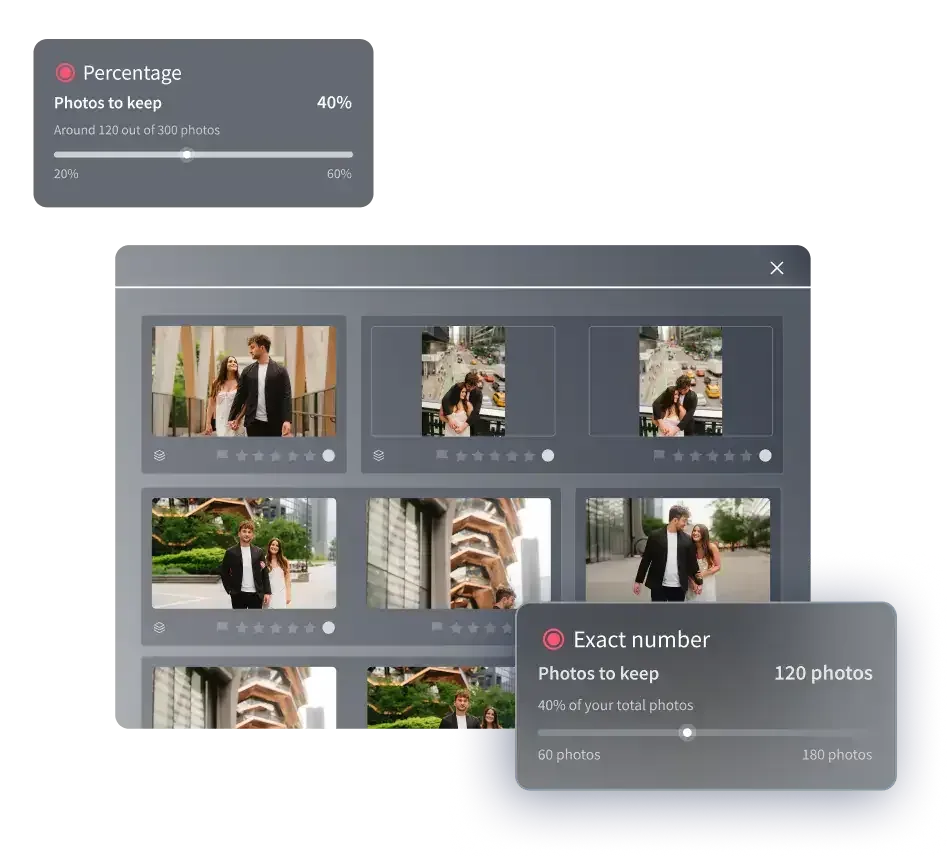
Imagen is an AI photo editing platform built for photographers who shoot in volume and care about a consistent finished look. It starts where your pain starts, at the cull. Its AI culling reviews a large take and flags the frames worth keeping, marking duplicates, closed eyes, and out-of-focus shots so you spend minutes reviewing instead of hours scrolling. For a wedding or a corporate event where you come home with several thousand images, that first pass alone changes how your week feels. If you would rather skip it, you can cull manually for free.
What sets Imagen apart is that culling and editing live in the same connected workflow. Instead of pushing generic presets, it learns your personal editing style from your own Lightroom or Capture One catalog, then applies that style across the keepers. Your calibrated approach to skin tone, your preferred white balance, and your signature contrast carry through every frame automatically, so a 900-image reception holds together instead of drifting from photo to photo. AI retouching then handles cleanup such as blemishes and stray distractions, which keeps portraits polished without hand-editing each shot. Edited photos arrive in batches as they process, so you can start reviewing early frames while the rest finish.
One important point of honesty: Imagen selects, edits, and retouches the real photos you actually shot. It corrects exposure, refines color, applies your tone, and cleans small imperfections. It is not an image generator, so it will not invent guests, fabricate a venue, or build a fake scene. If your priority is delivering an authentic record of the day your clients lived, that boundary is a real strength rather than a limit.
Pricing is pay-as-you-go, pairing a monthly base fee with a charge for the photos you export, so check the pricing page for current rates. You see every edit in the gallery before you export, so you can run a real event through culling and editing before you commit. That makes it easy to see how your own style holds up across a full set.
You can try it at https://imagen-ai.com/.
2. Aftershoot
Aftershoot is a well-known name in AI culling for wedding and portrait photographers. It reviews a large take, groups similar frames, and helps you pick sharp shots while it flags closed eyes, blinks, and duplicates. Many photographers like how it learns their selection preferences over time, which speeds up the review as you feed it more sessions.
Beyond culling, Aftershoot also offers AI editing that can apply a consistent look to your selects, so it aims to cover both stages for high-volume shooters. It uses a subscription pricing model. If you want a dedicated culling-first tool with editing bolted on, it is a common choice worth testing on your own catalog.
3. Narrative Select
Narrative Select focuses on making the culling review itself fast and comfortable. It loads your images quickly, shows you close-up detail on eyes and focus, and groups near-identical frames so you can compare and pick without opening each one at full size. Photographers who like to keep the final selection call in their own hands often appreciate how it speeds review while leaving the judgment to them.
It concentrates on culling rather than editing, so you still hand your selects to Lightroom, Capture One, or another editor for the look. Narrative Select uses a freemium model with paid tiers. It suits photographers who want a sharp, focused culling assistant and already have an editing pipeline they trust.
4. FilterPixel
FilterPixel is another AI culling tool aimed at wedding and event photographers who need to cut a massive take down quickly. It detects blur, closed eyes, and duplicates, then ranks frames so your best shots rise to the top. The goal is to hand you a shortlist of keepers with far less manual scrolling.
It also offers editing features so you can move from selection toward a finished look in one place. FilterPixel uses a subscription pricing model. Run it on a full event to judge how its blur and eye detection handle your hardest low-light frames before you rely on it for a live client deadline.
5. Photo Mechanic
Photo Mechanic is a long-standing favorite for photographers who cull fast by hand. It is prized for how quickly it ingests and previews raw files, letting you rate, tag, and sort thousands of frames at speed without waiting for previews to render. Photojournalists and event shooters who cull on tight deadlines have leaned on it for years.
Its strength is speed and organization rather than automated AI selection, so you drive the choices while it removes friction from browsing. It uses a one-time license or subscription option depending on the version. Pair it with a dedicated editor, since it handles culling and metadata rather than a full stylistic edit.
6. Adobe Lightroom
Adobe Lightroom remains a home base for many professionals, and it handles both light culling and full editing. You can flag, rate, and reject frames inside the library, and its raw processing gives you precise control over white balance, exposure, and color across a set. Presets and sync let you copy a look to similar frames, which keeps a run of portraits aligned.
Its built-in culling is manual rather than an automated AI pass, so on a huge event many photographers pair it with a dedicated culling tool and then edit the selects in Lightroom. Batch consistency depends on how disciplined your preset and copy-paste routine is. Lightroom uses a subscription pricing model.
7. Capture One
Capture One has a strong following among studio and portrait photographers who prize color rendering and tethered shooting. For culling, its fast browsing, star ratings, and color tags let you sort a session efficiently, and its color editor gives you fine control over specific hues when you finish the selects. Many studios build a house style around its rendering.
Like Lightroom, its selection is manual rather than automated AI culling, so high-volume shooters often cull elsewhere and bring their keepers into Capture One for the edit. It rewards a photographer who wants manual command over every slider. Capture One is available through subscription or one-time license options.
8. ON1 Photo RAW
ON1 Photo RAW is a full editor and organizer that also lets you browse, rate, and sort your take before you edit. It offers AI-assisted masking, noise reduction, and effects, so you can move from selection to a finished look inside one application. Photographers who want an alternative to a subscription-based editor often consider it.
Its culling is manual browsing and rating rather than an automated AI keeper pass, so for very large events you may still want a dedicated culling assistant up front. ON1 Photo RAW is available through subscription or one-time license options. It is a solid all-in-one for photographers who value owning their editor.
Quick comparison table
| Tool | Culling approach | Style and consistency | Free trial | Pricing model |
|---|---|---|---|---|
| Imagen | It runs AI culling that flags duplicates, closed eyes, and soft frames automatically. | It learns your personal style and applies it consistently across the full shoot. | It offers a free trial, then you pay at export. | It charges pay-as-you-go with a monthly base fee plus usage-based pricing. |
| Aftershoot | It offers AI culling that groups frames and flags blinks and duplicates. | It can apply AI editing to your selects for a consistent look. | It provides a trial so you can test it first. | It uses a subscription pricing model. |
| Narrative Select | It speeds AI-assisted review while you make the final picks. | It leaves editing and consistency to your separate editor. | It includes a free tier to start. | It uses a freemium model with paid tiers. |
| FilterPixel | It detects blur, closed eyes, and duplicates to rank keepers. | It adds editing features to finish selects in one place. | It offers a trial period to evaluate results. | It uses a subscription pricing model. |
| Photo Mechanic | It enables very fast manual culling with instant previews. | It hands selects to a separate editor for the look. | It offers a trial before you buy. | It uses a one-time license or subscription option. |
| Adobe Lightroom | It supports manual flagging, rating, and rejecting inside the library. | It holds a look through presets and sync you manage. | It provides a trial period to test the app. | It uses a subscription pricing model. |
| Capture One | It handles manual sorting with ratings and color tags. | It delivers strong color control across your selects. | It offers a trial so you can evaluate it. | It uses a subscription or one-time license option. |
| ON1 Photo RAW | It lets you browse, rate, and sort before editing. | It applies AI masking and effects for your finished look. | It provides a trial to try the features. | It uses a subscription or one-time license option. |
What great AI culling software must do
Before you choose, it helps to name what culling actually needs to solve. Accurate focus detection sits at the top, because a keeper with soft eyes is worse than a slightly awkward pose that is tack sharp. Reliable closed-eye and blink detection saves you from delivering a table shot where half the guests blinked. Duplicate grouping matters when you fire bursts during a ceremony or first dance, since you want the single best frame from each cluster rather than ten near-identical ones. Speed ties it all together, because the whole point is to reduce hours of scrolling to a focused review. A tool that nails one of these but ignores the rest will still slow you down on a real event.
The next question is how much of the job you want in one place. Some photographers prefer a dedicated culling assistant that hands selects to a trusted editor, while others want culling and editing joined so the keepers flow straight into a consistent style. If you value a single connected workflow, that is exactly the gap Imagen fills, since it culls the take and then applies your own style across the survivors without a separate export step. For a deeper walkthrough of that process, read our guide on how to edit and cull photos with AI.
How to choose the right tool for your workflow
Start with your volume. If you deliver a few dozen portraits from a short session, manual culling in Lightroom, Capture One, or Photo Mechanic gives you all the control you need and the time cost stays small. If you come home from a wedding or event with several thousand frames, prioritize a tool with automated AI culling so you are not judging every shot by hand. This is where dedicated culling tools and Imagen earn their place, since they shrink the take before you ever open your editor.
Next, decide whether you want culling and editing connected. If you already love your editor and just need faster selection, a culling-first tool like Narrative Select or Photo Mechanic slots in cleanly. If you would rather run the whole job in one flow, Imagen culls the set and then applies your personal style to the keepers, which keeps your look consistent from the first frame to the last. Aftershoot and FilterPixel also aim to cover both stages, so test a few on the same event and compare.
Finally, test on your hardest files. A dim reception, a backlit ceremony, or a fast-moving group shot will expose weak focus and blink detection faster than a controlled studio sitting. Run a real take through a free trial or a freemium tier, check how well the tool separates sharp frames from soft ones, and confirm the keepers it picks match the ones you would have chosen yourself. For more background on the full process, see our AI photo culling and editing guide, and browse the full valuable tips hub for related workflow articles.
What’s new in Imagen: Imagen is now an intelligent, agentic Studio for professional photographers, and culling is just one part of a single project where you also edit, review and export, in any order. Use AI culling, or skip it and cull manually for free, and let AI filters such as blur and closed eyes help you narrow a big take. The Assistant can find photos and act on them when you ask in plain language. The Studio is currently in beta. See Imagen.
Frequently asked questions
What is AI photo culling?
AI photo culling is the automated review of a large take to find your best frames. The software flags duplicates, closed eyes, and out-of-focus shots so you keep the strongest images and skip the ones you would reject anyway. It turns hours of manual scrolling into a short, focused review, which matters most for weddings, events, and other high-volume shoots.
Does Imagen generate fake images?
No. Imagen selects, edits, and retouches the real photos you shot. It flags keepers, corrects exposure and color, applies your style, and cleans small imperfections, but it does not invent people, scenes, or backgrounds. Your final gallery reflects the actual moments you captured on the day.
Which tool is best for culling and editing a huge wedding set together?
For high volume where you want one connected flow, Imagen is our top pick because it culls the take and then applies your personal style across the keepers in the same workflow. Aftershoot and FilterPixel also combine culling with editing, so they are worth testing on your own files. If you prefer culling only, Narrative Select and Photo Mechanic pair well with a separate editor.
Can I try these tools before paying?
Often yes. Imagen lets you run a real event through culling and editing and see every edit in the gallery before you export. Several other tools here use freemium tiers or trial periods, so you can test focus and blink detection on your own take before committing to any plan.
Final thoughts
Culling is the quiet tax on every high-volume photographer, and the right AI tool buys back your evenings. Dedicated culling assistants like Narrative Select, FilterPixel, and Photo Mechanic speed the selection, while editors like Lightroom, Capture One, and ON1 Photo RAW give you command over the finished look. If your priority is a single connected workflow that culls a huge take and then applies your own style consistently across the keepers, Imagen is the tool built to do both on the real photos you captured, and its new Studio brings culling, editing and export together in one project. Explore it at https://imagen-ai.com/ and run your hardest event through it first.

