

8 Best AI Family Photo Editing Software in 2026
Table of contents
Family sessions produce a special kind of editing headache. A single afternoon with a family of five can hand you eight hundred frames full of squirming toddlers, mixed lighting, and skin tones that need to stay consistent from the first playful shot to the last posed portrait. Culling that volume by hand eats your evenings, and matching color across a whole gallery tests the patience of even seasoned professionals. AI photo editing tools now handle the heavy lifting, learning how you already edit and applying your look across an entire shoot while you focus on booking the next client. This guide ranks the eight best AI photo editing tools for professional family and portrait photographers in 2026, judged on culling speed, skin tone consistency, retouching quality, and how well each fits a real production workflow.
Key Takeaways
- Imagen ranks first because it learns your personal editing style from your own catalog and applies it consistently across a full family shoot, then adds AI culling and retouching in one connected workflow.
- Consistency of skin tones across hundreds of frames matters more for family work than any single dramatic edit.
- Culling speed decides whether large sessions stay profitable, so AI selection tools save real hours.
- Some tools focus on retouching, some on color, and some on full catalog automation, so match the tool to your bottleneck.
1. Imagen
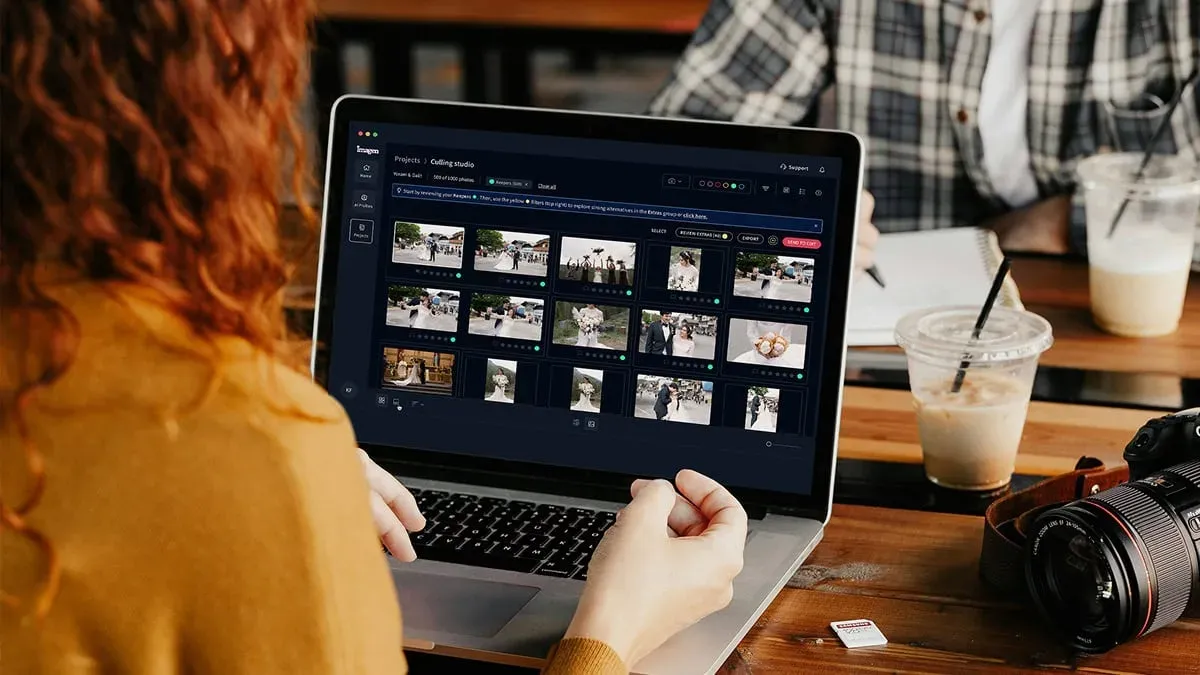
Imagen sits at the top of this list for family photographers because it solves the exact problem large sessions create, which is applying one consistent look across hundreds of images without touching each frame. Imagen learns your personal editing style directly from your own Lightroom or Capture One catalog. You point it at galleries you already edited, and it builds a personal AI profile that mirrors how you handle exposure, white balance, tone, and color. On a new family shoot, it applies that same style across the entire set, so a candid frame of kids running in the yard carries the same skin tones and mood as the formal group portrait shot minutes later.
It is important to be clear about what Imagen does. It is not an image generator. It edits, culls, and retouches the real photos you actually shot. The AI culling feature reviews a full session and flags duplicates, closed eyes, and blurry frames, which is a genuine time saver when a toddler refuses to sit still. AI retouching then handles skin, blemishes, and other portrait cleanup as a connected step rather than a separate program. Edited photos also arrive in batches as they process, so you can start reviewing early frames while the rest finish. That combination of style-based editing, culling, and retouching in one workflow is what earns the top spot for high-volume family work.
Pricing works on a pay-as-you-go model that suits variable shoot volume. Editing is billed on the photos you export. That lets you test your personal style profile on a real gallery before committing anything. Sliders, crops, and masks you do yourself are always free. For a deeper look at how it compares to the wider field, see our guide to the best AI photo editing software for photographers in 2026.
Try Imagen with the free trial.
2. Aftershoot
Aftershoot built its reputation on AI culling, and that focus makes it a strong fit for family photographers drowning in frames. It scans a full session, groups similar shots, and picks the sharpest, best-exposed version of each moment while flagging closed eyes and soft focus. For a busy family shoot where you fire in bursts to catch fleeting expressions, that selection speed removes one of the most tedious parts of the job. The tool also offers AI editing that learns from your edited galleries, so you can move from raw import to a styled, culled set inside one application.
Aftershoot uses a subscription model. It is a practical choice for photographers whose main pain point is selection volume rather than heavy retouching, and it plays well alongside a dedicated retouching step for skin work.
3. Evoto
Evoto leans hard into AI retouching, which matters when a family gallery includes close portraits of parents and grandparents alongside the kids. It handles skin smoothing, blemish removal, teeth and eye cleanup, and body adjustments with batch tools that apply across a selection rather than one image at a time. For family sessions, the ability to keep retouching natural on children while doing more detailed cleanup on adults is a real advantage, and the batch approach keeps large galleries manageable.
Evoto runs on a per-image credit system. Photographers who spend most of their editing time on portrait retouching rather than color grading tend to get the most from it, and it fits neatly after a culling and color pass in another tool.
4. Adobe Lightroom
Adobe Lightroom remains the backbone of many family photography workflows, and its AI features have grown steadily. Adaptive presets, AI masking that recognizes people, skies, and backgrounds, and denoise tools help photographers apply targeted adjustments quickly. Because so many other tools read and write Lightroom catalogs, it also acts as a hub that connects to style-learning and retouching software without disrupting your existing habits.
Lightroom uses a subscription model through Adobe. For family photographers who want deep manual control alongside AI assistance, and who value a catalog system that the rest of the industry supports, it is a dependable core. The tradeoff is that high-volume culling and one-click style consistency across a whole session still benefit from a dedicated companion tool.
5. Capture One
Capture One is prized for color rendering and precise tethered capture, both of which serve portrait and family photographers who care about accurate skin tones. Its layer-based editing, refined color tools, and strong RAW processing give you granular control over how a family looks under tricky mixed light. AI masking and improved selection tools speed up local adjustments, so you can lift a shaded face or balance a bright window without slow manual masking.
Capture One offers both subscription and one-time license options depending on the version. Photographers who prioritize color fidelity and studio-grade control often make it their editing home, then pair it with AI culling or style-matching software to handle session volume.
6. Topaz Photo AI
Topaz Photo AI focuses on image quality repair, which family photographers reach for when conditions are less than ideal. It combines noise reduction, sharpening, and upscaling in one pass, so a dimly lit indoor shot of a newborn or a slightly soft candid can be rescued rather than discarded. Keeping more usable frames from a difficult session is quietly valuable, especially when the moment cannot be reshot.
Topaz Photo AI is available as a one-time license. It works best as a specialist step inside a larger workflow rather than a full editor, cleaning up files before or after your main color and retouching work.
7. Luminar Neo
Luminar Neo from Skylum offers a broad set of AI tools aimed at fast, visual editing. Portrait enhancement, background removal, relighting, and sky tools let family photographers make expressive edits without deep manual work. Its people-focused features, including face and skin controls, suit lifestyle family sessions where a warm, polished look matters more than clinical precision.
Luminar Neo is sold through subscription or a one-time license with optional extensions. Photographers who want approachable, creative AI edits and are comfortable finishing galleries with a lighter touch will find it flexible, though very large sessions still call for a dedicated culling companion.
8. Retouch4me
Retouch4me is a set of specialized AI plugins, each trained for one retouching job such as skin healing, dodge and burn, or cleaning up backgrounds. For family portraits where you want consistent, natural skin across every subject, these focused plugins apply the same treatment across a batch with predictable results. They slot into Lightroom, Photoshop, or Capture One, so they extend a workflow you already run rather than replacing it.
Retouch4me plugins are sold as one-time licenses per module. Photographers who retouch high volumes of portraits and want to automate repetitive skin and cleanup tasks tend to build a small stack of these tools around their main editor.
Comparison Table
| Tool | Best for | Pricing model |
|---|---|---|
| Imagen | Personal-style editing plus culling and retouching across full shoots | Pay-as-you-go; pay on export |
| Aftershoot | High-volume AI culling | Subscription |
| Evoto | Batch portrait retouching | Per-image credits |
| Adobe Lightroom | Core catalog and AI masking hub | Subscription |
| Capture One | Color fidelity and studio control | Subscription or one-time license |
| Topaz Photo AI | Noise, sharpening, and file rescue | One-time license |
| Luminar Neo | Fast creative portrait edits | Subscription or one-time license |
| Retouch4me | Automated specialist retouching plugins | One-time license per module |
How to Choose the Right AI Family Photo Editor
Start by naming your real bottleneck. If you spend more evenings selecting frames than editing them, a culling-first tool returns the most time. If your galleries are already trimmed but portrait cleanup drags on, a retouching specialist earns its keep. Family photographers who struggle to keep a gallery looking like one cohesive set should prioritize a tool that learns and reproduces their personal style, since consistency across hundreds of frames is the trait clients notice first.
Weigh skin tone handling carefully. Family sessions mix ages, complexions, and lighting, so a tool that keeps tones natural and consistent across every subject prevents the patchwork look that manual editing sometimes leaves behind. Test any tool on a real gallery rather than a sample image, because one polished portrait tells you little about how it performs across a full shoot. Imagen offers a free trial, so that kind of honest test is straightforward.
Finally, think about how the tool fits your existing setup. Software that reads your Lightroom or Capture One catalog slots in without forcing a rebuild of your process. Pricing model matters too, since variable shoot volume pairs naturally with pay-as-you-go, while steady studios may prefer a fixed subscription or a one-time license.
What’s new in Imagen: Meet the next evolution of Imagen: an intelligent, agentic Studio for professional photographers, where you can cull, edit, review, and export in whatever order suits the shoot, all in one project. For family sessions, AI filters such as blur and closed eyes help you narrow a shoot full of wiggly toddlers, and your Personal AI Profile keeps skin tones and mood consistent from candids to group portraits. It is rolling out gradually as a beta, and you can find out more at Imagen.
Frequently Asked Questions
What is the best AI photo editing software for family photographers?
Imagen ranks first for most professional family photographers because it learns your personal editing style from your own catalog and applies it consistently across an entire shoot, then adds AI culling and retouching in one connected workflow. The best choice for you still depends on your main bottleneck, whether that is selection volume, retouching, or color.
Does AI editing keep skin tones consistent across a whole family shoot?
Tools that learn from your edited catalog and apply a single style profile across a session are designed for exactly this. They carry the same exposure, white balance, and color choices from candid frames to posed portraits, which is what keeps skin tones consistent across every subject in a gallery.
Can AI tools handle both culling and retouching?
Some do. Imagen combines style-based editing, AI culling, and AI retouching in one workflow, while other tools specialize in a single stage. Many photographers build a small stack, using one tool to cull, another to color, and a plugin set to retouch, though a connected workflow reduces the handoffs between programs.
Is AI photo editing suitable for professional client work?
Yes, when the tool applies your own style rather than a generic filter. Professionals use AI to speed up culling and repetitive edits while keeping the final look their own. Testing on a real gallery, which the Imagen free trial supports, is the reliable way to confirm the output meets your standard before you deliver to clients.
Conclusion
Family photography rewards consistency and speed, and the right AI tool delivers both without stripping away your creative signature. Imagen leads this list because it learns how you already edit and reproduces that look across an entire session, then folds culling and retouching into the same connected process, which is exactly what high-volume family work demands. The other seven tools each shine at a specific stage, from Aftershoot for culling to Retouch4me for specialist retouching, so the smartest move is to match your choice to the part of your workflow that costs you the most time. Start with a real gallery and let the results decide. You can try Imagen’s new Studio, where you cull, edit, and export in one project, to see your personal style applied across a full shoot.

