

Building a Faster Photo Culling Workflow for Wedding Photographers
Table of contents
- Key Takeaways
- Why Culling Is the Wedding Photographer’s Real Bottleneck
- Step 1: Ingest and Back Up Before You Cull
- Step 2: Make One Fast, Decisive First Pass
- Step 3: Solve the Burst-Duplicate Problem
- Step 4: Let AI Culling Remove the Heavy Lifting
- Step 5: Do a Final Human Review of the Keepers
- Step 6: Flow Straight From Culling Into a Consistent Edit
- Step 7: Handle Specialty Fixes as a Separate Step
- Common Culling Mistakes That Slow Wedding Photographers Down
- Putting the Culling Workflow Together
- Frequently Asked Questions
- Conclusion
A wedding can leave you with three or four thousand frames, and the single slowest part of delivery is rarely the editing. It is the culling: the long, quiet hours of clicking through near-identical shots, weeding out blinks and missed focus, and choosing the one keeper from a burst of eight. For most wedding photographers, culling is the real bottleneck between the last dance and a delivered gallery. The fastest way to fix that is a repeatable culling workflow, a fixed order of operations that gets you from a full card to a clean set of keepers with as few decisions and as little second-guessing as possible.
This guide walks through a practical culling workflow built for wedding volume. You will see how to prepare your files, how to make a fast first pass without agonizing over every frame, how to handle burst duplicates and expression checks, where AI culling removes the heaviest lifting, and how culling and editing fit together into one smooth pipeline. The aim is simple: cut the time you spend selecting images, protect your turnaround promise, and get your evenings back without lowering the quality of the final gallery.
Key Takeaways
- Culling is the wedding bottleneck. The selection pass, not the editing, is usually what eats your nights, so that is where the biggest time savings live.
- One fast pass beats several slow ones. A decisive first review with simple rules moves quicker than repeated rounds of maybe-piles.
- Burst duplicates are the hidden time sink. Choosing one frame from a sequence of near-identical shots is where most culling hours disappear.
- AI culling removes the heavy lifting. A tool that flags blinks, blur, and near-duplicates lets you review the take far faster than manual clicking.
- Culling and editing belong in one pipeline. When selection flows straight into a consistent batch edit, the whole gallery reaches the client sooner.
Why Culling Is the Wedding Photographer’s Real Bottleneck
Weddings produce enormous frame counts for a reason. You shoot in bursts to catch the perfect expression during the vows, you bracket around the first kiss, you fire continuously through the confetti exit, and you cover every angle of the reception because the moment only happens once. That coverage protects you on the day, but it hands you a mountain of near-duplicates afterward. Out of a four thousand frame take, maybe six hundred to eight hundred become the delivered gallery, which means the majority of your post-production decisions are about what to cut, not how to edit.
That is why culling deserves its own dedicated workflow rather than being treated as a warm-up to editing. Every hour you shave off selection is an hour saved on every single wedding you shoot, all season long. And because culling is repetitive and mentally draining, it is exactly the kind of task where fatigue leads to inconsistent choices: you are generous early in the take and ruthless by the end, or the other way around. A structured, repeatable process keeps your standard steady from the first frame to the last and stops the selection pass from swallowing your week.
Step 1: Ingest and Back Up Before You Cull
Speed starts before you reject a single frame. Build a fixed ingest routine so every wedding lands in the same place with the same structure. Offload both card slots to a working drive, immediately clone that to a second backup, and only then open the take for culling. A consistent folder scheme, dated and named by couple and event stage, means you never lose minutes hunting for the getting-ready shots or the reception coverage later.
Shoot RAW so you keep the most latitude for exposure and color recovery, which matters when a wedding day swings from a bright outdoor ceremony to a candle-lit dinner to a dark dance floor. Culling from RAW also means the frames you keep are ready for a high-quality edit with no re-import step. This ingest stage feels boring, but it is the foundation the whole pipeline rests on. Scramble your files once and the time cost dwarfs any culling shortcut.
Step 2: Make One Fast, Decisive First Pass
The most common culling mistake is turning it into several slow rounds of indecision. Instead, make a single fast first pass whose only job is to reject the obvious throwaways: closed eyes, clearly missed focus, awkward mid-motion frames, accidental shots of the floor, and the test frames you fired to check your settings. Do not agonize here. If a frame is plainly not a keeper, cut it and move on. You are not choosing the gallery yet, you are removing everything that could never be in it.
Do this in one focused sitting with full-screen review and quick keyboard flags rather than dragging it across days. Adopt a simple rule that keeps you moving: if you hesitate for more than a second or two, it is probably a cut. The goal of this pass is momentum. Getting the take down from four thousand frames to a couple thousand quickly makes every later decision lighter, because you are no longer wading through obvious rejects to find the real contenders.
Step 3: Solve the Burst-Duplicate Problem
Once the obvious rejects are gone, you hit the part of culling that actually consumes the hours: choosing one frame from a burst of near-identical shots. During the vows you may have fifteen frames that differ only by a blink, a half-smile, or a slight head turn. This is genuinely hard, high-value work, because the difference between the pick and the runner-up is the difference between a great gallery image and a forgettable one. It is also where most photographers lose their afternoons.
The manual method is to group each burst, compare the sequence side by side, and check the details that matter most: are both subjects’ eyes open, is the expression genuine, is the focus locked on the eyes. Pick the single strongest frame from each cluster and cut the rest. Done by hand across a full wedding this is slow and tiring, and your accuracy drops as the take goes on. That decline in judgment late in a long session is precisely the problem that AI culling is built to solve.
Step 4: Let AI Culling Remove the Heavy Lifting
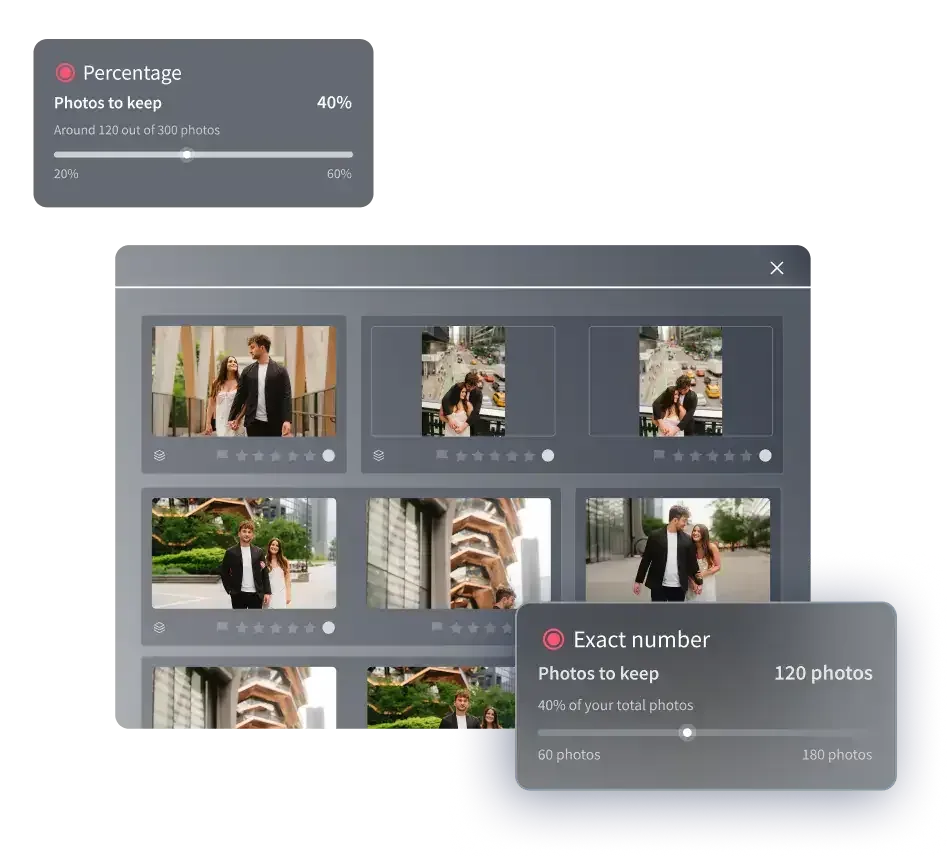
Manual culling with ratings and flags is a real improvement over aimless clicking, but it still leaves you personally inspecting every frame for blinks, soft focus, and duplicates. AI culling takes the next step. A tool can automatically flag closed eyes, out-of-focus shots, and near-identical frames within a burst, then surface the strongest candidate from each group so you review a curated shortlist instead of the raw take. You stay the final judge on every selection, but the machine does the exhausting mechanical sorting that used to eat your evening.
This is where Imagen’s AI wedding photo culling and editing software fits the workflow. Imagen is a desktop app with cloud processing that culls a full wedding by flagging blinks, blur, and duplicate frames, and it also learns your personal editing style through an AI profile so it can batch-edit the keepers to a consistent color and tone right after selection. It is a desktop app with cloud processing, so you upload the take, let the culling pass narrow it down, review and confirm your keepers, and move straight into a uniform edit, with edited photos arriving in batches as they process so you can start reviewing early frames. The photo editing runs on pay-as-you-go pricing, a monthly base fee plus a per-photo charge when you export, so the cost scales with what you actually deliver rather than a flat subscription you may not use every month. Sliders, crops, and masks you do yourself are always free.
The practical payoff for wedding shooters is turnaround. When the culling and the editing both collapse from a long manual grind into a fast, consistent pass, you can deliver sooner, take on more weddings in a season, and stop trading your nights for the light table. The tool does not replace your eye for a genuine expression. It removes the repetitive sorting so your judgment is spent on the choices that matter.
Step 5: Do a Final Human Review of the Keepers
Whether you cull by hand or with AI assistance, always finish with a short human review of the selected set. This is where you confirm the emotional beats of the day are all covered: the getting-ready details, the first look, the vows, the first kiss, the family groups, the speeches, the first dance, and the exit. Culling tools are excellent at technical rejection, catching the blinks and the blur, but you are the one who knows which slightly imperfect frame captures a real, unrepeatable moment that belongs in the gallery.
Keep this pass quick and confident. Its purpose is to check coverage and rescue the rare keeper that a technical filter might have flagged, not to reopen every decision you already made. A tight final review protects you from delivering a gallery with a gap in the story while adding only a few minutes to the process. Once it is done, your keepers are locked and ready to edit.
Step 6: Flow Straight From Culling Into a Consistent Edit
Culling and editing should not be two disconnected projects with a gap between them. The moment your keepers are locked, the next win is applying a consistent look across the whole wedding: correcting exposure, white balance, contrast, and tone so the ceremony matches the reception and the speeches match the dance floor. A gallery that holds a uniform look reads as professional and intentional, while a set that drifts in color and brightness reads as rushed, no matter how good the individual selections were.
The efficient method is to sort your keepers into lighting groups, then apply your look across each group as a batch rather than grading frame by frame. This is where a tool that learns your style earns its place: it can apply your color and tone targets across the entire keeper set and adapt to each frame’s exposure, so the edit finishes in minutes. Because the culling already flowed into the same pipeline, there is no re-import, no re-sorting, and no lost time between selecting the gallery and delivering it.
Step 7: Handle Specialty Fixes as a Separate Step
Some corrections sit outside a culling-and-batch-edit workflow, and it helps to treat them as their own focused step so they do not slow the main pipeline. Removing a stray exit sign or a photobombing guest from behind the couple is object removal work, best done with a dedicated retouching tool on the specific frames that need it. Recovering a blown-out window behind an indoor ceremony by merging bracketed exposures is a true HDR or exposure-blending task for a dedicated bracket-merging tool. Heavy compositing, deep denoise on extreme high-ISO dance-floor frames, and perspective corrections are similar specialty jobs.
The key is to keep these off the critical path. Cull and batch-edit the whole gallery for consistency first, then pull the handful of frames that need a specialty fix into a separate session. That way one tricky window recovery does not hold up the several hundred images that are already selected, edited, and ready to ship to the couple.
Common Culling Mistakes That Slow Wedding Photographers Down
The biggest time sink is the endless maybe-pile. When you defer decisions into a growing pool of frames to reconsider later, you end up reviewing the same images three or four times, which multiplies your culling hours instead of reducing them. Be decisive on the first pass and trust your rejections. The second common trap is editing before you finish culling, grading frames that will never make the gallery and throwing away that work the moment you cut them.
A third mistake is culling while exhausted right after a twelve-hour wedding day, when your judgment is at its weakest and your standard drifts. Schedule the selection pass for a fresh session, or lean on AI culling to carry the mechanical load when you are tired. Finally, many photographers treat culling and editing as separate, disconnected tools with a manual handoff between them, losing time to re-imports and re-sorting. Fixing these habits does more for your speed than any single trick, and pairing them with an AI culling and editing pipeline makes the gains compound.
Putting the Culling Workflow Together
Here is the full loop in order. Ingest and back up on a fixed routine before you touch the take. Make one fast, decisive first pass to remove the obvious rejects. Solve the burst-duplicate problem by picking the single strongest frame from each cluster. Let AI culling flag the blinks, blur, and near-duplicates so you review a shortlist instead of the raw thousands. Do a short human review to confirm the story is fully covered. Then flow straight into a consistent batch edit, and route any specialty fixes into their own separate session.
If you want to see how much time a smarter culling step gives back, the fastest experiment is to run a real wedding through it. You can start on the Imagen homepage, connect your catalog, and try Imagen’s new Studio, where you cull, edit and export in one project, taking a full take from raw card to finished exports so you can feel the difference against your current process. Most wedding photographers find that once the selection grind is off their plate, the turnaround that used to cost them a week of evenings shrinks to a fraction of the time.
What’s new in Imagen: Weddings now fit inside one Imagen project: an intelligent, agentic Studio for professional photographers where you cull, edit, review and export in any order. Use AI culling, or skip it and cull manually for free, then apply a Personal AI Profile learned from your past edits. Edited photos arrive in batches, so you can start reviewing early frames while the rest finish. The Studio is rolling out gradually as a beta.
Frequently Asked Questions
How long should it take to cull a wedding?
Done entirely by hand, culling a full wedding of three or four thousand frames can take several hours of focused clicking, and it often stretches across more than one sitting. With a fast, decisive first pass followed by AI culling that flags blinks, blur, and duplicates, the same take can be narrowed to your keepers far more quickly, because you review a curated shortlist instead of every raw frame. Your final human review then adds only a few minutes to confirm the story is covered.
What is the single fastest way to speed up culling?
Be decisive on your first pass and avoid the maybe-pile. Deferring choices into a pool you reconsider later means reviewing the same frames multiple times, which is the biggest hidden cost in culling. After that, the next biggest lever is AI culling that automatically sorts out blinks, soft focus, and near-duplicates, so your attention goes only to the frames that are genuine contenders.
Can AI culling really pick the right frame?
AI culling is excellent at the technical work of rejecting closed eyes, missed focus, and duplicate frames, and at surfacing the strongest candidate from a burst so you review a shortlist. You stay the final judge, though. A short human review after the automated pass lets you confirm coverage and rescue any slightly imperfect frame that captures a real, unrepeatable moment the couple will want in their gallery.
Should culling and editing be one workflow or two?
They work best as one connected pipeline. When your locked keepers flow straight into a consistent batch edit with no re-import or re-sorting, the whole gallery reaches the couple sooner. A tool that both culls the wedding and learns your editing style to batch-edit the keepers keeps selection and grading in the same place, which removes the manual handoff that quietly costs you time between the two stages.
Conclusion
A faster culling workflow is not about clicking harder at midnight after a wedding. It is about building a system: disciplined ingest, one decisive first pass, a clear method for burst duplicates, AI culling that carries the mechanical load, a short human review to protect the story, and a straight flow into a consistent batch edit with specialty fixes kept off the critical path. Get that loop running and your turnaround stops depending on how many late nights you can survive. For wedding photographers, an AI culling and editing tool is the piece that removes the biggest bottleneck, so you deliver a complete, consistent gallery fast and finally get your evenings back.

