
 Rated 4.8/5
AI Video Color Grading Software for Filmmakers
AI color grading that works while you don't. Designed for Adobe Premiere Pro and DaVinci Resolve workflows to deliver real estate videos by 9 AM.
Compatible with

*No credit card required
Pick a look
Or bring your own
AI Profiles by Imagen
Professionally trained looks, adapted clip by clip across your footage
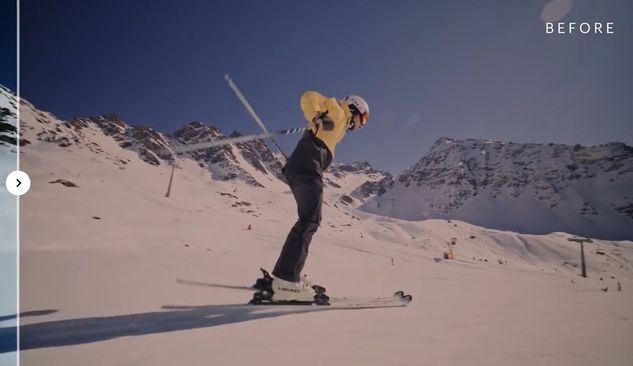
Motion of Light
Brightens your footage with strong contrast and vivid colors.
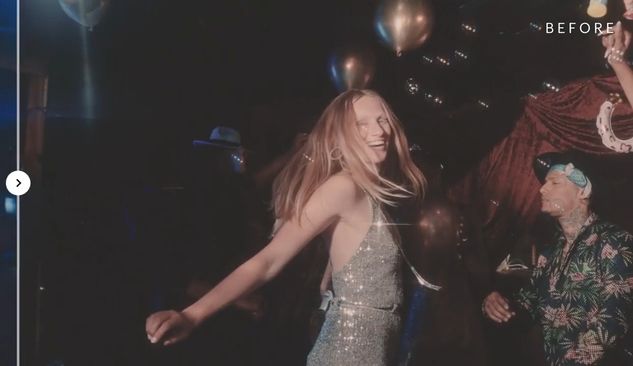
Frame One
Keeps brightness natural with deep contrast and accurate colors.

True to Life
Softens highlights for a dreamy feel with balanced contrast.
Have your own signature look?
Upload your LUTs and Imagen will adapt them to every clip in your footage.
Professional results that speak for themselves

The difference you’ll feel on a Friday afternoon
Deliver galleries by 9 AM
Designed for Adobe Premiere Pro and DaVinci Resolve workflows. Our AI video color grading software for filmmakers applies LUTs clip by clip. Get AI color grading that works while you don't.


Scale your video team
Keep property tours consistent across your team. AI Profiles handle skin tone matching and camera matching automatically. You'll get adaptive AI color grading across your sequence of footage.
Used by editors who got their weekends back

“I was blending shots from different cameras. Imagen blended everything well together. It’s almost too easy”
“Wow. The color correction turned out much better than I expected. Thank you for creating this.”
“I love this software. Cut down my coloring time to mere minutes.”
“I was blending shots from different cameras where student workers used different settings- one in Log, one in auto color.”
“I’ll shoot interviews with two or three cameras, all Sony, using Sony glass- but they never match perfectly.”
“This was great! Nearly spot on in terms of exposure, shadows, highlights, blacks, etc.”
Black Friday offers
Simple plans. Serious results
Good color used to cost a fortune in time. This doesn’t.
Pay-As-You-Go
Black Friday
No commitment. Just process minutes when you need them.
Was US$1now US$0.60/minuteInvoiced monthly
No base fee. Pay only for the minutes you process.
Start for free- Grade any project, pay only for what you use
- Full access to AI Profiles and LUT-based grading
- Perfect for project-based work
- Cancel anytime
Best value
Starter Pack
Black Friday
For editors with consistent workloads. Grade more, pay less per minute.
Was US$30now US$18/monthIncludes 50 minutes (US$0.36 per min)
Extra minutes for just US$0.60 / min
Start for free- Unused minutes roll over
- Full access to AI Profiles and LUT-based grading
- Best per-minute rate
- Cancel anytime
Bigger teams.
Smarter rates.
Talk to us
* Custom pricing
Contact sales- Better rates as your team grows
- Every editor on one account
- One invoice. Zero admin headaches
- Dedicated account support
You’re probably wondering...
What makes this the best AI video color grading software for filmmakers?
No install, no Lightroom required. Imagen Video is cloud based AI Video Color Grading Software for Filmmakers that brings adaptive AI color grading directly to your browser. Designed for Adobe Premiere Pro and DaVinci Resolve workflows, this tool gives real estate videographers perfect color without slowing down their computers. You simply upload your sequence to the cloud through your web browser. Our AI color grading that works while you don't analyzes the footage clip by clip to ensure perfect exposure and white balance. You can apply specific AI Profiles to match your unique editing style. You keep full control over the final look by applying creative or technical LUTs to the graded footage. Because the processing happens in the cloud, you save massive amounts of local computing power. You get consistent skin tone matching across different rooms and accurate camera matching when you shoot a property with several cameras. Once the software finishes the heavy lifting, you download the resulting files right back into your project. This gives you back 96% of the time you normally spend tweaking color wheels. It is the perfect software tool for busy real estate creators who need reliable results fast.
How do I use this software in my daily real estate video editing routine?
You access our software entirely through your web browser. Because there is no install, no Lightroom required to use Imagen Video, you save valuable hard drive space. Designed for Adobe Premiere Pro and DaVinci Resolve workflows, the process fits naturally into your existing habits. You export your raw sequence and upload it to the cloud. Our adaptive AI color grading takes over from there. You get true AI color grading that works while you don't. While you film another property or eat lunch, the software analyzes your video clip by clip. It applies your chosen AI Profiles to correct exposure and white balance automatically. When you return to your computer, you download the graded files from your browser. You can then apply your favorite creative or technical LUTs to give the property a specific mood. The cloud handles the complex camera matching and skin tone matching for you. You drop the finished color back into your project and export the final video for your listing agent. This software workflow cuts hours of tedious manual correction out of your day.
Why use cloud software instead of doing it manually in my video editing program?
Doing manual color correction takes hours of tedious clicking and drains your computer processing power. Our software runs completely in the cloud. With no install, no Lightroom required, your computer stays fast and free for other tasks. Designed for Adobe Premiere Pro and DaVinci Resolve workflows, Imagen Video provides adaptive AI color grading that handles the heavy lifting for you. This is AI color grading that works while you don't. When you upload your video through your browser, the system adjusts everything clip by clip. It uses smart AI Profiles to achieve perfect camera matching across different drone and interior cameras. You also get flawless skin tone matching when listing agents appear on screen. Doing this manually requires matching dozens of clips by eye. Our software does it automatically in a fraction of the time. You retain total creative control by adding creative or technical LUTs after the base correction is done. Using cloud software saves you up to 90% of your editing time while delivering perfectly consistent real estate videos.
Does the software run on both Mac and PC computers?
Yes, you can use our software on any operating system because it runs entirely in your web browser. There is no install, no Lightroom required to get started. You simply open your preferred browser on a Mac or a PC and log into your cloud account. Designed for Adobe Premiere Pro and DaVinci Resolve workflows, this adaptive AI color grading tool is completely platform independent. You get AI color grading that works while you don't regardless of your computer hardware. The cloud servers process your footage clip by clip using advanced AI Profiles. This ensures perfect camera matching between your drone footage and your interior walkthroughs. It also guarantees accurate skin tone matching for real estate agents speaking on camera. Because the software operates in the cloud, you never have to worry about system requirements or graphics card compatibility. You just download the corrected files and apply your preferred creative or technical LUTs. This browser based approach gives you professional color grading power on any machine you choose to use.
How does using cloud software affect my video turnaround times for listing agents?
Using cloud software dramatically reduces the time it takes to deliver final videos to your clients. With no install, no Lightroom required, you jump straight into the browser and upload your sequence. Designed for Adobe Premiere Pro and DaVinci Resolve workflows, Imagen Video gives you adaptive AI color grading that takes care of the most time consuming parts of post production. You get AI color grading that works while you don't. The software processes your video clip by clip in the cloud while you focus on other tasks. It uses custom AI Profiles to fix exposure and white balance instantly. It performs complex camera matching and accurate skin tone matching automatically. What normally takes 4 hours of manual adjustment now takes just minutes. You download the graded footage and quickly add your creative or technical LUTs to finalize the look. This software allows you to deliver high quality real estate videos 80% faster. You can take on more properties each week and keep your listing agents thrilled with rapid delivery times.
Do I need to buy a powerful graphics card to run this software?
You do not need expensive computer hardware to get perfect color. Because our software operates entirely in the cloud, your local graphics card does not matter. There is no install, no Lightroom required. You access the adaptive AI color grading directly through your web browser. Designed for Adobe Premiere Pro and DaVinci Resolve workflows, the system uses our powerful servers to do all the rendering. This is AI color grading that works while you don't. You upload your project and the cloud analyzes it clip by clip. The software applies your selected AI Profiles to achieve flawless camera matching between your wide angle lenses and your detail cameras. It also takes care of precise skin tone matching for any people in the frame. You simply download the finished correction from your browser and drop it onto your footage. You remain in complete control and can apply any creative or technical LUTs you want. This software gives you access to enterprise level processing power from a basic laptop.
How does the software handle large batches of real estate video clips?
Our software processes large batches of video files easily through the cloud. With no install, no Lightroom required, you just open your browser and upload your entire sequence at once. Designed for Adobe Premiere Pro and DaVinci Resolve workflows, this adaptive AI color grading tool is built for volume. You get AI color grading that works while you don't. The cloud servers analyze every single file clip by clip to ensure consistent exposure and white balance across the whole property. By using your chosen AI Profiles, the software performs accurate camera matching so your drone shots blend perfectly with your interior gimbal footage. It also guarantees perfect skin tone matching for real estate agents giving property tours. Processing massive batches in the browser frees up your computer for other editing tasks. Once the batch is complete, you download the data and apply your creative or technical LUTs to finish the project. This software eliminates the tedious repetition of matching hundreds of real estate clips by hand.
Can I control the final look when using AI video color grading software for filmmakers?
You always stay in complete control of your final real estate videos. Our software acts as your assistant in the cloud. With no install, no Lightroom required, you use your browser to handle the tedious base corrections. Designed for Adobe Premiere Pro and DaVinci Resolve workflows, the adaptive AI color grading gives you a perfect neutral starting point. You experience AI color grading that works while you don't. The software adjusts your footage clip by clip using precise AI Profiles to fix white balance and exposure. It handles the difficult camera matching and skin tone matching automatically. Once you download the corrected files from the cloud, the creative decisions are entirely yours. You can apply your own creative or technical LUTs to give the property a warm and inviting feel or a clean and modern look. The software takes care of the technical math so you can focus on the creative art of real estate filmmaking. You get perfect consistency without sacrificing your unique personal style.
Does this software run directly inside my video editing program?
Imagen Video is a standalone cloud application accessed through your web browser. There is no install, no Lightroom required to use our software. Designed for Adobe Premiere Pro and DaVinci Resolve workflows, it provides adaptive AI color grading entirely outside of your local editing program. This means it never slows down your computer. You get true AI color grading that works while you don't. You upload your sequence to the cloud and the software analyzes it clip by clip. It uses intelligent AI Profiles to provide perfect camera matching and beautiful skin tone matching. Because it runs independently in the browser, you can close your editing program completely while the cloud does the heavy lifting. When the processing finishes, you download the results and apply your favorite creative or technical LUTs. Keeping the software separate from your local programs prevents crashes and saves massive amounts of processing power. It is the smartest way to grade real estate videos without bogging down your editing machine.
What file types does the browser software accept for color grading?
Our software accepts standard export files directly through your web browser. With no install, no Lightroom required, getting your files into the cloud is incredibly simple. Designed for Adobe Premiere Pro and DaVinci Resolve workflows, the adaptive AI color grading system reads the standard XML or similar sequence files you export from your project. This provides AI color grading that works while you don't. The software reads the data clip by clip to understand your exact edit. It then applies your selected AI Profiles to perform complex camera matching across your different video formats. Whether you shoot with drones or mirrorless cameras, the cloud handles the skin tone matching and exposure correction smoothly. After the browser software finishes the calculations, you download a file that links perfectly back to your original raw media. You then add your creative or technical LUTs to complete the real estate video. This software workflow supports the professional camera files you already use every single day.