
 Rated 4.8/5
AI Batch Color Correct Video Clips Software
Deliver real estate videos by 9 AM with adaptive AI color grading that works while you don't, built for Adobe Premiere Pro and DaVinci Resolve.
Compatible with

*No credit card required
Pick a look
Or bring your own
AI Profiles by Imagen
Professionally trained looks, adapted clip by clip across your footage
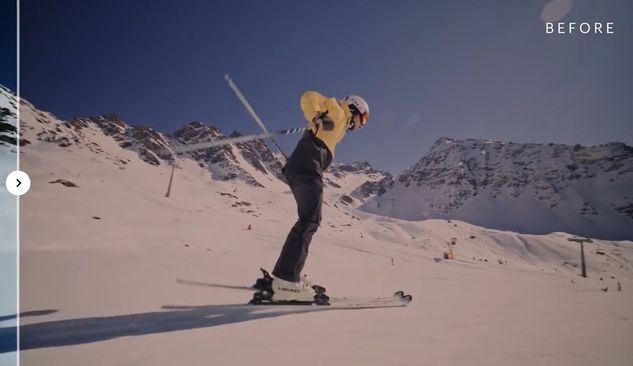
Motion of Light
Brightens your footage with strong contrast and vivid colors.
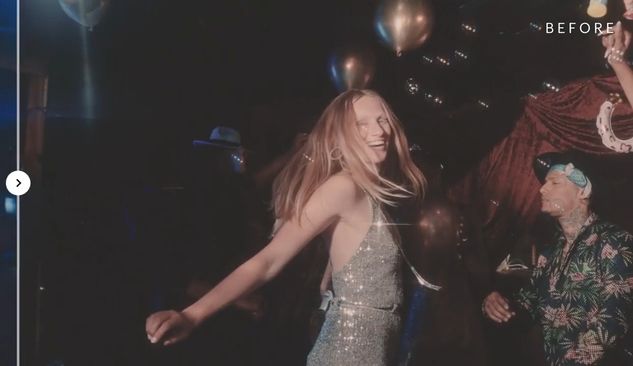
Frame One
Keeps brightness natural with deep contrast and accurate colors.
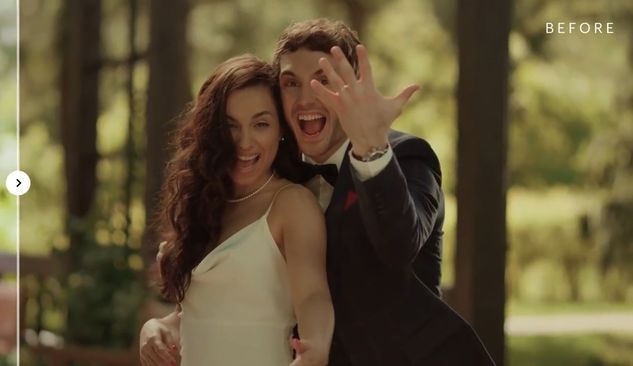
True to Life
Softens highlights for a dreamy feel with balanced contrast.
Have your own signature look?
Upload your LUTs and Imagen will adapt them to every clip in your footage.
Professional results that speak for themselves

The difference you’ll feel on a Friday afternoon
Deliver listings by 9 AM
Built for Adobe Premiere Pro and DaVinci Resolve workflows, our AI batch color correct video clips software processes footage clip by clip. It's AI color grading that works while you don't.


Match styles across teams
You'll keep your style consistent across every property. We use adaptive AI color grading and AI Profiles to apply technical LUTs, camera matching, and skin tone matching for your team.
Used by editors who got their weekends back

“I was blending shots from different cameras. Imagen blended everything well together. It’s almost too easy”
“Wow. The color correction turned out much better than I expected. Thank you for creating this.”
“I love this software. Cut down my coloring time to mere minutes.”
“I was blending shots from different cameras where student workers used different settings- one in Log, one in auto color.”
“I’ll shoot interviews with two or three cameras, all Sony, using Sony glass- but they never match perfectly.”
“This was great! Nearly spot on in terms of exposure, shadows, highlights, blacks, etc.”
Black Friday offers
Simple plans. Serious results
Good color used to cost a fortune in time. This doesn’t.
Pay-As-You-Go
Black Friday
No commitment. Just process minutes when you need them.
Was US$1now US$0.60/minuteInvoiced monthly
No base fee. Pay only for the minutes you process.
Start for free- Grade any project, pay only for what you use
- Full access to AI Profiles and LUT-based grading
- Perfect for project-based work
- Cancel anytime
Best value
Starter Pack
Black Friday
For editors with consistent workloads. Grade more, pay less per minute.
Was US$30now US$18/monthIncludes 50 minutes (US$0.36 per min)
Extra minutes for just US$0.60 / min
Start for free- Unused minutes roll over
- Full access to AI Profiles and LUT-based grading
- Best per-minute rate
- Cancel anytime
Bigger teams.
Smarter rates.
Talk to us
* Custom pricing
Contact sales- Better rates as your team grows
- Every editor on one account
- One invoice. Zero admin headaches
- Dedicated account support
You’re probably wondering...
What makes this software different from traditional grading tools?
Our AI batch color correct video clips software operates completely in the cloud with no install, no Lightroom required. You access everything directly through your web browser. This means you don't need a massive local application to process your real estate property tours. Built for Adobe Premiere Pro and DaVinci Resolve workflows, our software provides adaptive AI color grading that analyzes your footage clip by clip. When you move from a bright exterior shot to a dimly lit basement, the AI Profiles adjust automatically. You get accurate skin tone matching for your listing agent interviews and seamless camera matching if you shoot with a drone and a mirrorless body. Because the processing happens in the cloud, you can upload your clips and step away. It is literally AI color grading that works while you don't. Once the grading is done, you download the results and apply them to your sequence. You keep total creative control over your LUTs and final look while saving hours of manual adjustment.
How do I use this AI batch color correct video clips software without installing it?
You run the entire process through your web browser using our secure cloud infrastructure. There is absolutely no install, no Lightroom required to get your real estate videos looking perfect. You simply upload your flat or log footage directly to the software via your browser. Designed for Adobe Premiere Pro and DaVinci Resolve workflows, the system applies adaptive AI color grading to your media clip by clip. This approach ensures consistent exposures across tricky interior lighting situations. You can apply technical or creative LUTs to establish a specific mood for your property listings. The AI handles the tedious camera matching between your wide angle gimbals and detail cameras. It also performs precise skin tone matching for any on camera talent. Because the heavy lifting happens remotely, your computer remains free for other tasks. You get AI color grading that works while you don't. When the analysis finishes, you pull the graded files back into your sequence and make any final tweaks you want.
Why use cloud software instead of manually grading my sequence?
Manual grading takes hours, but our software cuts that time down by up to 96%. With our cloud setup, you get the benefit of no install, no Lightroom required, and instant access via your browser. When you grade a real estate video manually, you adjust every single shot for exposure and white balance. Our adaptive AI color grading evaluates your footage clip by clip. It automatically balances mixed lighting in kitchens and living rooms. Built for Adobe Premiere Pro and DaVinci Resolve workflows, Imagen Video integrates smoothly with your existing process. The system uses your chosen AI Profiles and LUTs to apply a consistent look across the entire property tour. It manages complex tasks like camera matching across different sensor types and skin tone matching for the real estate agents on screen. You maintain complete control over the final output, but you skip the tedious balancing phase. You truly get AI color grading that works while you don't.
Can I process log footage through the browser software?
Yes, you can upload your log footage directly into the browser. Our software handles massive video files in the cloud, meaning you enjoy a process with no install, no Lightroom required. Designed for Adobe Premiere Pro and DaVinci Resolve workflows, the system is highly capable of reading flat profiles from Sony, Canon, and DJI cameras. The adaptive AI color grading applies your specific technical LUTs to bring the footage into a standard color space. From there, it adjusts the video clip by clip. This is especially helpful for real estate videos where you fly a drone outside and walk a gimbal inside. The AI Profiles ensure flawless camera matching between those vastly different sensors. If your listing agent does an intro, the software guarantees accurate skin tone matching. You simply start the upload and focus on your next shoot. It is AI color grading that works while you don't.
How does this software impact my real estate video turnaround time?
You'll deliver property videos significantly faster because the software handles the most time consuming part of post production. By using our cloud architecture, you access the tools via a browser with no install, no Lightroom required. You can start processing your footage the moment you get back to your desk. Built for Adobe Premiere Pro and DaVinci Resolve workflows, the system applies adaptive AI color grading to your media clip by clip. Instead of spending 3 hours matching exposures across 50 different rooms, the AI Profiles do it automatically. You get perfect camera matching between your interior and exterior shots. The system also nails skin tone matching for any agent walkthroughs. You can apply your favorite creative LUTs to give the property a warm and inviting feel. Because the processing happens externally, it is AI color grading that works while you don't. You can literally sleep or shoot another house while your footage gets graded.
Do I lose creative control when using AI software for video?
You remain in complete control of your final look at all times. Our software acts as your assistant in the cloud, accessible via your browser with no install, no Lightroom required. Designed for Adobe Premiere Pro and DaVinci Resolve workflows, it provides a solid foundation rather than a locked final product. The adaptive AI color grading analyzes the media clip by clip to fix exposure and white balance. It handles the technical heavy lifting like camera matching and skin tone matching. Once the AI Profiles finish their job, you apply the graded files to your sequence. You can then add your own creative LUTs or tweak the contrast to suit a specific luxury real estate brand. The AI batch color correct video clips software gets you 90% of the way there automatically. You get the massive time savings of AI color grading that works while you don't, but you always have the final say on the aesthetic.
How does the software handle a real estate shoot with multiple cameras?
The software excels at balancing different camera bodies and sensors automatically. Because everything runs in the cloud through your browser, you enjoy a fast workflow with no install, no Lightroom required. When you shoot a property, you might use a drone, a mirrorless camera on a gimbal, and a 360 camera. Built for Adobe Premiere Pro and DaVinci Resolve workflows, our adaptive AI color grading evaluates every single file clip by clip. The AI Profiles are specifically trained to perform accurate camera matching across these different formats. It brings all your footage into a cohesive look. If an agent speaks on camera, you also get reliable skin tone matching regardless of which camera filmed them. You can easily apply technical LUTs to normalize the log footage before adding a creative look. This gives you AI color grading that works while you don't, leaving you with perfectly matched media ready for your sequence.
What kind of computer do I need to run this software?
You only need a computer with a basic web browser and an internet connection. Our AI batch color correct video clips software operates entirely in the cloud. You get the massive benefit of no install, no Lightroom required, and no heavy demand on your local graphics card. Designed for Adobe Premiere Pro and DaVinci Resolve workflows, the system processes your heavy video files remotely. The adaptive AI color grading analyzes your property footage clip by clip on our secure servers. Whether you need precise skin tone matching for a broker interview or complex camera matching for mixed drone and interior shots, our servers do the hard work. You can apply your custom AI Profiles and LUTs without worrying about your computer crashing. This setup truly sends back AI color grading that works while you don't. You can edit another project on your laptop while your current real estate video processes smoothly in the background.
Will the software keep my real estate videos looking consistent?
Yes, consistency is the primary benefit of using our cloud software. You manage the entire process through your browser with no install, no Lightroom required. Built for Adobe Premiere Pro and DaVinci Resolve workflows, the system applies adaptive AI color grading to evaluate your interior and exterior shots clip by clip. Real estate lighting changes drastically from room to room. Our AI Profiles understand these shifts and adjust the exposure and color temperature to maintain a uniform look. You get reliable camera matching between your wide shots and detail shots. The system also guarantees accurate skin tone matching when listing agents present the home. By applying uniform technical and creative LUTs across the batch, every video you deliver will match your brand standard. You just upload the files and let the system run. It is AI color grading that works while you don't, keeping a professional and consistent result every single time.
Do I have to pay for updates to the software?
You never have to worry about paying for updates or downloading new versions. Because our software lives in the cloud, you access the latest features automatically through your browser. You get a smooth experience with no install, no Lightroom required. Designed for Adobe Premiere Pro and DaVinci Resolve workflows, the platform is constantly improving its adaptive AI color grading capabilities. When we release better algorithms for analyzing footage clip by clip, you get them instantly. We frequently refine how our AI Profiles handle complex camera matching and delicate skin tone matching for real estate videos. You can always upload your newest LUTs knowing the system is fully up to date. This maintenance free approach is a huge part of providing AI color grading that works while you don't. You can focus entirely on shooting properties and editing your sequence while we ensure the technology backing you remains fast and reliable.